 Skip to navigation
Skip to main content
Skip to navigation
Skip to main content




TP-Link Router Yellow Light Meaning: Causes and Fix Guide

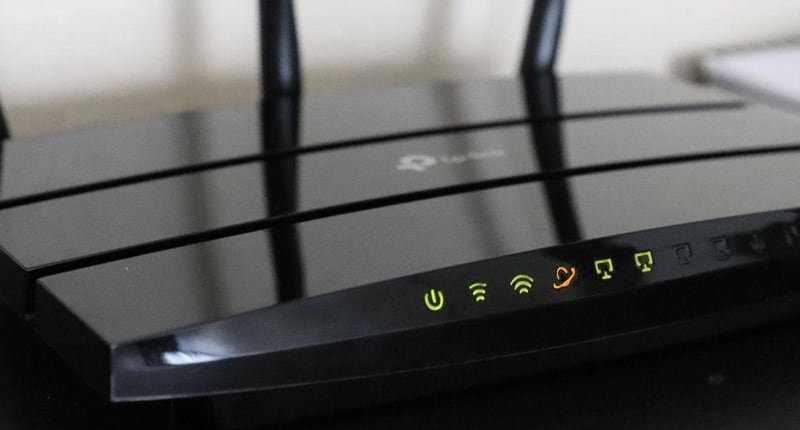
If your TP-Link router is showing a yellow or orange light, don’t panic. In most cases, this is not a hardware failure. It usually indicates a connection, speed, or ISP-related issue that can be fixed within minutes.
This guide explains what the TP-Link yellow light means, why it happens, and step-by-step solutions to fix it.
Quick Answer: What Does TP-Link Yellow Light Mean?
A yellow (amber) light on a TP-Link router typically means:
- No active internet connection (WAN issue)
- 100 Mbps link speed instead of Gigabit
- Incorrect ISP login credentials
- Loose or damaged Ethernet cable
- Temporary ISP outage
1. TP-Link WAN / Internet Light Yellow – No Internet Access
If the Internet or WAN light is yellow and your internet is not working, this usually means the router is connected to the modem but not receiving internet from your ISP.
Common Causes
- ISP service outage
- Wrong PPPoE username/password
- Loose WAN cable
- Modem not synchronized properly
- Router configuration error
How to Fix WAN Yellow Light
- Turn off your router.
- Turn off your modem.
- Wait 2 full minutes.
- Turn on modem first and wait until lights stabilize.
- Turn on router.
- Check internet status.
Check ISP Login Credentials
- Open browser and enter 192.168.0.1 or 192.168.1.1
- Login to router dashboard
- Go to Network ? Internet
- Select PPPoE
- Re-enter ISP username and password
- Save and reboot
2. LAN Port Yellow Light – What It Means
- Yellow/Orange = 10/100 Mbps connection
- Green = 1000 Mbps (Gigabit)
This is normal behavior. It simply indicates connection speed.
How to Enable Gigabit Speed
- Use Cat6 Ethernet cable
- Ensure device supports Gigabit Ethernet
- Confirm router supports 1000 Mbps ports
- Update network drivers
3. TP-Link WiFi Light Yellow or Blinking
If WiFi LED is yellow or blinking unusually, possible causes include:
- Router booting
- Firmware issue
- Wireless disabled
- Overheating
- Power fluctuation
Fix WiFi Yellow Light
- Restart router
- Update firmware
- Perform factory reset
How to Perform TP-Link Factory Reset
Warning: This will erase all settings.
- Keep router powered ON
- Press and hold reset button for 10–15 seconds
- Release when lights blink
- Wait for reboot
- Reconfigure internet settings
When to Contact Your ISP
- Modem internet light is red or off
- WAN light remains yellow after restart
- PPPoE authentication fails
- Frequent disconnections occur
How to Prevent TP-Link Yellow Light Issues
- Use quality Cat6 cables
- Keep firmware updated
- Use UPS during power cuts
- Ensure proper ventilation
- Avoid overloading router
Frequently Asked Questions (FAQ)
1. What does the yellow light on a TP-Link router mean?
It usually indicates a connection issue, 100 Mbps link speed, incorrect ISP credentials, loose cable, or ISP outage.
2. Why is my TP-Link WAN light yellow and internet not working?
This means the router is connected to the modem but not receiving internet due to authentication failure or ISP problem.
3. Why is my TP-Link router orange but internet works?
This typically indicates a 100 Mbps connection speed, which is normal if internet is functioning properly.
4. Can a bad Ethernet cable cause yellow light?
Yes. A damaged or loose Ethernet cable can trigger a yellow WAN or LAN light.
5. How do I fix TP-Link router yellow light?
Restart modem and router, check cables, verify ISP credentials, update firmware, or reset the router.
6. Does yellow light mean router is damaged?
No. It usually indicates a network configuration issue rather than hardware failure.
7. How do I know if my ISP is down?
If your modem internet light is red, off, or continuously blinking, your ISP may be experiencing an outage.
8. Should I replace my router if yellow light stays on?
Only after confirming cables, ISP status, and configuration settings are correct.
9. Why is my TP-Link LAN port light orange instead of green?
Orange means the device is connected at 10/100 Mbps instead of Gigabit speed.
10. Can firmware issues cause TP-Link yellow light?
Yes. Outdated or corrupted firmware can cause connection problems and LED indicator changes.


