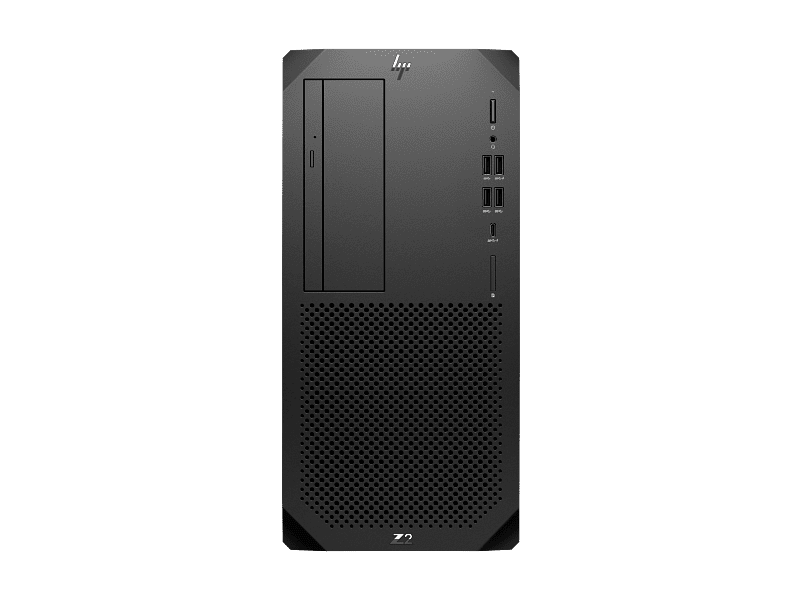
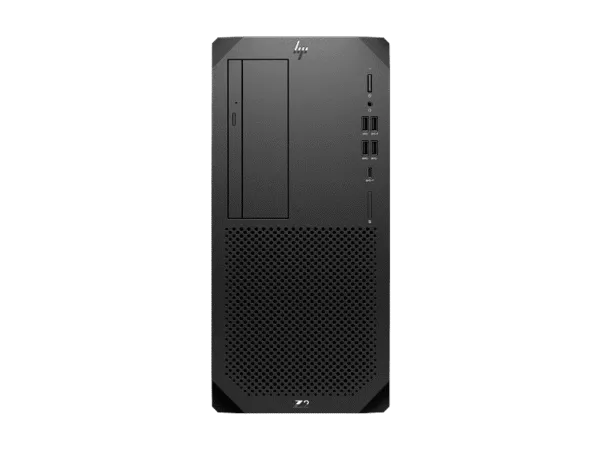
The HP Z2 Tower G9 C25WWPT is a 24-core workstation that does not mess around. It ships with an Intel Core i9-14900 processor, 32 GB of DDR5-4800 memory, and a 1 TB PCIe Gen4 NVMe SSD — specs that handle SolidWorks assemblies, AutoCAD regenerations, and 4K video timelines without breaking a sweat. If you run an architecture firm in Gurgaon, a mechanical design studio in Noida, or a media house in Nehru Place and you are tired of consumer PCs crashing under load, this is the machine that actually behaves like a workstation. If you are looking at our full desktop and laptop range for your team, Thencix stocks this HP Linux-ready configuration with GST invoice and same-day dispatch for Delhi NCR.
What the HP Z2 Tower G9 C25WWPT Actually Delivers
The C25WWPT is not a gaming PC with a workstation sticker. It is ISV-certified for AutoCAD, SOLIDWORKS, and Siemens NX, which means HP has tested the drivers, BIOS, and thermal profile specifically so those applications do not crash during large assembly regenerations or long renders. The Intel Core i9-14900 is a 24-core chip — 8 performance cores plus 16 efficient cores — with a 36 MB L3 cache and turbo speeds up to 5.8 GHz. That is the kind of core count that lets you keep Chrome, Outlook, Spotify, and a CAD viewport open simultaneously without the system grinding to a halt.
You get 32 GB of DDR5-4800 memory installed as two 16 GB UDIMMs, leaving two slots free for future expansion up to 128 GB total. The 1 TB HP Value M.2 SSD is a PCIe Gen4 x4 drive that boots the OS and loads large project files in seconds, not minutes. Three M.2 2280 slots in total mean you can add more NVMe storage without sacrificing drive bays — useful when your SolidWorks project library starts eating gigabytes.
This configuration ships with HP Linux-ready support, meaning it comes without Windows pre-installed. You can install Ubuntu, RHEL, or whatever Linux distribution your workflow demands, or add a Windows 11 Pro license separately. The integrated Intel UHD Graphics 770 handles dual-monitor setups at up to 4K resolution through the two DisplayPort 1.4 outputs on the back panel. If you need professional GPU power later, the PCIe Gen5 x16 slot accepts NVIDIA RTX A-series or AMD Radeon Pro cards without bottlenecking them.
Why the Core i9-14900 and 32GB DDR5 Matter for Real Workloads
The i9-14900 in this config is the 65W non-K version, not the power-hungry 125W K-series. That matters for Indian offices where electricity costs add up and air conditioning is not always running at full blast. The 65W TDP still delivers 24 cores and 32 threads, which is more than enough for multi-threaded rendering in Blender, simulation preprocessing in ANSYS, or compiling large codebases in Visual Studio. The K-series chips run hotter and draw more power for marginal single-thread gains — this non-K i9 gives you 90% of the performance at half the cooling headache.
The 32 GB DDR5-4800 runs in dual-channel mode with two 16 GB sticks, which is the sweet spot for most professional workflows in 2026. Single-channel memory cripples integrated graphics performance and slows down large dataset operations. With four DIMM slots total, you can bump to 64 GB later by adding two more 16 GB sticks, or go all the way to 128 GB if you start working with massive point clouds or 8K video timelines. DDR5 also brings higher bandwidth than DDR4, which shows up as smoother viewport navigation in Revit and faster cache performance in Premiere Pro.
HP’s High Performance Mode, accessible through the BIOS, can boost multi-threaded performance by up to 34% compared to default power settings. For a rendering farm in Faridabad or a simulation team in Delhi, that is free performance you unlock with one setting change. The thermal design keeps the CPU and VRMs cool even under sustained all-core loads, with front intake fans and a rear exhaust fan that stay quiet enough for open-plan offices.
Tool-Free Upgrades, PCIe 5, and Room to Grow
One of the best things about the Z2 Tower G9 is that you do not need a screwdriver to upgrade it. The side panel pops off with a rear release handle, exposing the motherboard, memory slots, M.2 drives, and PCIe slots. The memory retention clips are tool-free, the M.2 SSDs slot in without screws on some configs, and the graphics card support bracket releases with a switch. For IT teams in Noida managing a fleet of 20 workstations, this means a RAM upgrade takes five minutes per machine, not twenty.
The PCIe Gen5 x16 slot is the standout expansion feature. It offers double the bandwidth of PCIe Gen4, so when you install an NVIDIA RTX A4000 or A5000 later, the card is not starved for data. The three M.2 2280 slots support up to 4 TB each with HP Z Turbo drives, or you can use non-HP NVMe SSDs if you prefer. Two 3.5-inch drive bays with tool-free caddies accommodate cheap bulk storage for archives and backups, plus a 2.5-inch bay for an additional SSD. The 700W power supply has headroom for a high-end GPU and additional drives without needing a PSU swap.
The flex I/O module on the back lets you customize ports based on your needs. Options include a second Gigabit Ethernet port, VGA for legacy projectors, HDMI 2.0b for direct monitor connection, USB Type-C 10Gbps with 15W charging, or even Thunderbolt 3 with USB4 at 40 Gbps. For a design studio in Gurgaon that still uses a VGA projector for client presentations, or an engineering firm that needs Thunderbolt for external NVMe enclosures, this modular approach means you do not waste money on ports you will never use.
Key Features
- 24-Core Intel Core i9-14900: 8 performance cores plus 16 efficient cores, 32 threads, up to 5.8 GHz turbo, and 36 MB L3 cache for heavy multi-threaded workloads.
- 32 GB DDR5-4800 Dual-Channel: Two 16 GB UDIMMs with two slots free, expandable to 128 GB total for massive assemblies and video timelines.
- 1 TB PCIe Gen4 NVMe M.2 SSD: Fast boot and application loading with three total M.2 slots supporting up to 4 TB each and RAID configurations.
- ISV-Certified Workstation: Tested and certified for AutoCAD, SOLIDWORKS, and Siemens NX with HP High Performance Mode for up to 34% multi-threaded uplift.
- Tool-Free Expandable Chassis: PCIe Gen5 x16 for future GPUs, 700W PSU, flex I/O module, and tool-less access to memory, storage, and graphics.
Technical Specifications
| Specification |
Detail |
| Model |
HP Z2 Tower G9 (C25WWPT) |
| Operating System |
HP Linux-ready (no OS pre-installed) |
| Processor |
Intel Core i9-14900 (up to 5.8 GHz with Intel Turbo Boost Technology, 36 MB L3 cache, 24 cores, 32 threads, 65W TDP) |
| Chipset |
Intel W680 |
| Graphics |
Integrated Intel UHD Graphics 770 (UMA) |
| Memory |
32 GB DDR5-4800 MT/s non-ECC UDIMM (2 x 16 GB) |
| Memory Slots |
4 DIMM (expandable up to 128 GB) |
| Internal Storage |
1 TB HP Value PCIe Gen4 NVMe M.2 2280 SSD |
| Storage Expansion |
3 M.2 2280 NVMe SSD slots; 2x 3.5″ HDD bays; 1x 2.5″ HDD bay; RAID supported |
| Max Storage |
Up to 48 TB total (3x M.2 + 3x HDD) |
| Expansion Slots |
1 PCIe 5 x16; 1 PCIe 3 x4 (x16 connector); 1 PCIe 3 x4 (x4 connector); 1 PCIe 3 x1 (x4 connector); 1 M.2 2230 for WLAN |
| Front Ports |
4 SuperSpeed USB Type-A 10 Gbps (1 charging); 1 universal audio jack |
| Rear Ports |
1 audio-in; 1 audio-out; 1 RJ-45; 2 DisplayPort 1.4; 2 SuperSpeed USB Type-A 10 Gbps; 1 SuperSpeed USB Type-A 5 Gbps; 3 USB Type-A 480 Mbps |
| Flex I/O Module (Optional) |
DisplayPort 1.4, HDMI 2.0b, VGA, 2nd 1GbE LAN, USB Type-C 10 Gbps (15W charging), Thunderbolt 3/USB4 40 Gbps, serial |
| Network |
Integrated Intel I219-LM Gigabit Ethernet (vPro) |
| Wireless |
Intel Wi-Fi 6 AX211 (2×2) and Bluetooth 5.3 with internal antenna |
| Audio |
Realtek ALC3205-VA2-CG, 2.0W internal mono speaker |
| Keyboard |
HP Wired Desktop 320K Keyboard |
| Mouse |
HP Wired 320M Mouse |
| Power Supply |
700 W 92% efficient, wide-ranging, active PFC |
| Dimensions (W x D x H) |
35.6 cm x 16.9 cm x 38.5 cm |
| Weight |
Starting at 6.2 kg |
| Security |
HP Wolf Security for Business, HP Sure Start Gen7, HP Sure Recover, HP Secure Erase, HP Sure Click, hood sensor optional |
| Management |
HP Driver Packs, HP Management Integration Kit, HP System Software Manager, HP BIOS Configuration Utility |
| Certifications |
ISV certified for AutoCAD, SOLIDWORKS, Siemens NX; EPEAT Gold; ENERGY STAR; TCO Certified configurations available |
| Sustainability |
45% post-consumer recycled plastic, 20% ITE-derived closed loop plastic, ocean-bound plastic in fans and speaker |
Package Contents
- HP Z2 Tower G9 Workstation (C25WWPT) — 1 unit
- HP Wired Desktop 320K Keyboard — 1 unit
- HP Wired 320M Mouse — 1 unit
- Power Cord — 1 unit
- Quick Setup Poster — 1 copy
- Warranty Documentation — 1 set
NOT INCLUDED: Monitor — must be purchased separately. Thencix stocks HP Z Displays and third-party monitors compatible with this workstation. Operating system — this is an HP Linux-ready configuration; Windows 11 Pro, Ubuntu, or RHEL must be purchased and installed separately. Browse our business laptop range for mobile workstation alternatives. Discrete graphics card — Intel UHD Graphics 770 integrated only; NVIDIA RTX A-series, AMD Radeon Pro, or Intel Arc discrete GPUs must be configured at purchase or added later via the PCIe Gen5 x16 slot. Additional memory modules — 32 GB is baseline; upgrades require separate DIMM purchases. Additional storage drives — HDDs and extra SSDs are NOT included. DisplayPort cable, HDMI cable, and Ethernet patch cable are NOT included.
Ideal Use Cases
1. Architecture and BIM Firms in Gurgaon and South Delhi
Mid-size architecture practices in Cyber City or Hauz Khas running Revit, AutoCAD, and SketchUp benefit from the Z2 Tower’s ISV certification, which eliminates the viewport lag and unexpected crashes common on non-certified commercial PCs. The 24-core i9 handles large BIM models with linked files, while 32 GB DDR5 keeps multiple applications responsive. The integrated UHD Graphics 770 drives two 4K monitors for drafting and scheduling simultaneously. When the firm lands a larger project, adding an NVIDIA RTX A4000 via the PCIe Gen5 slot turns this into a real-time ray tracing machine for Enscape walkthroughs. With GST invoice from Thencix, firms claim input tax credit on hardware purchased for project work.
2. Mechanical Engineering and Product Design Studios in Noida and Faridabad
Engineering consultancies using SOLIDWORKS, Siemens NX, or CATIA need workstation-class stability for parametric modeling and FEA simulations. The i9-14900’s 36 MB L3 cache and 5.8 GHz turbo frequency handle complex surface modeling and mesh generation without stuttering. The 32 GB baseline is sufficient for assemblies up to several thousand parts, with an easy upgrade path to 64 GB or 128 GB as product complexity grows. The complete security camera range at Thencix is unrelated, but if your factory floor needs surveillance alongside design workstations, we handle both.
3. Media Production and Content Creation Houses in Nehru Place
Video editing studios and motion graphics teams in Delhi’s electronics hub need reliable hardware for Adobe Premiere Pro, After Effects, and DaVinci Resolve. The 1 TB NVMe SSD provides fast project loading and cache performance, while the NPU in the Core Ultra architecture accelerates AI-powered features like auto-reframe and speech-to-text. The front USB-A ports at 10 Gbps allow rapid offload of footage from external SSDs and cameras. The quiet thermal design keeps edit suites free from fan noise that would ruin audio capture during voiceover sessions. For teams running on Jio Fiber or Airtel Xstream broadband, the Gigabit Ethernet port ensures smooth NAS access for shared project storage.
4. Corporate IT Departments and Development Teams in Delhi NCR
Large enterprises and software development firms deploying standardized desktop fleets benefit from the Z2 Tower’s vPro remote management capabilities, which allow IT teams to diagnose, update, and repair machines remotely without site visits. The tool-less chassis reduces service time for on-site technicians, and the 3-year on-site warranty minimizes downtime. HP Wolf Security provides firmware-level protection against ransomware attacks increasingly targeting Indian businesses. The ENERGY STAR certification helps organizations meet sustainability reporting requirements, while the 65W CPU draws less power than K-series alternatives — a real saving when you are running 50 workstations on a single floor in Noida.
Why Buy from Thencix
- Genuine HP Product: Sourced directly from authorized HP distribution. Every unit carries original serial number, QR code verification, and India warranty eligibility.
- GST Invoice Provided: Full tax invoice with HSN code for input tax credit claim. Essential for businesses, design firms, and engineering consultancies filing GST returns in Tally or similar accounting software.
- Same-Day Dispatch Delhi NCR: Orders confirmed before 3 PM ship same day via express courier to Delhi, Noida, Gurgaon, and Faridabad.
- Pan-India Delivery: Secure packaging and insured shipping to all states. Tracking number shared via WhatsApp within 2 hours of dispatch.
- Technical Support: Post-sale assistance for OS installation, driver updates, ISV software optimization, and hardware upgrades. Our team has hands-on experience with HP Z workstations, Z1 Tower, and Elite desktops.
- Cash on Delivery Available: COD option for select locations. Prepaid orders processed faster with additional discount.
- WhatsApp Support: Quick queries, configuration help, and order tracking via WhatsApp at +91 9891150949. No IVR, no hold time — message and get a response.
FAQ — HP Z2 Tower G9 C25WWPT Price India
Does the HP Z2 Tower G9 C25WWPT come with Windows installed?
No, this is an HP Linux-ready configuration. It ships without Windows pre-installed. You can install Ubuntu, RHEL, SUSE, or another Linux distribution, or purchase and install Windows 11 Pro separately. Thencix can assist with genuine Windows 11 Pro OEM licensing and installation guidance. Contact us on WhatsApp at +91 9891150949 for bundled pricing.
Can I add a discrete graphics card to the HP Z2 Tower G9 C25WWPT later?
Yes, the Z2 Tower G9 has a PCIe Gen5 x16 slot that accepts NVIDIA RTX A-series professional cards, NVIDIA GeForce RTX consumer cards, AMD Radeon Pro and RX GPUs, and Intel Arc graphics. The 700W power supply supports configurations up to the NVIDIA RTX A5000. The tool-less chassis means you can swap the graphics card without a screwdriver. Thencix stocks professional GPUs and can quote a bundled price including installation.
What is the warranty on HP Z2 Tower G9 C25WWPT in India?
HP provides a 3-year limited warranty (3/3/3) on this workstation in India, covering 3 years of parts, labor, and on-site repair. Terms and conditions vary by country with certain restrictions and exclusions. Thencix supplies the original GST invoice required for all warranty claims and RMA processing. For warranty service, contact HP India customer care or reach out to Thencix support at +91 9891150949 for assistance with documentation and service coordination.
What is the difference between the HP Z2 Tower G9 and the Z1 Tower G1i?
The Z2 Tower G9 is a mid-tower workstation with full-size expansion, up to 128 GB RAM, three M.2 slots, multiple 3.5-inch drive bays, and support for high-end dual-slot GPUs like the RTX A5000. The Z1 Tower G1i is a compact entry-level workstation with limited expansion, smaller chassis, and lower power supply options. If you need serious GPU power, massive storage, or plan to upgrade components over 3-5 years, the Z2 Tower is the better investment. If desk space is tight and your workloads are light CAD or office productivity, the Z1 Tower G1i is more practical. Contact Thencix at +91 9891150949 for sizing guidance.
How much memory can I upgrade the HP Z2 Tower G9 C25WWPT to?
The Z2 Tower G9 has four DDR5 DIMM slots. This C25WWPT config ships with 32 GB (2 x 16 GB), leaving two slots empty. You can add two more 16 GB sticks for 64 GB total, or replace all four sticks with 32 GB modules for 128 GB total. HP officially supports up to 128 GB of DDR5-4800 memory. For large simulation datasets or 8K video editing in Premiere Pro, 64 GB is the sweet spot. Thencix stocks compatible DDR5 UDIMMs and can install them before dispatch if you order the upgrade together.
 Skip to navigation
Skip to main content
Skip to navigation
Skip to main content








 Free Delivery










Reviews
Clear filtersThere are no reviews yet.