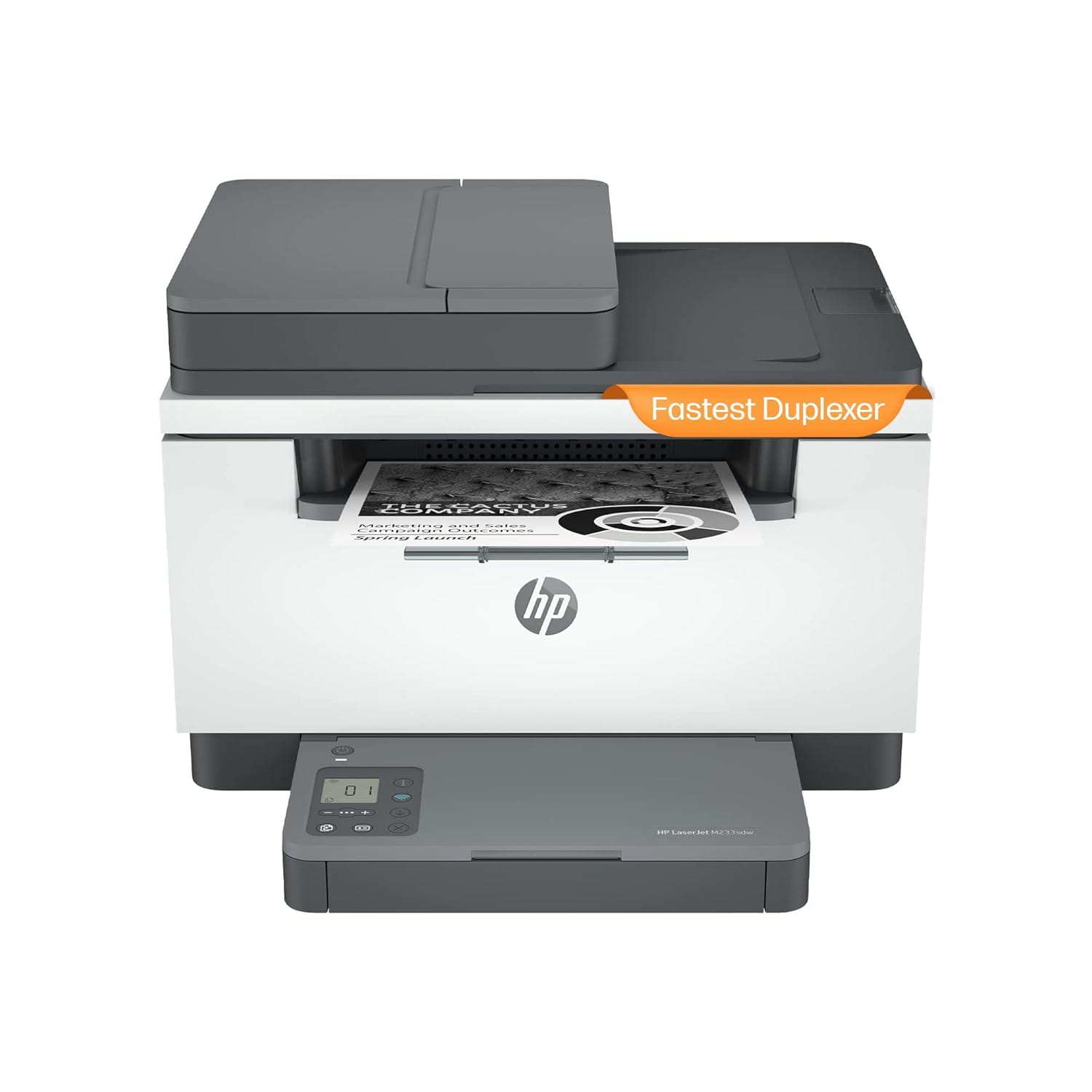
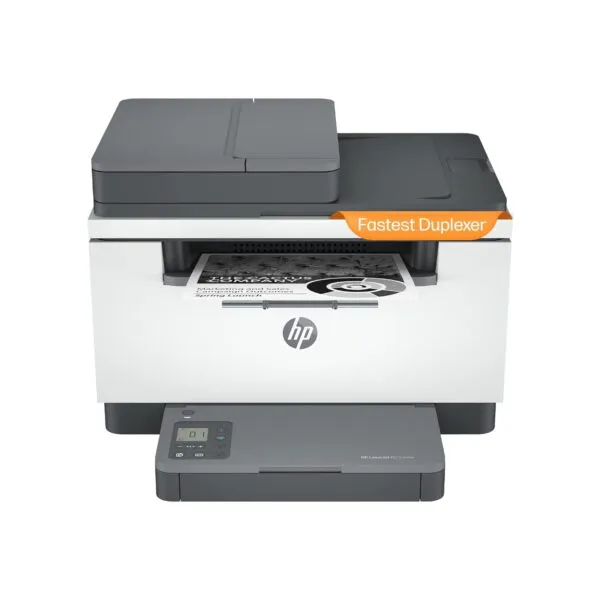
The HP LaserJet MFP M233sdw is a monochrome multifunction laser printer designed for small offices, home offices and business teams that need printing, copying and scanning in one compact device. With automatic two-sided printing, an automatic document feeder and wired and wireless networking, it supports everyday document workflows while reducing manual handling of multipage jobs.
This printer delivers print speeds of up to 29 pages per minute for A4 documents and up to 30 pages per minute for Letter-size documents, according to the supplied product specifications. Its 40-sheet automatic document feeder helps process multipage originals, while the flatbed scanner accommodates individual pages and documents that are unsuitable for the feeder. Automatic duplex printing helps reduce paper consumption for reports, forms and business correspondence.
Wireless connectivity supports printing from compatible computers and mobile devices, while Ethernet provides a wired network option for shared office use. USB 2.0 is also available for a direct connection. The printer supports Apple AirPrint, Mopria certification, HP Smart App features and Wi-Fi Direct printing, subject to compatible devices and software.
Key Features
- Three functions in one: Print, copy and scan monochrome business documents from a single device.
- Fast black-and-white printing: Up to 29 ppm for A4 and 30 ppm for Letter-size documents.
- Automatic duplex printing: Prints on both sides of the paper without requiring manual page reloading.
- 40-sheet ADF: Helps handle multipage originals for scanning and copying.
- Flatbed scanner: Supports individual sheets and documents that should not be fed through the ADF.
- 150-sheet input capacity: Provides a practical paper supply for routine office printing.
- Wi-Fi and Ethernet: Supports wireless printing and wired network integration.
- USB 2.0 connection: Allows direct connection to a compatible computer.
- Mobile printing: Supports Apple AirPrint, Mopria, HP Smart App features and Wi-Fi Direct printing.
- Compact laser design: Combines printing, copying and scanning in a device suitable for desks and small work areas.
- One-year onsite warranty: The supplied product sheet lists one year of onsite warranty coverage, subject to the applicable terms.
Efficient Printing for Everyday Business Documents
Laser printing is well suited to offices that produce invoices, quotations, purchase orders, reports, letters, forms and other text-heavy documents. The monochrome printing system produces black output without requiring colour toner, making it a practical option when colour printing is not part of the regular workflow.
The HP LaserJet MFP M233sdw is designed for teams of up to five users. HP recommends a monthly page volume of 200 to 2,000 pages for optimal performance, while the listed maximum monthly duty cycle is up to 20,000 pages. The maximum duty cycle represents a limit for comparison and is not the same as the recommended routine monthly workload.
For a small office, the recommended volume is a more useful guide when assessing whether the printer matches daily requirements. Organisations with consistently high-volume printing should compare the recommended monthly page volume, toner costs, service requirements and paper handling capacity before choosing a device.
Automatic Two-Sided Printing
Automatic duplex printing allows the printer to produce both sides of a sheet without requiring the user to manually turn and reload the paper. This can help reduce paper use for internal reports, training materials, meeting documents and other multipage print jobs.
Duplex printing is particularly useful in offices that print repeated document sets throughout the day. The actual time required for a duplex job depends on document complexity, print settings and the number of pages. HP lists duplex print speeds of up to 18 images per minute for A4 and up to 19 images per minute for Letter-size documents.
For documents that must be submitted on one side only, the print settings can be configured for single-sided output. Always confirm the required format before printing official forms or documents with specific submission requirements.
Automatic Document Feeder and Flatbed Scanning
The 40-sheet automatic document feeder helps process multipage originals without requiring each sheet to be placed on the scanner glass individually. This is useful for scanning or copying office documents such as signed forms, invoices, application pages and business records.
The flatbed scanner provides an alternative for individual pages, fragile documents or originals that are not suitable for feeding through the ADF. Using the appropriate scanning method helps reduce manual handling and supports more convenient document processing.
HP lists hardware scanning resolution of 600 × 600 dpi and optical scanning resolution up to 600 dpi. Listed scan speeds are up to 19 pages per minute for black-and-white A4 scanning and up to 10 pages per minute for colour scanning. Actual performance varies with scan resolution, computer performance, network conditions and software settings.
The scanner supports common file formats including JPEG, TIFF, PDF, BMP and PNG through compatible software workflows. HP also lists scan-to-email and scan-to-PDF features. Available destinations and workflow options depend on the HP application, computer software and configuration.
Copying for Everyday Office Work
The integrated copier allows users to duplicate documents without first creating a separate digital file. Copy settings include the number of copies, reduction and enlargement, lighter or darker output, and document optimisation. HP lists black copy speeds of up to 29 copies per minute for A4 and up to 30 copies per minute for Letter-size documents under specified conditions.
Copy scaling from 25% to 400% supports different document sizes and layout requirements. The flatbed and ADF provide flexibility when copying single-page originals or multipage sets. Duplex copying speed and processing time depend on the original, settings and workflow.
For routine administrative use, the combined printer and copier can help reduce the need for a separate copying device. Users should still check document alignment, legibility and page order when producing large or important copy sets.
Wireless, Network and Mobile Printing
The HP LaserJet MFP M233sdw supports built-in Wi-Fi, Ethernet and USB 2.0 connectivity. Wireless networking allows compatible computers and mobile devices to print without a direct USB cable, while Ethernet is useful where a stable wired connection is preferred.
Wi-Fi Direct enables compatible devices to connect to the printer without requiring the same conventional wireless-network arrangement. Apple AirPrint and Mopria support printing from compatible devices, and HP Smart App features can help users set up the printer and manage supported print and scan tasks.
In shared office environments, select the connection method based on the network layout, number of users, security requirements and location of the printer. A wired Ethernet connection can be suitable for a fixed office printer, while Wi-Fi can be useful where cabling is inconvenient. Wi-Fi Direct is best considered a separate connection option rather than a replacement for a properly managed business network.
Mobile printing and scanning capabilities depend on the device operating system, application version, permissions and network configuration. Confirm the supported workflow before deployment in an environment that uses managed mobile devices or restricted network access.
Paper Handling and Input Capacity
The supplied product sheet lists an input capacity of up to 150 sheets. This capacity is suitable for many small-office workflows, although the frequency of paper replenishment depends on daily page volume, document length and the selected media.
Using the correct paper size and media type helps maintain reliable feeding and print quality. Keep paper stored in a dry environment, fan the stack if recommended by the paper manufacturer, and adjust the guides to fit the loaded media. Do not exceed the stated tray capacity.
For teams that print large batches, consider the practical relationship between paper capacity and monthly usage. The printer’s compact design supports everyday office printing, but a larger paper supply or higher-volume model may be more appropriate for continuous production environments.
Print Quality and Document Output
The product sheet lists black print quality up to 600 × 600 dpi. This is suitable for common office text, invoices, forms and business correspondence. Actual output quality depends on the source document, toner condition, paper quality, print settings and printer maintenance.
For the best results, use compatible paper and the appropriate print-quality setting. Draft or economy settings can be useful for internal working copies, while standard or higher-quality settings may be preferable for customer-facing documents. Check that the selected paper size in the application matches the paper loaded in the printer.
As a monochrome laser device, this printer is intended for black-and-white output rather than colour graphics or photo printing. If colour marketing materials, product photographs or colour-coded charts are a regular requirement, consider a suitable colour printer in addition to or instead of this model.
Toner Compatibility and Page Yield
The supplied product sheet identifies HP 137A/X black toner cartridges for this printer family. The listed cartridge yields are approximately 1,150 pages for the HP 137A black cartridge and 2,600 pages for the HP 137X black cartridge. These are estimated yields under specified test conditions, not guaranteed results for every job.
Actual toner yield varies with page coverage, document type, print settings, environmental conditions and usage patterns. Documents with dense text, large black areas or repeated graphics can consume more toner than simple text pages. When comparing printing costs, use the expected monthly page volume and realistic toner consumption rather than cartridge price alone.
The product sheet lists a cartridge MRP of ?5,584.00 for the HP 137A/X Black cartridge line, with the page-yield column showing approximately 1,150/2,600 pages. Confirm the current cartridge price, exact cartridge part number and yield for the selected cartridge before purchase, as prices and availability can change.
HP states that this printer is intended to work with cartridges using a new or reused HP chip and uses dynamic security measures that may block cartridges using a non-HP chip. Firmware updates can affect cartridge compatibility. Review HP’s cartridge compatibility information and applicable terms before selecting replacement supplies.
Monthly Workload and Business Suitability
HP lists a recommended monthly page volume of 200 to 2,000 pages and a maximum monthly duty cycle of up to 20,000 pages. These figures serve different purposes. The recommended range is the more relevant guide for regular day-to-day use, while the maximum duty cycle is a product-capacity rating and should not be treated as a recommended continuous workload.
This makes the printer a potential fit for small offices, home offices, consultants, retail counters, administrative departments and teams that need occasional scanning and copying alongside routine printing. It may also suit businesses that share one multifunction printer across a small group of users.
For organisations printing several thousand pages every month on a consistent basis, compare the recommended monthly volume, toner yield, paper capacity and service arrangements with the workload. A higher-volume business printer may offer a better fit for sustained demand.
Installation and Setup
Before installation, choose a stable, level surface with adequate clearance for the paper tray, scanner lid and ADF. Provide access to a suitable power outlet and, where applicable, an Ethernet connection or reliable Wi-Fi coverage.
For a wired setup, connect the printer to the computer or office network using the appropriate cable and install compatible HP software and drivers. For wireless installation, follow the setup process for the intended network and verify that authorised computers and mobile devices can discover the printer.
After installation, test printing, copying, flatbed scanning and ADF scanning. Check automatic duplex printing with a short test document and verify that the selected paper size and orientation are correct. If several users will share the printer, confirm permissions and network access before putting it into regular service.
Warranty and Purchase Considerations
The supplied product sheet lists a one-year onsite warranty. Warranty eligibility, service coverage, exclusions and claim procedures are governed by the applicable HP India warranty terms and the supplied product documentation. Keep the purchase invoice, product serial number and warranty information for service requests.
Before ordering, confirm the current selling price, stock status, included starter toner cartridge, supplied accessories and the exact warranty applicable to the unit. The price printed on a product sheet may not reflect current market pricing, so obtain a current quotation before making a purchase decision.
Technical Specifications
| Specification |
Details |
| Brand |
HP |
| Product Family |
HP LaserJet MFP |
| Model Number |
M233sdw |
| HP Product Number |
6GX06A#ACJ |
| Functions |
Print, copy and scan |
| Print Technology |
Monochrome laser |
| Print Speed, A4 |
Up to 29 ppm |
| Print Speed, Letter |
Up to 30 ppm |
| Automatic Duplex Printing |
Yes |
| Maximum Monthly Duty Cycle |
Up to 20,000 pages |
| Recommended Monthly Page Volume |
200–2,000 pages |
| Print Resolution |
Up to 600 × 600 dpi, as listed |
| Automatic Document Feeder |
40 sheets |
| Scanner Type |
Flatbed and ADF |
| Hardware Scan Resolution |
600 × 600 dpi |
| Optical Scan Resolution |
Up to 600 dpi |
| Scan Speed, A4 |
Up to 19 ppm black-and-white; up to 10 ppm colour |
| Copy Speed, A4 |
Up to 29 cpm black |
| Copy Scaling |
25%–400% |
| Paper Input Capacity |
Up to 150 sheets |
| Connectivity |
USB 2.0, Ethernet, dual-band Wi-Fi |
| Mobile Printing |
Apple AirPrint, Mopria, HP Smart App features, Wi-Fi Direct |
| Memory |
64MB |
| Processor |
500MHz |
| Compatible Toner |
HP 137A Black, HP 137X Black |
| Approximate Toner Yield |
137A: 1,150 pages; 137X: 2,600 pages |
| Dimensions (W × D × H) |
418 × 308 × 294.4mm |
| Product Weight |
9.5kg |
| Warranty Listed on Supplied Sheet |
1-year onsite warranty, subject to applicable terms |
Package Contents
Confirm the exact package contents with the supplier before ordering. The printer configuration is associated with an HP black toner cartridge, power and connection accessories, and setup documentation; the precise contents and starter cartridge yield should be verified for the supplied regional package.
Why Buy from THENCIX?
THENCIX supplies printers and business IT equipment for home offices, small businesses and corporate environments. Contact our team to confirm the current price, stock availability, warranty details and toner configuration before placing your order.
- GST invoice for business procurement
- Assistance with product and toner selection
- Support for printer connectivity and usage enquiries
- WhatsApp support at +91 9891150949
Visit THENCIX at 109B Osian Building, 12 Nehru Place, Delhi 110019, or email [email protected] for a quotation.
Explore our PC and office-computing range, browse our Smart Home & Security category for related office and security equipment, or view our HP Pro Tower commercial desktop if you are planning a broader office setup.
Frequently Asked Questions
What functions does the HP LaserJet MFP M233sdw provide?
It supports monochrome printing, copying and scanning.
Does this printer support automatic duplex printing?
Yes. It supports automatic two-sided printing for compatible print jobs.
How fast does it print?
HP lists up to 29 pages per minute for A4 and up to 30 pages per minute for Letter-size documents. Actual speed depends on the job and settings.
Does it include an automatic document feeder?
Yes. The supplied product sheet lists a 40-sheet ADF, alongside a flatbed scanner.
What is the paper input capacity?
The supplied sheet lists an input capacity of up to 150 sheets.
Can I print wirelessly from a phone?
Yes. Supported options include Apple AirPrint, Mopria, HP Smart App features and Wi-Fi Direct, subject to device and software compatibility.
Does it have Ethernet connectivity?
Yes. Ethernet is available alongside USB 2.0 and built-in Wi-Fi.
Which toner cartridges does it use?
The supplied sheet lists HP 137A and HP 137X black toner cartridges, with approximate yields of 1,150 and 2,600 pages respectively. Actual yield varies by usage.
What is the warranty?
The supplied product sheet states a one-year onsite warranty. Confirm the terms and coverage for the exact unit before ordering.
Is it suitable for heavy daily printing?
HP lists a recommended monthly volume of 200–2,000 pages and a maximum monthly duty cycle of up to 20,000 pages. Businesses with consistently high printing volumes should evaluate their expected workload before purchasing.
For current pricing, availability and warranty confirmation, contact THENCIX at WhatsApp +91 9891150949 or [email protected].
 Skip to navigation
Skip to main content
Skip to navigation
Skip to main content








 Free Delivery










Reviews
Clear filtersThere are no reviews yet.