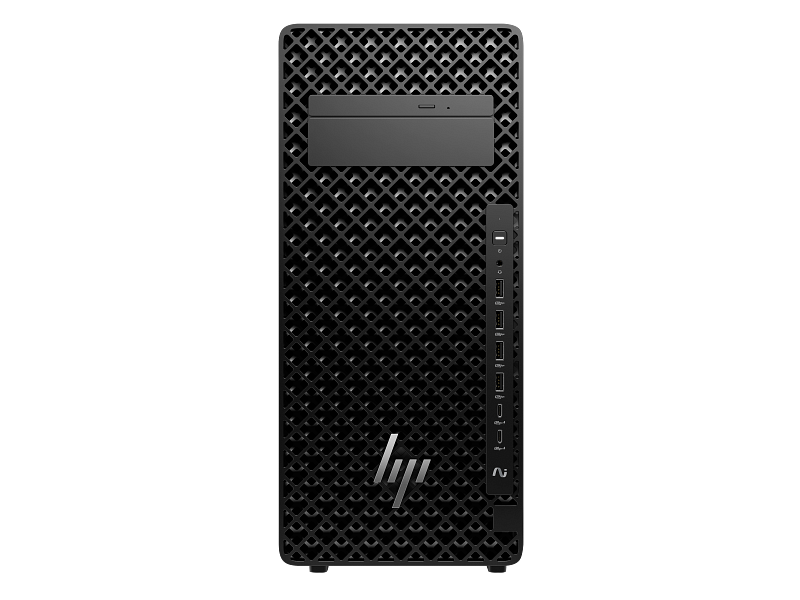
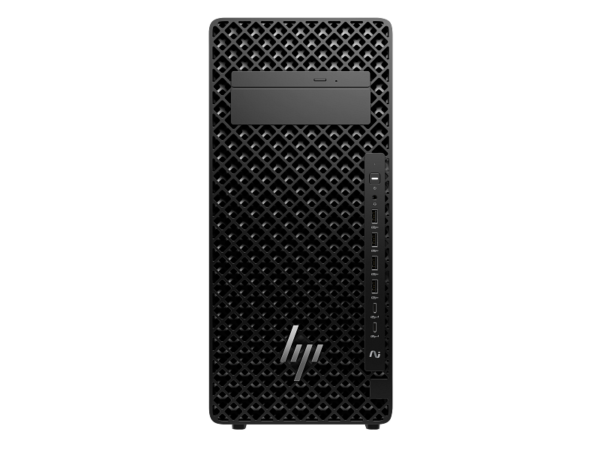
The HP Z2 Tower G1i Workstation is designed for professional environments that need strong desktop processing, fast storage and a tower platform with expansion options. It combines an Intel Core Ultra 9 285K processor, 32GB DDR5-5600 memory, a 1TB PCIe Gen4 M.2 SSD and integrated Intel Graphics. Businesses comparing business PCs and professional workstation systems for offices in Delhi NCR can consider this model for software development, technical computing, business multitasking and CPU-oriented professional workloads. The workstation also features an Intel W880 chipset, Wi-Fi 7, Bluetooth 5.4, Gigabit Ethernet, a slim DVD-Writer, a 1200W internal power supply, an HP wired keyboard and an HP wired mouse. THENCIX supplies business IT equipment from Nehru Place, Delhi, with GST invoicing and configuration assistance. Contact WhatsApp +91 9891150949 for availability, delivery arrangements and purchasing support.
Product Overview
The HP Z2 Tower G1i is a professional tower desktop built around the Intel Core Ultra 9 285K processor. Its combination of a high-performance desktop CPU, 32GB memory and solid-state storage supports demanding multitasking and a range of professional workflows. The tower form factor also provides options for supported memory, storage and expansion-card upgrades as business needs change.
This model uses integrated Intel Graphics. It should therefore be selected with the intended applications in mind: general productivity, software development and many CPU-oriented tasks have different graphics requirements from advanced 3D rendering, GPU-based AI processing or complex visualisation. If a workload needs a dedicated professional graphics card, the final configuration should be chosen around the software vendor’s requirements.
For businesses in Noida, Gurugram, Faridabad and Delhi, a tower workstation can serve as a central desktop platform for technical teams, developers and professional users. Before deployment, organisations should establish their operating-system plan, application licensing, data backup policy and expected upgrade path. The supplied Linux Ready configuration is suitable for buyers who plan their software environment around compatible Linux deployments.
Key Features
- Intel Core Ultra 9 285K processor with 24 cores, 24 threads, 36MB L3 cache and up to 5.7GHz turbo frequency.
- 32GB DDR5-5600 memory installed as one 32GB module, with four DDR5 memory slots.
- 1TB PCIe Gen4 M.2 SSD for operating-system files, applications and active projects.
- Integrated Intel Graphics, Intel Wi-Fi 7, Bluetooth 5.4 and Intel I219-LM Gigabit Ethernet.
- 1200W internal power supply, slim DVD-Writer, HP 125 v2 wired keyboard, HP 125 wired mouse and 3-Year HP Onsite Warranty.
Why Choose This Workstation
A professional workstation should be selected around the workload rather than processor specifications alone. The Core Ultra 9 285K provides substantial desktop CPU resources, while the SSD helps applications and active project files load responsively. The tower chassis offers flexibility for supported expansion and can be a practical choice for organisations that prefer desktop serviceability and planned upgrades.
An engineering consultancy in Noida may use the workstation for technical documentation, calculations, drawing preparation and project coordination. A development team in Gurugram may run coding tools, test environments, databases and multiple business applications. Actual performance depends on the software, project size, memory demand, graphics hardware and system configuration.
Graphics-heavy applications require special consideration. The listed graphics solution is integrated Intel Graphics, not a dedicated NVIDIA RTX card. Buyers working with advanced 3D scenes, GPU rendering or GPU-accelerated engineering software should check the recommended graphics tier and select a compatible workstation configuration if dedicated graphics are required.
Processor Architecture and Computing Performance
The Intel Core Ultra 9 285K is specified with 24 cores, 24 threads, 36MB of L3 cache and a maximum turbo frequency of up to 5.7GHz. Turbo frequency varies with workload, cooling, power limits and operating conditions. These specifications describe the processor’s capabilities but do not guarantee a fixed performance level across all applications.
Multi-core resources can help with workloads that divide tasks across several CPU cores, including software compilation, background processing and some forms of technical calculation. High-frequency operation can also benefit applications where responsiveness depends on a smaller number of active threads. The degree of benefit varies by software design and the complexity of the files being processed.
For an Indian software business, the processor can support development environments, browsers, communication applications and test tools running together. For technical offices, it can provide a strong CPU foundation for engineering documentation and calculations. Applications that depend heavily on graphics acceleration still require an appropriate graphics solution.
AI Processing and Workload Planning
AI workloads can place very different demands on a computer. Some rely mainly on the CPU, while others require a supported NPU or dedicated graphics processor with sufficient memory. The presence of a Core Ultra processor does not by itself guarantee a particular AI application’s compatibility or performance.
Businesses planning local model inference, machine-learning development or GPU-accelerated analytics should identify the framework, model size and supported hardware requirements before selecting a workstation. A dedicated GPU may require additional power connectors, suitable physical clearance, cooling and compatible drivers. The 1200W power-supply rating does not guarantee compatibility with every graphics card.
For organisations using cloud-based AI services or primarily CPU-oriented applications, integrated graphics may be adequate. For accelerated workloads, specify the graphics requirements in the purchase quotation and verify the complete configuration before ordering.
Graphics Performance and Display Planning
Integrated Intel Graphics provides the graphics solution for this configuration. It is appropriate to consider for general desktop display tasks and workloads that do not require a high-performance discrete GPU. Complex 3D visualisation, GPU rendering and some engineering applications can have substantially higher graphics requirements.
Buyers should distinguish between a workstation family’s possible graphics options and the components included in a specific configuration. This listing does not include a specified discrete graphics card. If the intended software requires a professional GPU, verify the recommended card, graphics memory, driver support and any formal certification requirements.
Display connectivity should also be planned around the work environment. HP lists two DisplayPort 1.4 outputs on the rear panel. Confirm monitor inputs, resolution and refresh-rate requirements before deployment, especially when using multiple professional displays.
Memory Architecture and Upgrade Path
The workstation has 32GB DDR5-5600 memory installed as one 32GB module and four DDR5 memory slots. This capacity is a practical starting point for many professional multitasking, development and general technical workloads. Memory requirements increase with larger datasets, complex models, virtual machines and multiple applications running simultaneously.
A single-module arrangement can leave room for expansion, but upgrades should follow the platform’s supported memory capacity and population rules. Before purchasing additional modules, verify compatible memory specifications and the intended slot arrangement. Do not assume that all memory kits or capacities are supported simply because the motherboard has available slots.
The listed memory specification does not identify ECC memory. Businesses that require error-correcting memory should verify the supported memory type and exact platform configuration before purchasing. For organisations deploying several workstations, standardising memory upgrades can simplify maintenance and future procurement.
Storage Technology and Data Management
The system includes a 1TB PCIe Gen4 M.2 SSD. Solid-state storage helps reduce application launch and project-loading delays compared with conventional mechanical drives, although actual throughput depends on the drive, workload and available capacity. The 1TB capacity offers space for the operating system, installed applications and active work files.
Teams working with engineering documents, source code, research datasets or media projects should plan storage around both active files and long-term retention. The internal SSD should not be treated as a backup. Use an appropriate backup system and periodically test recovery so that accidental deletion or drive failure does not result in avoidable data loss.
The tower platform includes multiple M.2 positions and a 3.5-inch internal drive bay. Additional storage should be selected according to supported drive interfaces, mounting requirements and available space. Organisations can also consider network or external storage where shared access, centralised backup or long-term archiving is important.
Expansion and Upgradeability
HP lists M.2 storage positions and PCIe expansion slots for the Z2 Tower G1i platform. These provide options for supported storage devices and expansion cards. Actual upgrade choices depend on slot availability, electrical lane configuration, physical clearance, power requirements and the delivered system configuration.
Graphics upgrades need more planning than adding a basic peripheral. Check card length, thickness, cooling, auxiliary power connectors, driver support and the application’s recommended hardware. Do not select a graphics card based only on the workstation’s power-supply rating.
For businesses in Delhi NCR purchasing workstations for several employees, a documented upgrade plan can simplify maintenance. Record the initial memory, storage, expansion cards and service details so that later changes remain consistent with the organisation’s support requirements.
Ports and Connectivity
The workstation provides front USB-C and USB-A ports, a headphone/microphone combo jack, rear USB-A ports, two DisplayPort 1.4 outputs, an RJ-45 network port and audio line-in/line-out. This range supports common office peripherals, wired displays and network connectivity. Buyers should check connector types and display requirements before ordering adapters or additional accessories.
Wireless connectivity uses Intel Wi-Fi 7 BE200 (2×2) and Bluetooth 5.4. The benefits of Wi-Fi 7 depend on compatible network equipment, drivers, signal quality and the local wireless environment. A compatible router or access point is needed to take advantage of supported Wi-Fi 7 features.
The Intel I219-LM Gigabit Ethernet interface supports wired network integration. In managed business environments, wired Ethernet can simplify connectivity and network administration. Organisations using specialised instruments, external storage or multiple monitors should check the complete port layout against their deployment plan.
Enterprise Security and Deployment
Business security combines platform capabilities with firmware configuration, operating-system updates, endpoint protection, access controls and user policies. Organisations should enable and manage the security features documented for their exact system rather than assuming that every feature associated with a workstation family is automatically active.
For deployment, prepare a standard checklist covering asset registration, firmware updates, operating-system installation, endpoint security, user accounts, backup and recovery. Businesses handling confidential client files, financial records or source code should also define administrator access and removable-storage policies.
For multi-unit procurement, retain the quotation, GST invoice, serial numbers, configuration details and warranty documents in the organisation’s asset records. This makes support requests and future replacement planning easier.
Reliability, Cooling and Power
The tower chassis is designed for desktop operation and supports airflow through its enclosure. Temperature and fan behaviour depend on ambient conditions, workload, dust accumulation and installed components. Keep the intake and exhaust areas clear and avoid placing the workstation in an enclosed space without adequate ventilation.
The internal power supply is rated at 1200W, with up to 92% efficiency and active power-factor correction. The rating describes the power supply’s capacity, not the computer’s continuous power consumption. Actual consumption varies according to workload and installed hardware.
For business continuity, use appropriate power protection based on the real connected load and required backup duration. If a UPS is required, consider the workstation, display and any other connected equipment together. Keep important data backed up independently of the workstation’s internal storage.
Professional Software Compatibility
The processor, memory and SSD provide a capable foundation for many professional computing tasks, development tools and CPU-oriented applications. Software compatibility also depends on the operating system, drivers, licences, graphics requirements and the application version.
HP lists this model as Linux Ready. Buyers should select a supported Linux distribution and verify application and driver requirements before deployment. If Windows is required, confirm the licence, edition and installation arrangements before ordering.
For applications such as AutoCAD, Revit, SolidWorks, Blender or other professional design software, check the vendor’s requirements for memory and graphics hardware. Formal ISV certification should only be claimed when documentation confirms it for the relevant hardware and software combination.
Industry Applications Across India
Architecture and construction: An architecture practice in Noida can use a workstation for technical documentation, drawing preparation and project coordination. Large BIM models and advanced visualisation projects should be matched with suitable graphics hardware and sufficient memory.
Manufacturing and engineering: A Faridabad engineering team may use the system for product documentation, calculations and technical applications. Complex 3D assemblies and GPU rendering can require a dedicated graphics configuration selected against the software vendor’s recommendations.
Software development and analytics: A Gurugram development team can use the processor and SSD for coding tools, compilation, local services and data analysis. Teams running multiple virtual machines should assess memory use and consider expansion if workloads demand it.
Education and research: An engineering college in Delhi can deploy workstations for programming, technical coursework and selected design applications. Standardised configurations, software licences and asset records help simplify support across computer labs.
Technical Specifications
| Specification |
Details |
| Brand |
HP |
| Product |
HP Z2 Tower G1i Workstation Desktop PC |
| Model / Part Number |
D53J8PA |
| Processor |
Intel Core Ultra 9 285K |
| Processor cores / threads |
24 cores / 24 threads |
| Maximum turbo frequency |
Up to 5.7GHz |
| L3 cache |
36MB |
| Chipset |
Intel W880 |
| Graphics |
Integrated Intel Graphics |
| Memory |
32GB DDR5-5600 MT/s, 1 × 32GB |
| Memory slots |
4 DDR5 slots |
| Storage |
1TB PCIe Gen4 M.2 SSD |
| Operating system |
Linux Ready |
| Wireless |
Intel Wi-Fi 7 BE200 (2×2), vPro wireless card |
| Bluetooth |
Bluetooth 5.4 |
| Network interface |
Intel I219-LM Gigabit Ethernet |
| Form factor |
Tower |
| Dimensions |
17.5 × 42.6 × 38.8cm |
| Weight |
Starting at 8.6kg |
| Keyboard |
HP 125 v2 Wired Keyboard |
| Pointing device |
HP 125 Wired Mouse |
| Audio |
Realtek ALC3205 codec; universal audio jack with CTIA and OMTP headset support |
| Front ports |
2 USB-C 20Gbps, 4 USB-A 10Gbps, 1 headphone/microphone combo |
| Rear ports |
2 USB-A 10Gbps, 2 DisplayPort 1.4, 1 RJ-45, 1 audio line-in/line-out, 3 USB-A 480Mbps |
| Expansion slots |
2 M.2 2280 PCIe 4.0 ×4; 1 M.2 2230 WLAN; 1 M.2 2280 PCIe 5.0 ×4; PCIe 4.0 and PCIe 5.0 expansion slots |
| Internal drive bay |
One 3.5-inch bay |
| External drive bays |
One slim optical-drive bay and one 5.25-inch bay |
| Optical drive |
9.5mm Slim DVD-Writer |
| Power supply |
1200W internal, up to 92% efficiency, active PFC |
| Warranty |
3-Year HP Onsite Warranty |
| Invoice |
GST invoice from THENCIX |
Package Contents
The HP Z2 Tower G1i package includes the workstation and the standard accessories listed for this configuration.
- HP Z2 Tower G1i Workstation Desktop PC.
- HP 125 v2 Wired Keyboard.
- HP 125 Wired Mouse.
- Power cable and standard product documentation.
A monitor, UPS, additional drives, discrete graphics card and separate software licences are not included unless specifically listed in the sales quotation. Businesses requiring a complete desk setup should request a consolidated quote for compatible accessories.
Why Buy From THENCIX
THENCIX supports business IT procurement from 109B Osian Building, 12 Nehru Place, Delhi 110019. Customers can discuss intended workloads, operating-system requirements and upgrade plans before ordering. A GST invoice is provided for eligible purchases, helping businesses maintain their procurement and asset records.
This workstation is offered with a 3-Year HP Onsite Warranty. Warranty service is subject to HP’s applicable terms and service entitlement. Keep the invoice and warranty documentation for any service request. For stock, delivery, configuration questions or bulk purchasing, contact WhatsApp +91 9891150949.
Comparison With Similar Workstation Configurations
| Buying factor |
HP Z2 Tower G1i configuration |
Alternative workstation configuration |
| Processor |
Intel Core Ultra 9 285K, 24 cores / 24 threads |
Choose a processor based on the software and workload |
| Memory |
32GB DDR5-5600, 1 × 32GB |
Higher capacity may suit larger datasets and virtual machines |
| Graphics |
Integrated Intel Graphics |
A dedicated professional GPU may be needed for advanced 3D workloads |
| Storage |
1TB PCIe Gen4 M.2 SSD |
Additional storage may be useful for larger project libraries |
| Best fit |
CPU-oriented professional workloads and business multitasking |
Choose a graphics-equipped configuration for GPU-heavy applications |
Choose this configuration when the processor, memory and integrated graphics meet the requirements of your intended workload. Choose a dedicated-graphics workstation configuration when the software vendor recommends a professional GPU or substantial graphics memory. Compare the full component list, operating-system plan and warranty terms before making a purchasing decision.
For power protection, businesses can consider a suitable UPS for workstation and office equipment. Select a UPS according to the actual connected load and required backup duration.
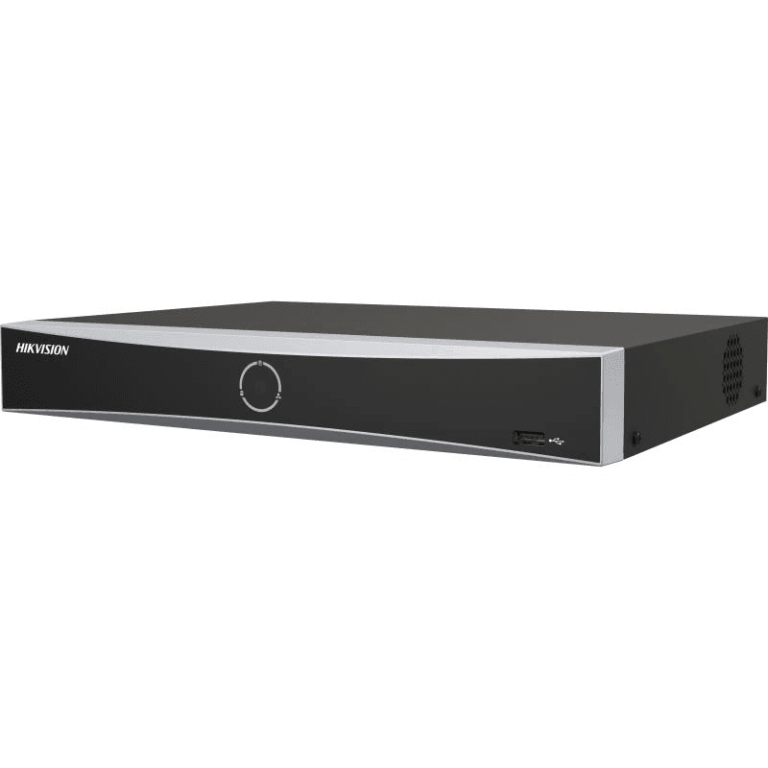
For organisations integrating workstations into a wider office infrastructure, suitable security camera systems may also be part of the site’s overall IT and physical-security planning.
Frequently Asked Questions About HP Z2 Tower G1i Workstation Price India
Availability and quotation in India
Pricing and stock may change with supplier availability. Contact THENCIX for a current quotation, GST invoice details and delivery arrangements for Delhi NCR or other Indian locations. WhatsApp +91 9891150949 with your required quantity and delivery PIN code.
Three-year onsite warranty coverage
This workstation is offered with a 3-Year HP Onsite Warranty. Service eligibility and claim handling are subject to HP’s applicable terms and service entitlement. Retain the invoice and warranty documentation for support requests.
Processor suitability for professional workloads
The Intel Core Ultra 9 285K has 24 cores and 24 threads and can support demanding desktop workloads. Application performance depends on software optimisation, project size, memory use and graphics requirements.
Graphics requirements for CAD applications
This configuration uses integrated Intel Graphics and does not list a discrete GPU. If your CAD or rendering application requires dedicated graphics, select a compatible graphics-equipped configuration based on the software vendor’s recommendations.
Memory expansion options
The workstation includes 32GB DDR5-5600 memory in one module and has four DDR5 memory slots. Confirm the supported maximum capacity and compatible module arrangement before upgrading.
Storage expansion options
The workstation includes a 1TB PCIe Gen4 M.2 SSD and supports additional storage positions on the platform. Confirm available slots, drive types and mounting requirements before purchasing extra storage.
Linux Ready operating-system status
HP lists this model as Linux Ready. Confirm the intended Linux distribution, drivers and application compatibility before deployment. If Windows is required, arrange the appropriate licence and installation separately.
Software certification and compatibility
Specific ISV certification should not be assumed for every configuration or application version. If certification is required for a tender or professional workflow, obtain documentation for the exact hardware and software combination before purchasing.
ECC memory requirements
The listed memory is 32GB DDR5-5600. Businesses that require ECC memory should verify the supported memory type and platform configuration with HP before ordering.
Bulk purchasing and institutional procurement
THENCIX can discuss multi-unit requirements, configuration consistency, GST invoicing and delivery planning. Tender compliance depends on the tender documents and the exact configuration offered. WhatsApp +91 9891150949 with the quantity and specification.
Integrated graphics versus dedicated graphics
Integrated Intel Graphics can suit general productivity and some technical workloads. GPU-heavy CAD, advanced 3D rendering and accelerated AI applications may require a dedicated graphics card selected according to the software vendor’s recommendations.
Delivery and configuration assistance
Before ordering, confirm availability, final specifications, package contents, warranty details and delivery arrangements with THENCIX. Contact WhatsApp +91 9891150949 for a quotation and compatible accessory options.
Final Buying Recommendation
The HP Z2 Tower G1i with Intel Core Ultra 9 285K, 32GB DDR5 memory and 1TB SSD is a professional tower platform for CPU-oriented technical work, software development and business multitasking. Its integrated graphics should be considered carefully when the intended applications require dedicated GPU acceleration. Before purchase, finalise the operating-system plan, graphics requirements, expansion needs and service terms. For a quotation from Nehru Place, Delhi, contact THENCIX on WhatsApp at +91 9891150949.
 Skip to navigation
Skip to main content
Skip to navigation
Skip to main content







 Free Delivery










Reviews
Clear filtersThere are no reviews yet.