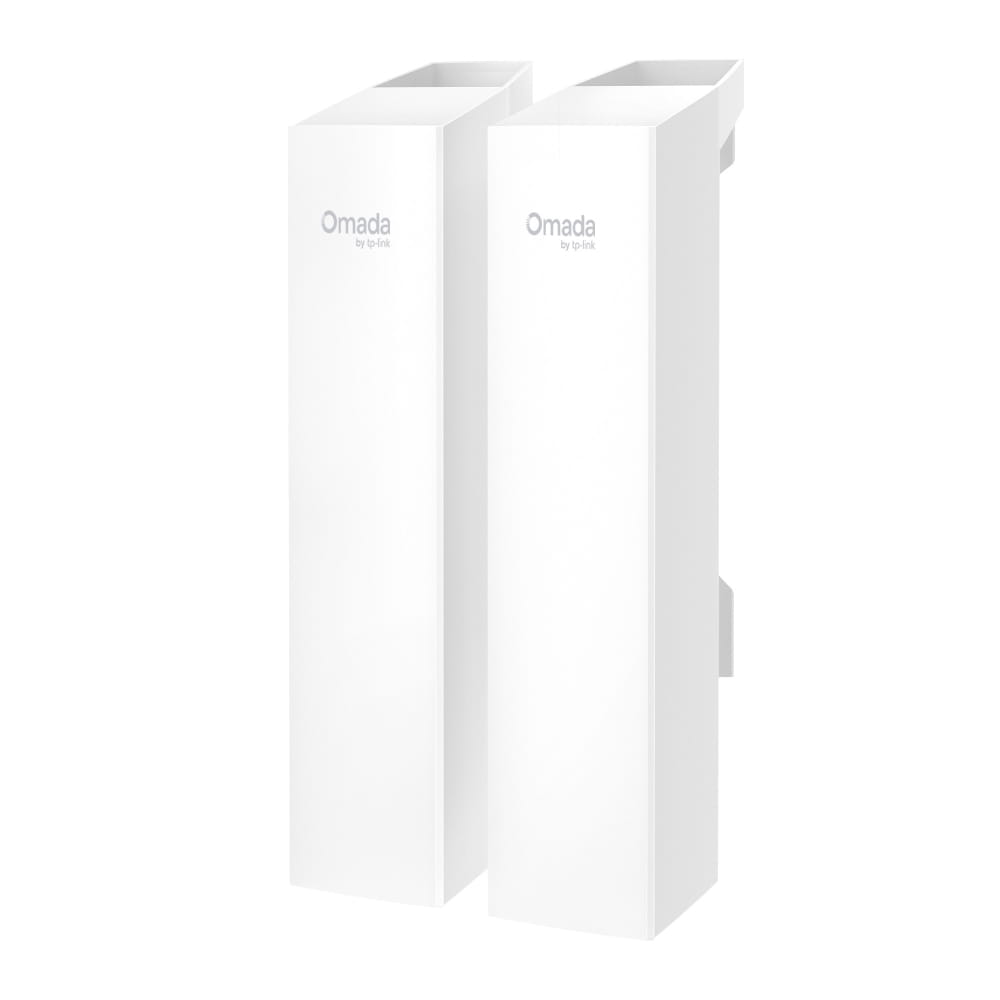
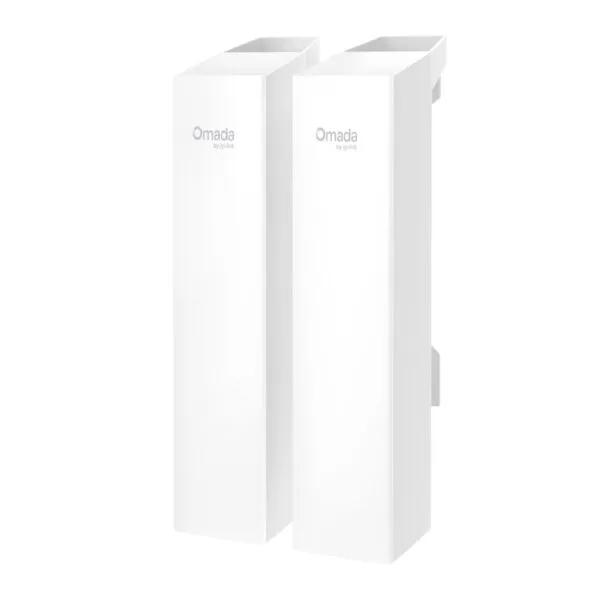
Connect two buildings, remote CCTV locations or separate network areas without running a long Ethernet cable between them. The TP-Link Omada EAP215-Bridge KIT is a preconfigured 5 GHz outdoor wireless bridge designed to carry network traffic across long distances. It supports wireless speeds up to 867 Mbps and advertises transmission distances of up to 5 km under suitable installation conditions.
The kit is designed for point-to-point links and multi-bridge deployments. Its directional antennas, weather-resistant enclosure, Gigabit Ethernet ports and flexible power options make it suitable for connecting IP cameras, network switches and other Ethernet devices at locations where a wired connection is difficult or expensive to install.
Wireless Network Connection Between Separate Locations
A wireless bridge creates a network connection between two physically separated locations. One bridge connects to the main network, while the paired remote bridge receives the wireless signal and makes the network available through its Ethernet ports.
This arrangement is useful for warehouses, factories, farms, commercial properties, parking areas, campuses and security installations. For example, a remote building can receive network connectivity from the main office without requiring a dedicated fibre or copper cable between the two structures.
The EAP215-Bridge KIT is supplied as a preconfigured kit for straightforward pairing. For a basic point-to-point installation, mount one unit at each location, establish a suitable line of sight, power both units and connect the Ethernet interfaces to the respective network equipment.
5 GHz Wireless Performance up to 867 Mbps
The EAP215-Bridge KIT operates on the 5 GHz band and uses IEEE 802.11a/n/ac wireless standards. Its maximum advertised wireless signal rate is 867 Mbps. This is a theoretical wireless link rate rather than guaranteed application throughput. Actual performance depends on distance, signal quality, interference, antenna alignment, regulatory restrictions and network traffic.
The 5 GHz band is suitable for dedicated wireless links where a clear radio path can be maintained. Before installation, check the route between the two mounting locations for trees, buildings, metal structures and other obstructions. A clear line of sight and accurate directional alignment are important for long-distance performance.
Directional 14 dBi Antennas for Long-Distance Links
Each bridge uses an internal 2×2 dual-polarised directional MIMO antenna with a listed 14 dBi gain on the 5 GHz band. Directional antennas concentrate radio energy towards the intended remote location, helping establish a focused wireless connection rather than distributing the signal equally in every direction.
The antenna has a listed horizontal beamwidth of approximately 43 degrees and vertical beamwidth of 18 degrees on the V3 specification. This makes accurate positioning important, particularly over longer distances. Use the Omada app-guided alignment feature during installation to help position the units and verify the wireless link.
Point-to-Point and Multi-Bridge Connectivity
The EAP215-Bridge KIT supports point-to-point connectivity between two locations. It also supports point-to-multipoint deployment, with up to four remote bridge connections in the supported configuration. This allows a central network location to connect to multiple remote buildings or camera locations without installing an independent cable route to each site.
Multi-bridge auto-pairing simplifies supported deployments. The role switch and pairing process help configure the central and remote bridge roles. Check the required hardware revision and deployment guide before planning a multi-bridge installation, particularly where several remote locations will operate simultaneously.
Three Gigabit Ethernet Ports on Each Unit
Each EAP215-Bridge unit provides three Gigabit Ethernet ports. This allows compatible wired devices to connect directly at the remote location without necessarily requiring a separate switch for a small installation.
For a CCTV deployment, the remote bridge can connect to multiple IP cameras or to a nearby network switch. In a building-to-building link, the Ethernet ports can connect a switch, recorder or other network equipment. The available wireless bandwidth is shared by traffic crossing the bridge, so the number of connected devices and their combined traffic requirements should be considered when planning the installation.
IP65 Outdoor Protection
The EAP215-Bridge KIT is designed for outdoor installation and uses an IP65-rated enclosure. The published operating temperature range is -40°C to +70°C, supporting deployment in demanding outdoor environments.
The product also specifies 6 kV lightning protection. This does not make an installation immune to lightning strikes. Outdoor mounting, grounding, cable routing and surge-protection practices should follow the manufacturer’s installation instructions and applicable electrical safety requirements.
Mount the units securely on poles or walls using the supplied mounting hardware. Position the equipment to minimise physical obstruction and ensure that the Ethernet and power connections are protected from water ingress.
Flexible Power Options
The EAP215-Bridge supports multiple power methods, including 802.3af PoE, 24V passive PoE and 12V DC. This flexibility is useful for installations where power is available at the mounting location or where a compatible PoE network arrangement is preferred.
The maximum listed power consumption is 11.5 W per unit. Confirm the required voltage, PoE standard, pin assignment and adapter compatibility before connecting power. Do not connect a passive PoE supply to equipment that does not support the corresponding voltage and pin configuration.
Omada App and Centralised Management
The bridge can be managed in standalone mode or through the Omada SDN platform. Supported management options include the Omada App, web interface and compatible Omada hardware, software or cloud-based controllers.
For installation teams, app-guided alignment and speed testing help verify the wireless link after the units have been mounted. In larger deployments, centralised management can make it easier to monitor multiple bridge connections and maintain network settings from one management platform.
Cloud access and centralised controller functions require a compatible Omada Controller and appropriate network configuration. Controller-dependent features should be planned as part of the complete network design.
Where the EAP215-Bridge KIT Can Be Used
- CCTV installations: Carry camera traffic from a remote gate, parking area or building back to the main NVR or surveillance network.
- Warehouse connectivity: Connect a separate warehouse block to the main office network where trenching or cable installation is impractical.
- Farm and agricultural properties: Establish network links between a main building and remote structures, subject to line of sight and local radio regulations.
- Factories and industrial premises: Extend Ethernet connectivity to separate buildings or outdoor work areas.
- Educational campuses: Connect compatible network equipment across separate campus buildings.
- Commercial properties: Link offices, storage areas, security gates and other remote network locations.
Technical Specifications
| Specification |
Details |
| Brand |
TP-Link Omada |
| Model |
EAP215-Bridge KIT |
| Product type |
Long-range indoor/outdoor wireless bridge |
| Wireless standard |
IEEE 802.11a/n/ac |
| Frequency |
5 GHz |
| Maximum wireless signal rate |
867 Mbps |
| Transmission distance |
Up to 5,000 m under suitable conditions |
| Antenna |
Internal 2×2 dual-polarised directional MIMO |
| Antenna gain |
14 dBi at 5 GHz |
| Horizontal beamwidth |
43° |
| Vertical beamwidth |
18° |
| Ethernet interfaces |
3 × Gigabit Ethernet ports per unit |
| Wireless modes |
Point-to-point and point-to-multipoint |
| Multi-bridge support |
Up to 1:4 connections |
| Pairing |
Preconfigured auto-pairing and multi-bridge auto-pairing |
| Alignment |
App-guided alignment and speed testing |
| Power supply |
12V DC / 802.3af PoE / 24V passive PoE |
| Maximum power consumption |
11.5 W |
| Weather protection |
IP65 |
| Lightning protection |
6 kV |
| Operating temperature |
-40°C to +70°C |
| Dimensions |
79 × 60 × 276 mm per unit |
| Mounting |
Pole and wall mounting |
| Management |
Standalone mode and Omada SDN |
| Warranty |
3 Years Brand Warranty |
Installation Planning for a Reliable Wireless Link
Before purchasing a long-range bridge, identify the exact locations where the two units will be installed. Check the distance, height difference, mounting positions and line of sight. A bridge advertised for up to 5 km should not be assumed to deliver that distance through buildings, dense trees or other obstructions.
For a CCTV link, calculate the combined bandwidth required by all cameras. Include the recording resolution, frame rate, compression settings and number of cameras. A remote switch can connect multiple cameras to the bridge, but their combined traffic must remain within the practical capacity of the wireless link.
For building-to-building connectivity, use suitable network switches and routers at both ends. If the installation requires VLAN separation, configure the switches and gateway accordingly. The bridge transports network traffic; it does not replace the routing, switching or firewall functions of the wider network.
For long-distance outdoor installations, use secure pole mounting, suitable grounding and weather-protected cabling. Follow the manufacturer’s regional frequency and transmission-power requirements. Actual usable range and performance depend on local regulations as well as the radio environment.
Procurement from THENCIX
THENCIX supplies networking and surveillance infrastructure for business, commercial and professional installations. The TP-Link Omada EAP215-Bridge KIT is suitable for projects requiring wireless connectivity between separate network locations, including remote CCTV and building-to-building links.
For purchase enquiries, configuration assistance and GST billing, contact THENCIX at +91 9891150949 or [email protected]. Business buyers can share the distance, number of remote locations and connected devices to help determine whether a point-to-point or point-to-multipoint bridge arrangement is appropriate.
Frequently Asked Questions
What is the maximum speed of the TP-Link EAP215-Bridge KIT?
It supports a maximum theoretical wireless signal rate of up to 867 Mbps on the 5 GHz band. Actual throughput depends on distance, signal quality, interference and network traffic.
What is the maximum transmission distance?
TP-Link advertises transmission distances of up to 5 km under suitable conditions. A clear line of sight and accurate antenna alignment are important for long-distance operation.
Does the EAP215-Bridge KIT support CCTV cameras?
Yes. Each bridge unit has three Gigabit Ethernet ports, allowing compatible IP cameras or a network switch to connect at the remote location.
Can the EAP215 connect more than two locations?
Yes. It supports point-to-multipoint operation with up to four bridge connections in the supported configuration.
Is the EAP215 suitable for outdoor installation?
Yes. It has an IP65-rated enclosure and a published operating temperature range of -40°C to +70°C.
What power options does the EAP215 support?
It supports 802.3af PoE, 24V passive PoE and 12V DC. Confirm power-supply compatibility and pin assignments before installation.
How many Ethernet ports are available?
Each EAP215-Bridge unit has three Gigabit Ethernet ports.
Can the EAP215-Bridge KIT be managed through Omada?
Yes. It supports standalone management and Omada SDN management through compatible controllers, web management and the Omada App.
What warranty is offered on this product?
This THENCIX listing carries a 3 Years Brand Warranty.
 Skip to navigation
Skip to main content








 Free Delivery











Reviews
Clear filtersThere are no reviews yet.