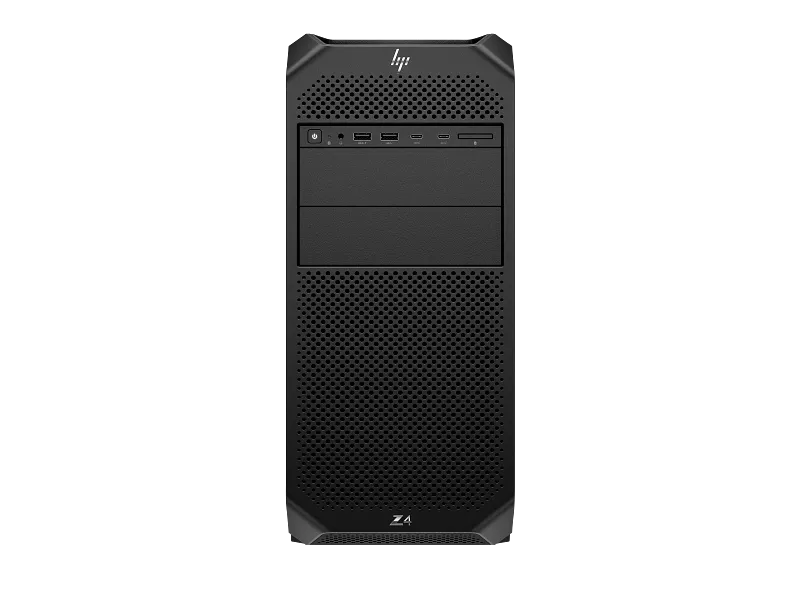
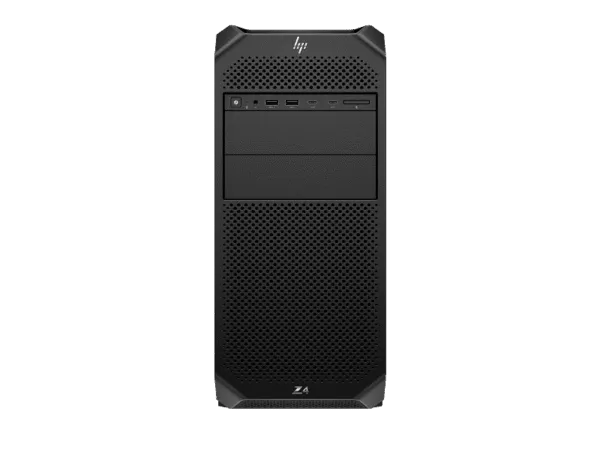
The HP Z4 G5 Workstation is a professional tower workstation designed for engineers, designers, technical professionals, developers and businesses that need dependable computing performance, workstation-class memory support and dedicated professional graphics. This configuration combines the Intel Xeon W3-2423 processor, 32GB DDR5 ECC memory, NVIDIA RTX A400 4GB graphics and a 1TB HP Z Turbo Drive PCIe Gen4 SSD, providing a capable hardware platform for professional applications and demanding everyday workloads.
Powered by an Intel Xeon W3-2423 processor with 6 cores and 12 threads, the HP Z4 G5 is designed for professional environments where consistent processing performance, memory reliability and expansion flexibility matter. Its 32GB DDR5-4800 ECC memory provides a suitable starting point for engineering applications, technical workloads, multitasking and professional software environments. The NVIDIA RTX A400 4GB dedicated graphics card adds professional GPU capabilities for supported design, visualisation and graphics workflows.
With Ubuntu Linux 24.04 preinstalled, this configuration is particularly relevant to Linux-based development environments, engineering workflows, software development, technical computing and organisations that prefer an open-source operating system. The 1TB HP Z Turbo Drive PCIe Gen4 TLC M.2 SSD provides fast storage for the operating system, professional applications, project files and everyday work data.
Professional Workstation Performance with Intel Xeon W3-2423
The processor is one of the most important components when selecting a professional workstation. The HP Z4 G5 configuration uses the Intel Xeon W3-2423, a workstation-class processor with 6 cores, 12 threads, a maximum turbo frequency of up to 4.0GHz and 15MB of L3 cache.
Its multi-core architecture supports professional applications that distribute workloads across multiple processor threads. At the same time, its turbo frequency helps with tasks that rely more heavily on individual core performance. This combination makes the workstation suitable for a range of professional workloads, including technical design, engineering applications, software development, data processing and general workstation productivity.
For engineering professionals, processor performance can influence application responsiveness, model calculations, design operations and the time required to complete certain computational tasks. For developers, it can help manage integrated development environments, compilers, virtualised workloads and multiple applications running simultaneously. For business users, it provides a capable platform for complex multitasking and professional software.
The Intel Xeon W3-2423 is paired with the Intel W790 workstation platform. This platform is designed for professional workstation configurations and provides a foundation for memory expansion, dedicated graphics and additional storage or expansion hardware.
32GB DDR5-4800 ECC Memory for Professional Workloads
This HP Z4 G5 configuration includes 32GB of DDR5-4800 ECC memory, installed as two 16GB memory modules. This provides a useful memory capacity for professionals working with multiple applications, technical documents, engineering projects, development tools and larger working files.
Memory capacity has a direct influence on how comfortably a workstation can handle simultaneous applications and active projects. When a system has sufficient RAM, it can keep more working data readily available instead of relying heavily on slower storage-based memory management. This can be particularly useful when switching between professional software, reference documents, browsers, development tools and other productivity applications.
The use of ECC memory is an important workstation feature. Error-Correcting Code memory is designed to detect and correct certain types of memory errors. This capability is valuable in professional environments where system reliability and data integrity are important considerations.
The workstation platform supports memory expansion through its eight DIMM slots. This provides flexibility for organisations and professionals who may need to increase memory capacity as their software requirements grow. The exact supported memory configuration and upgrade compatibility should be considered when planning future expansion.
For users working with larger engineering assemblies, more demanding datasets, virtual machines or memory-intensive applications, additional RAM may be worth considering. The included 32GB provides a starting configuration, while the platform’s memory expansion capability gives users room to plan for future requirements.
NVIDIA RTX A400 4GB Professional Graphics
The HP Z4 G5 is equipped with the NVIDIA RTX A400 graphics card with 4GB of dedicated GDDR6 graphics memory. This professional GPU is designed for supported workstation applications and provides dedicated graphics processing for professional visualisation, design and display workloads.
A dedicated graphics card can be important when working with applications that use GPU acceleration or require graphics hardware for displaying and manipulating technical content. Depending on the software and project requirements, professional graphics hardware can support CAD workflows, 2D design, entry-level 3D modelling, technical visualisation and multi-display productivity.
The NVIDIA RTX A400 is a compact professional graphics solution for users whose workloads do not require a higher-tier graphics card. Its 4GB of dedicated graphics memory is intended for suitable professional workloads, but the available memory should be considered carefully when working with complex scenes, large textures, advanced visual effects or graphics-intensive projects.
For engineers and designers, application compatibility is an important part of graphics selection. Before choosing a workstation for a particular CAD, design or visualisation application, consider the software’s GPU requirements, graphics memory recommendations and supported professional graphics configurations.
Users planning advanced 3D rendering, GPU-intensive simulation, large visualisation projects or workloads requiring substantial graphics memory may need to evaluate a higher-performance graphics configuration. The Z4 G5 workstation platform offers an upgrade-oriented tower design, allowing users to plan their hardware around changing professional requirements.
1TB HP Z Turbo Drive PCIe Gen4 TLC M.2 SSD
Storage performance affects operating system startup, application loading, project access and everyday workstation responsiveness. This configuration includes a 1TB HP Z Turbo Drive PCIe Gen4 TLC M.2 SSD, providing high-speed solid-state storage for professional software and working data.
Compared with conventional mechanical hard drives, an NVMe solid-state drive can provide significantly faster data access and lower storage latency. This is useful when starting the operating system, opening applications, accessing project files and working with frequently used datasets.
The 1TB capacity provides space for Ubuntu Linux 24.04, installed software, development environments, professional applications, documents and active project files. Actual usable storage capacity will be lower than the advertised capacity because of formatting, operating system requirements and system recovery or reserved partitions where applicable.
Professionals who work with large datasets, extensive project archives, high-resolution media or multiple virtual machines may require additional storage. Storage expansion can be planned according to the workstation’s available connections, supported drive types and the user’s data management requirements.
For business environments, it is also advisable to maintain a separate backup strategy. A workstation SSD provides fast local storage, but it should not be treated as a substitute for regular backups. Important project files and business data should be backed up to an appropriate external, network or cloud storage destination.
Ubuntu Linux 24.04 for Development and Technical Computing
This configuration comes with Ubuntu Linux 24.04, making it a suitable option for users who prefer a Linux-based workstation environment. Ubuntu is widely used in software development, programming, server administration, technical computing, research and open-source software environments.
Ubuntu provides access to a broad ecosystem of development tools, programming languages, package management utilities and command-line applications. Developers can configure environments for C, C++, Python, Java and other programming languages according to their requirements. It can also be used with supported development frameworks, source-code management tools, container platforms and database environments.
For software developers, a workstation with a multi-core Xeon processor, 32GB ECC memory and NVMe storage offers a capable foundation for coding, compiling, testing and multitasking. The available resources can support development environments that involve multiple applications, documentation, local databases and test services.
Linux is also used in technical and engineering environments where specialised software tools, command-line workflows and open-source applications are part of everyday work. Organisations can configure the operating system according to their internal development standards, security policies and software requirements.
Before purchasing, users should confirm that their required professional applications and peripherals support Ubuntu Linux 24.04. Some commercial CAD, engineering, accounting and business applications may require Windows or may offer only limited Linux support. Software compatibility should always be checked against the application’s official requirements.
HP Z4 G5 Tower Workstation Platform
The HP Z4 G5 is a tower workstation platform designed for professional desktop environments. Its form factor provides room for workstation components and offers expansion options that are useful when planning a system for changing business or technical requirements.
The Intel W790 platform provides the foundation for the installed Xeon processor, ECC memory and dedicated graphics. The workstation’s expansion architecture supports additional compatible hardware, depending on the available slots, installed components, power requirements and physical clearance.
Expansion flexibility can be useful for professionals who expect their computing requirements to change over time. A workstation may initially be deployed for engineering applications or development work and later be adapted with additional compatible storage, memory or expansion hardware.
The tower format is also relevant for organisations that prefer desktop workstations that can be positioned in an office, engineering department, design studio or dedicated workstation environment. Its physical design should be considered alongside desk space, ventilation, cable management and the location where the system will be installed.
PCIe Expansion and Future Upgrade Planning
Professional workstation users may need more than the components included in the initial configuration. Additional graphics hardware, storage controllers, network adapters and other PCIe devices can form part of a future workstation upgrade plan.
The HP Z4 G5 platform provides PCIe expansion options, including PCIe 5.0 and PCIe 4.0 slots. The availability of an expansion slot does not automatically mean every add-in card will be compatible. Users should consider the card’s interface, dimensions, power requirements, cooling needs and the available space inside the chassis.
When planning a graphics upgrade, check the graphics card’s physical size, power connector requirements and total power consumption. Multiple expansion cards may also affect airflow and the availability of neighbouring slots. A suitable configuration should be selected before purchasing additional components.
Storage upgrades should similarly be planned around the supported drive interfaces and available mounting options. Users who work with extensive project libraries or large datasets may benefit from a storage layout that separates the operating system, active project files and long-term data archives.
For businesses purchasing workstations for multiple employees, planning an upgrade strategy can help maintain consistency across the installed hardware fleet. It can also simplify future maintenance, replacement planning and configuration management.
Professional Applications and Suitable Workloads
The HP Z4 G5 combines a workstation-class Intel Xeon processor, ECC memory, dedicated NVIDIA professional graphics and fast PCIe Gen4 storage. These components make it a candidate for a range of professional desktop workloads. The suitability of the system depends on the exact software, project complexity and performance requirements.
CAD and Engineering Design
Engineering teams use desktop workstations for computer-aided design, technical drawings, component modelling and design documentation. The Xeon W3-2423 processor provides multi-core computing resources, while the NVIDIA RTX A400 offers dedicated graphics for supported professional applications. The 32GB ECC memory configuration provides working capacity for suitable design projects and multitasking.
Users should evaluate the complexity of their assemblies, the number of components in their models and the graphics requirements of their chosen CAD software. Larger assemblies and advanced visualisation workflows may benefit from higher memory capacity or a more powerful graphics card.
3D Modelling and Visualisation
Professional 3D workflows can involve geometry creation, scene editing, viewport navigation, material setup and visualisation. A dedicated professional GPU can help with supported graphics operations, while the processor and system memory support the wider application workload.
The RTX A400 4GB is intended for appropriate entry-level professional graphics requirements. It should not be treated as a high-end rendering GPU. Users working with large scenes, complex textures, advanced rendering engines or GPU-intensive effects should compare the application’s hardware recommendations with the capabilities of this configuration.
Software Development and Programming
The combination of Ubuntu Linux 24.04, a Xeon processor, 32GB ECC memory and NVMe storage makes this workstation relevant to developers who prefer Linux-based environments. It can be configured for programming, application development, compiling, testing, database tools and development utilities.
Developers can use the workstation for code editing, local development services, supported container workloads and testing environments. The available memory and processor resources should be considered when running several virtual machines, containers or memory-intensive development tools at the same time.
Technical Computing and Research
Technical professionals and research teams often work with specialised applications, datasets and computational tools. This workstation provides a professional desktop platform that can be configured for suitable technical computing tasks. The Xeon processor, ECC memory and dedicated graphics offer a foundation for supported workloads.
Actual performance will depend on the software’s ability to use multiple CPU cores, system memory and GPU acceleration. Applications with specialised hardware requirements should be checked before selecting the workstation configuration.
Business and Professional Productivity
Businesses may require workstation-class desktop systems for technical departments, specialist applications, development teams and employees handling complex professional workloads. The HP Z4 G5 offers a tower workstation platform with dedicated graphics and upgrade flexibility.
It can also be considered for users who need a more configurable desktop platform than a conventional office PC. The appropriate configuration should be based on the employee’s daily applications, expected workload and future expansion requirements.
Choosing the Right Workstation Configuration
Workstation selection should begin with the applications and tasks the system is expected to handle. Processor specifications alone do not determine whether a workstation is suitable. Memory capacity, graphics hardware, storage performance, operating system compatibility and expansion requirements all contribute to the overall system capability.
The HP Z4 G5 configuration combines the Xeon W3-2423 processor with 32GB ECC memory and NVIDIA RTX A400 4GB graphics. This is a balanced starting point for users whose professional applications have moderate graphics requirements and who benefit from workstation-class platform features.
If your work involves larger 3D scenes, high-resolution visualisation, GPU rendering or advanced graphics acceleration, compare the RTX A400 with higher-tier professional graphics options. If your projects involve large datasets, virtual machines or extensive engineering assemblies, consider whether additional memory would be beneficial.
Storage requirements should also be assessed before purchase. The included 1TB SSD is suitable for an operating system, professional software and active working files, but users maintaining extensive project archives may need additional storage capacity.
Operating system compatibility is another important consideration. This configuration includes Ubuntu Linux 24.04. If your organisation depends on Windows-only software, confirm the availability of a compatible Linux version or consider an alternative workstation configuration with the required operating system.
Designed for Workstation Deployment in Professional Environments
When deploying workstations in an office, engineering department or technical organisation, consistency and planning are important. The HP Z4 G5 tower can be considered for individual professional workstations as well as planned desktop deployments where users require dedicated computing resources.
Before deployment, organisations should identify the applications that need to be installed, the required user permissions, network access requirements and data storage policies. Linux-based environments may also require specific package repositories, security configurations, authentication methods and internal development tools.
For teams using specialised software, it is useful to establish a standard workstation image or installation procedure. This can help maintain consistent application versions and system settings across multiple computers. Hardware configuration records can also assist with asset tracking and future maintenance.
Businesses should plan for backup, data security and operating system updates as part of their workstation deployment. Important files should be stored and backed up according to the organisation’s data protection policy. Regular maintenance can help keep the workstation environment organised and ready for daily use.
Technical Specifications – HP Z4 G5 Workstation
| Product |
HP Z4 G5 Workstation |
| Model Number |
CB4J2PT#ACJ |
| Processor |
Intel Xeon W3-2423 |
| Processor Cores |
6 Cores |
| Processor Threads |
12 Threads |
| Maximum Turbo Frequency |
Up to 4.0GHz |
| Processor Cache |
15MB L3 Cache |
| Chipset |
Intel W790 |
| Installed Memory |
32GB DDR5-4800 ECC |
| Memory Configuration |
2 × 16GB |
| Memory Slots |
8 DIMM slots |
| Graphics |
NVIDIA RTX A400 |
| Graphics Memory |
4GB GDDR6 |
| Primary Storage |
1TB HP Z Turbo Drive PCIe Gen4 TLC M.2 SSD |
| Operating System |
Ubuntu Linux 24.04 |
| Form Factor |
Tower Workstation |
| Power Supply |
775W |
| Optical Drive |
DVD-RW |
Why Buy Your HP Z4 G5 Workstation from TheNcix.Com?
Choosing the right workstation is only one part of the purchase. Customers also need access to product guidance, clear billing information and assistance when they have questions after delivery. At TheNcix.Com, operated by Netlink Computer, we aim to support customers throughout the buying and ownership experience.
Warranty Assistance and Coordination
If you experience a warranty-related issue with your purchased workstation, contact our team for assistance. We can help you understand the relevant warranty process, guide you through the required information and assist with coordination through the applicable manufacturer service channel. Actual warranty coverage, service eligibility and resolution remain subject to the manufacturer’s warranty terms.
Pickup and Drop-Off Assistance
For eligible service cases, we can assist with coordinating product pickup and drop-off arrangements so that customers do not have to manage every part of the service process independently. Availability depends on the customer’s location, the nature of the service requirement and the applicable logistics arrangements. Any associated charges or service conditions will be communicated before coordination.
Technical Guidance Before Purchase
Not sure whether this workstation is suitable for your CAD software, engineering application, development environment or professional workload? Contact our team before ordering. We can help you understand the configuration and discuss the processor, memory, graphics and storage requirements relevant to your intended use.
Post-Purchase Assistance
Our support does not stop when your order is delivered. You can contact us with purchase-related questions, configuration queries and assistance with the warranty process. We aim to make it easier for customers to get guidance when they need it.
GST Invoice and Clear Billing
Purchases are supported by a GST invoice, providing billing documentation for individual customers, companies and institutional buyers. Customers purchasing for business use can contact us for product and quotation-related assistance.
Pickup, In-Store and Online Communication
Customers can connect with Netlink Computer through TheNcix.Com or contact our team directly. Our business location in Nehru Place, New Delhi, also provides an in-person point of contact for customers with computer hardware requirements.
Computer Hardware and Technology Products
TheNcix.Com offers a range of computer hardware and technology products, including workstations, desktop computers, laptops, processors, graphics cards, memory, storage devices, networking equipment and surveillance products. This makes it convenient for customers planning a complete workstation setup or sourcing additional compatible hardware.
Explore our desktop computers and workstation range to compare available systems and configurations. You can also browse our graphics cards for professional and desktop graphics requirements, or view other HP workstation options available in our store.
Frequently Asked Questions
1. Which processor is installed in the HP Z4 G5 Workstation?
This configuration comes with the Intel Xeon W3-2423 processor, featuring 6 cores, 12 threads, a maximum turbo frequency of up to 4.0GHz and 15MB of L3 cache.
2. Does this HP Z4 G5 workstation include ECC memory?
Yes. It includes 32GB DDR5-4800 ECC memory, configured as two 16GB modules. The workstation platform has eight DIMM slots for supported memory expansion configurations.
3. Which graphics card is included in this configuration?
This workstation includes the NVIDIA RTX A400 professional graphics card with 4GB of dedicated GDDR6 graphics memory.
4. Which operating system comes preinstalled?
This configuration comes with Ubuntu Linux 24.04. Customers should check the compatibility of their required professional applications and peripherals with this operating system before ordering.
5. Can I get assistance with warranty service and product pickup?
Yes. Contact Netlink Computer for warranty-process guidance and assistance coordinating eligible pickup and drop-off arrangements. Availability and any applicable logistics charges depend on the service location and case requirements. Manufacturer warranty coverage and service decisions remain subject to the applicable warranty terms.
Contact TheNcix.Com for HP Workstation Assistance
If you are planning to purchase a professional workstation for engineering, design, development or business use, contact Netlink Computer to discuss your requirements. Our team can help you understand the installed configuration and provide assistance with product-related queries before and after purchase.
Online Store: TheNcix.Com
Business: Netlink Computer
Address: 109B Osian Building, 12 Nehru Place, New Delhi, Delhi 110019
WhatsApp: +91 9891150949
Email: [email protected]
The HP Z4 G5 combines Intel Xeon processing, ECC memory, NVIDIA professional graphics and fast NVMe storage in an expandable tower workstation platform. Contact TheNcix.Com to discuss whether this configuration matches your professional computing requirements.
 Skip to navigation
Skip to main content





 Free Delivery










Reviews
Clear filtersThere are no reviews yet.