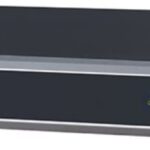
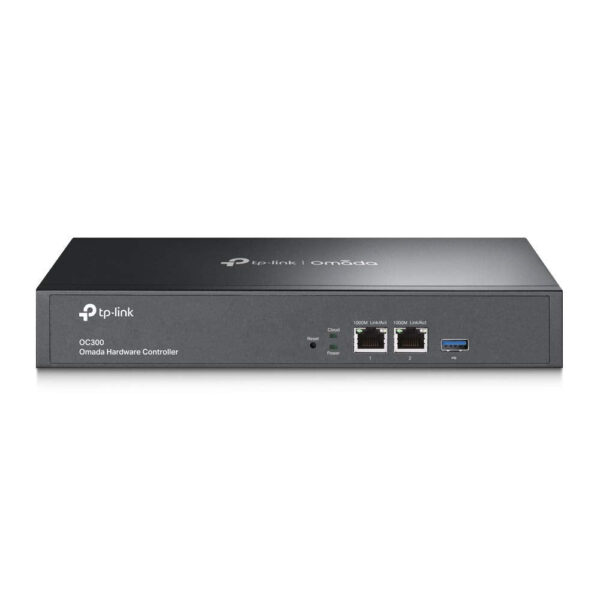
The TP-Link OC300 is an Omada SDN hardware controller that centrally manages up to 500 access points, 100 switches, and 100 routers from a single dashboard — on-premises or via cloud. Built on a quad-core ARM Cortex-A72 processor at 1.2 GHz with 2 GB DDR4 RAM and 8 GB eMMC storage, it runs 24/7 without requiring a dedicated PC or virtual machine. Two Gigabit Ethernet ports, USB 3.0 for automatic configuration backup, metal rackmount chassis, and 9W idle power consumption make it the dedicated brain for multi-site TP-Link Omada deployments. If you are looking for the TP-Link OC300 price in India with a 3-year warranty and valid GST invoice, Thencix stocks genuine TP-Link enterprise products at our Nehru Place, Delhi store. Browse our full range of networking equipment at Thencix for routers, switches, and access points.
TP-Link OC300 — Why Use a Hardware Controller
Without a controller, each Omada access point, switch, and router is managed individually — logging into each device’s web interface separately to configure SSIDs, VLANs, firmware updates, and security policies. For a hotel with 50 access points, an office campus with 20 switches, or a retail chain with locations across multiple cities, individual management is impractical. The OC300 solves this by providing a single interface that manages every Omada device on your network — configure once, deploy everywhere.
The alternative to a hardware controller is running the free Omada Software Controller on a PC or virtual machine. The software controller works, but it needs to be running 24/7 on a machine that you maintain — OS updates, reboots, and hardware failures all affect your network management. The OC300 eliminates this dependency: it is a dedicated appliance that boots in seconds, runs headless, consumes 9 watts, and does nothing except manage your network. No Windows updates, no VM overhead, no shared resource contention.
Manage 500 APs, 100 Switches, 100 Routers
The OC300 supports up to 500 Omada EAP access points, 100 JetStream/Omada switches, and 100 SafeStream/Omada routers — covering up to 15,000 clients across multiple sites. This scale covers everything from a single office floor to a multi-building campus to a nationwide chain of retail locations managed from a central IT team. Each site can have its own SSIDs, VLANs, firewall rules, and bandwidth policies while sharing a common management platform.
Multi-site management lets you monitor all locations from one dashboard — see which access points are online, which switches have high port utilisation, and which sites are experiencing bandwidth issues, all without VPN-ing into each location separately. Multi-tenant management with role-based access control assigns different permission levels to different administrators — a regional IT manager sees only their sites while the head office admin sees everything. For access points to deploy with this controller, browse our networking accessories at Thencix.
Cloud Access, On-Premises Security, and Zero-Touch Provisioning
The OC300 supports hybrid cloud architecture — manage your network locally through the on-premises web interface for maximum security and stability, or remotely via TP-Link’s cloud portal and the Omada mobile app from anywhere in the world. No user traffic passes through the cloud — only management data — so your network remains private and compliant with data residency requirements.
Zero-Touch Provisioning (ZTP) means new Omada devices added to the network are automatically discovered, configured with the correct settings, and brought online without manual intervention. Ship a new EAP610 access point to a remote branch office, plug it into the network, and the OC300 configures it automatically with the correct SSID, VLAN, and security policy. This eliminates the need for an IT technician to visit every site for device deployment.
Key Features — TP-Link OC300
- Centralized Management — 500 APs + 100 Switches + 100 Routers: Single dashboard for all Omada devices across multiple sites. Multi-tenant role-based access. Supports up to 15,000 clients
- Quad-Core ARM A72, 2 GB DDR4, 8 GB eMMC: Dedicated hardware appliance — no PC or VM required. Boots in seconds, runs 24/7 at just 9W. Metal rackmount/desktop chassis
- Cloud + On-Premises Hybrid Management: Remote access via cloud portal and Omada app. Local management for security-sensitive deployments. No user traffic passes through cloud
- Zero-Touch Provisioning: New devices auto-configure when connected to the network. Batch firmware updates, scheduled reboots, and automated backups via USB 3.0
- 2 × Gigabit Ethernet + USB 3.0: Dual GbE for management network redundancy. USB 3.0 for automatic config backup to flash drive. Kensington lock slot for physical security
Technical Specifications — TP-Link OC300
| Specification |
Detail |
| Brand |
TP-Link |
| Model |
OC300 |
| Product Type |
Omada SDN Hardware Controller |
| Processor |
Quad-Core ARM Cortex-A72 @ 1.2 GHz |
| Memory |
2 GB DDR4 |
| Storage |
2 MB NOR Flash + 8 GB eMMC |
| Ethernet Ports |
2 × 10/100/1000 Mbps RJ-45 |
| USB Port |
1 × USB 3.0 (auto backup) |
| Other Interfaces |
1 × Kensington Lock, 1 × Reset |
| Management Scale |
Up to 500 APs, 100 Switches, 100 Routers |
| Max Clients |
15,000 |
| Multi-Site Management |
Yes |
| Multi-Tenant Management |
Yes (Role/Site/Device Privileges) |
| Cloud Access |
Yes (free) |
| Zero-Touch Provisioning |
Yes |
| Network Management |
Wired + Wireless |
| VPN Support |
IPSec, L2TP, PPTP, OpenVPN |
| Portal Authentication |
Voucher, Local User, SMS, RADIUS, Facebook, External Portal |
| 802.1x |
Supported |
| RADIUS |
Authentication, MAC Auth, Accounting |
| Security |
ACL, URL Filtering, Attack Defence |
| Power Supply |
100–240 V AC, 50/60 Hz |
| Max Power Consumption |
9.0 W (no USB); 14.8 W (with USB connected) |
| Chassis |
Metal, 1U rackmount/desktop |
| Dimensions |
294 × 180 × 44 mm |
| Certifications |
FCC, CE |
| Warranty |
3 Years TP-Link Manufacturer Warranty |
Package Contents
- 1x TP-Link OC300 Omada Hardware Controller
- 1x Power adapter (100–240V AC)
- 1x Ethernet cable
- 1x Rackmount kit
- 1x Quick Installation Guide
- Note: Access points, switches, and routers sold separately. The OC300 is the management controller only — it does not provide WiFi, switching, or routing. WhatsApp +91 9891150949 for complete Omada system bundles.
Ideal Use Cases — TP-Link OC300 in India
Hotels and Hospitality: Manage 50–500 wall-plate and ceiling access points across floors, lobbies, conference rooms, and outdoor pool areas from a single dashboard. Configure guest WiFi with captive portal and voucher authentication, staff WiFi on a separate VLAN, and IPTV on a third — all centrally managed. Remote firmware updates across all APs without visiting each floor. Ideal for hotel chains managing multiple properties from a central IT office.
Offices, Co-Working Spaces, and Corporate Campuses: Centralise management of all Omada switches, APs, and routers across floors and buildings. VLAN segmentation for departments, bandwidth allocation per group, and 802.1x authentication for corporate devices. The cloud portal lets the IT admin manage the office network from home or while travelling. For PoE switches to power access points in these deployments, browse our PoE switch range at Thencix.
Retail Chains and Multi-Site Businesses: A chain of shops, clinics, or service centres across Indian cities — each site has 2–10 Omada devices (AP + switch + router). The OC300 manages all sites from headquarters. Zero-Touch Provisioning means the local staff just plugs in the new device and the OC300 configures it remotely. Network topology view shows the status of every device at every location in real time.
Why Buy the TP-Link OC300 from Thencix
Thencix stocks genuine TP-Link enterprise products at our Nehru Place, Delhi store — available for immediate pickup or delivery.
- 100% genuine TP-Link product — authorised channel, sealed box
- 3-year TP-Link manufacturer warranty — Thencix handles everything: diagnostics, pickup, replacement, return. You don’t lift a finger
- Valid GST invoice with every order — claim full input tax credit
- Complete Omada ecosystem available: EAP access points, JetStream switches, SafeStream routers
- System design guidance — WhatsApp for Omada deployment sizing
- Express delivery across Delhi, Noida, Gurgaon, and Faridabad
- Pan-India delivery available
- Cash on Delivery available
- Walk-in: 109B Osian Building, 12 Nehru Place, Delhi 110019
- WhatsApp: +91 9891150949
Frequently Asked Questions — TP-Link OC300 Price India
How many devices can the TP-Link OC300 manage?
Up to 500 Omada access points, 100 Omada/JetStream switches, and 100 Omada/SafeStream routers — supporting up to 15,000 clients across multiple sites. This covers everything from a single office to a nationwide chain of locations.
What is the difference between OC300 and the free Omada Software Controller?
The free Omada Software Controller runs on a Windows or Linux PC that must stay powered on 24/7. The OC300 is a dedicated hardware appliance — no PC needed, no OS maintenance, boots in seconds, runs at 9W, and is always available. For businesses that need reliable always-on network management without depending on a separate computer, the OC300 is the recommended choice. The software controller supports up to 1500 APs on powerful hardware; the OC300 supports 500 APs.
Does the OC300 require a subscription or license fee?
No — cloud access and all management features are completely free with the OC300. No subscription, no per-device license, no annual renewal. This is a significant cost advantage over competitors like Cisco Meraki or Aruba Central that charge per-device license fees. You pay once for the hardware and manage unlimited devices up to the scale limit at no additional cost.
Can I manage the OC300 remotely from my phone?
Yes — use the Omada app (Android and iOS) for remote monitoring, device management, and alerts from anywhere. You can also access the full management dashboard via the cloud web portal from any browser. No VPN or port forwarding needed — the cloud connection is built in and free.
What is the warranty on the TP-Link OC300?
3-year TP-Link manufacturer warranty. If anything goes wrong, just WhatsApp +91 9891150949 — Thencix handles everything from diagnostics to pickup to replacement to return. You don’t need to contact TP-Link, visit any service centre, or follow up on claims. We take care of it end to end.
 Skip to navigation
Skip to main content
Skip to navigation
Skip to main content






 Free Delivery










Reviews
Clear filtersThere are no reviews yet.