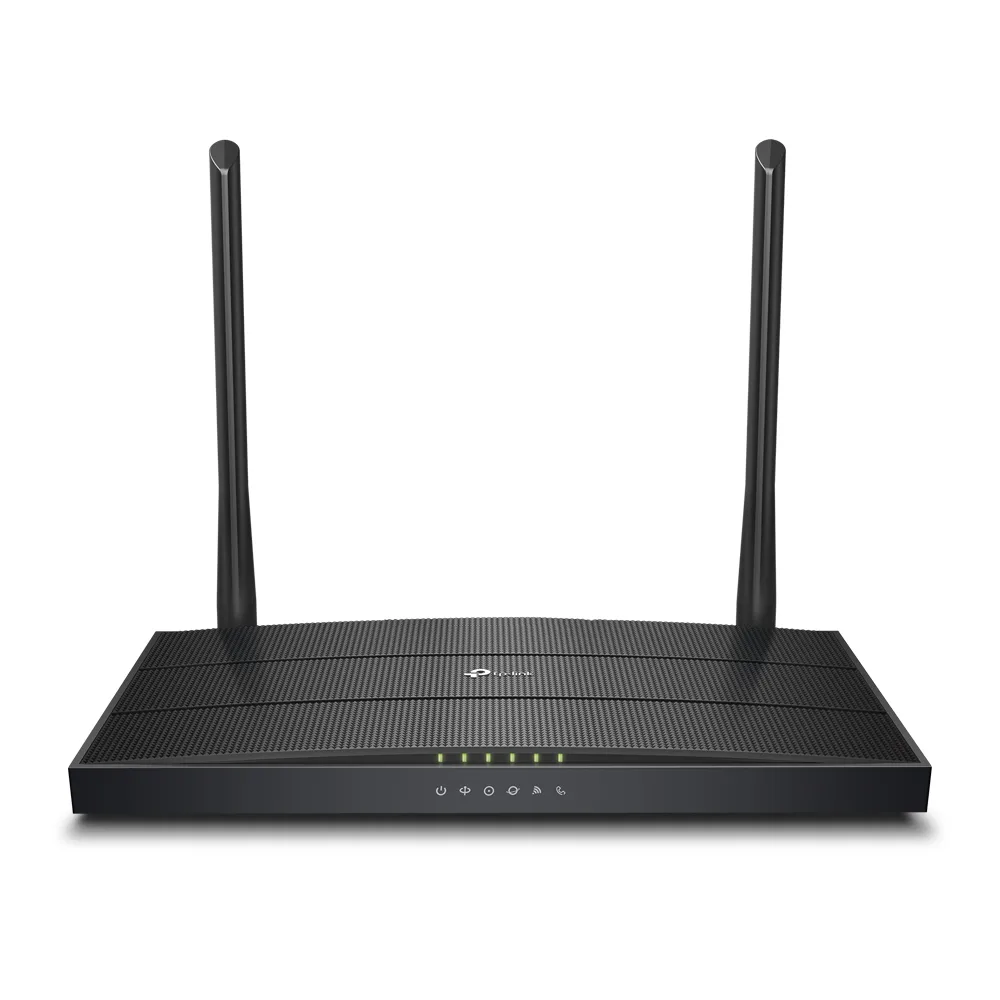
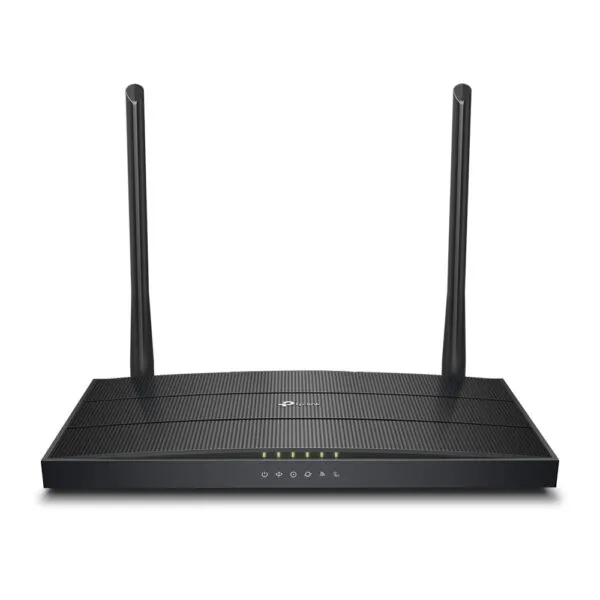
The TP-Link XC220-G3v AC1200 Wireless VoIP XPON Router is designed for fibre broadband installations that require wireless connectivity, wired Gigabit networking and internet-based telephone services in one device. Combining an XPON optical fibre interface with dual-band 802.11ac Wi-Fi, four Gigabit Ethernet LAN ports and an RJ11 FXS telephone port, this router provides an integrated networking solution for homes, small offices and compatible fibre broadband deployments.
With wireless data rates of up to 1167 Mbps across its two frequency bands, the XC220-G3v supports up to 300 Mbps on 2.4 GHz and up to 867 Mbps on 5 GHz under ideal conditions. Its four 10/100/1000 Mbps Ethernet ports provide wired connectivity for desktop computers, smart TVs, network switches, gaming consoles and other Ethernet-enabled devices. The integrated FXS port allows a compatible telephone handset to connect for VoIP calling when the service provider has provisioned the required SIP service.
The XPON optical interface is designed for fibre-to-the-home deployments. XPON technology supports GPON and EPON access modes, allowing compatible network deployments to use the appropriate optical access technology. However, compatibility with a particular internet service provider depends on its OLT, provisioning requirements, optical network parameters and firmware configuration. Confirm compatibility with your broadband provider before purchasing or replacing an existing optical network terminal.
XPON Fibre Connectivity for FTTH Broadband
The XC220-G3v is an optical network terminal and wireless router designed for fibre broadband applications. It connects to the service provider’s optical fibre network through its SC/APC XPON port. Unlike a conventional Ethernet-only wireless router, an XPON terminal incorporates the optical network interface required to connect to a compatible fibre access network.
XPON refers to passive optical network technology that can support GPON and EPON access modes. This flexibility is useful in fibre deployments where the service provider’s network infrastructure determines the access technology. The actual mode used by the router depends on the supported hardware revision, firmware and service-provider configuration. The optical terminal must be registered and provisioned by a compatible OLT before it can access the broadband service.
For GPON networks, the associated standard supports theoretical line rates of up to 2.488 Gbps downstream and 1.244 Gbps upstream. These are optical network technology rates, not a guarantee of internet speed delivered to a subscriber. Actual internet throughput depends on the subscribed broadband plan, OLT configuration, network congestion, optical signal levels, ISP policies and the capabilities of connected devices.
For an EPON deployment, the optical access mode and supported data rates depend on the applicable network standard and equipment configuration. Before deploying the device, the ISP or network administrator should confirm whether the fibre connection uses GPON or EPON and whether the optical terminal is accepted on that network.
The SC/APC optical connector is the physical fibre interface specified for this XPON configuration. Fibre connectors should be handled carefully. Dust, contamination, sharp bends and poor connector alignment can affect optical performance. Installation should be performed using suitable fibre handling practices, and the optical connector should be protected when it is not connected.
For new broadband installations, the service provider may need to register the device’s optical serial number or other identifiers, configure the required WAN service and provision internet, IPTV or voice settings. Replacing an ISP-supplied optical terminal is not always a simple plug-and-play process. Confirm the provider’s device approval and provisioning procedure before purchasing a replacement terminal.
AC1200 Dual-Band Wi-Fi for Wireless Devices
The XC220-G3v uses dual-band IEEE 802.11ac wireless technology to provide Wi-Fi connectivity on both 2.4 GHz and 5 GHz frequency bands. Its combined wireless data rate is advertised at up to 1167 Mbps, comprising up to 300 Mbps on 2.4 GHz and up to 867 Mbps on 5 GHz. These are theoretical wireless link rates and should not be interpreted as guaranteed internet download speeds.
The 2.4 GHz band is useful for devices that require broader coverage or support older Wi-Fi standards. It can be suitable for basic browsing, messaging, smart-home equipment and devices located farther from the router. However, the 2.4 GHz band is often more congested because it is shared by many wireless networks and household devices. Interference from neighbouring access points and other radio equipment can affect wireless performance.
The 5 GHz band offers a higher advertised wireless link rate and can provide better performance for compatible devices operating within suitable range. It is useful for high-bandwidth activities such as HD and 4K streaming, online gaming, large file transfers and video conferencing. Its coverage can be more affected by walls and physical obstructions than 2.4 GHz, so router placement remains important.
The router supports IEEE 802.11ac/n/a on 5 GHz and IEEE 802.11b/g/n on 2.4 GHz. Wireless performance depends on the client device’s Wi-Fi capability, antenna design, distance, channel conditions, interference, building construction and the broadband connection. A device that supports only older Wi-Fi standards will not achieve the maximum advertised AC1200 wireless rate.
Two external dual-band antennas provide wireless signal transmission and reception. For better coverage, position the router in a central and elevated location, away from large metal objects, enclosed cabinets and sources of interference. In larger homes or offices, wireless coverage may require additional access points or a compatible mesh arrangement.
EasyMesh and Whole-Home Wireless Coverage
The XC220-G3v documentation lists mesh compatibility, including WPA EasyMesh and TP-Link OneMesh support depending on the hardware and firmware version. Mesh networking can help extend wireless coverage by connecting compatible networking devices into a coordinated wireless system. Instead of relying on a single router to cover every room, a mesh arrangement can provide additional access points in areas where the primary router’s signal is weak.
Mesh compatibility should be checked against the exact hardware revision, firmware and companion devices. EasyMesh and OneMesh are not interchangeable names for every implementation, and not every TP-Link router, extender or access point supports every mesh feature. Before purchasing additional mesh equipment, confirm that the selected devices support the same mesh technology and the intended operating mode.
Wireless coverage depends on the building layout, wall materials, floor count, interference and placement of the main router and additional nodes. A mesh system should be positioned so that each node receives a reliable connection from the upstream device. Placing a node in an area where the primary signal is already extremely weak may not provide the expected improvement.
Four Gigabit Ethernet LAN Ports
The router includes four 10/100/1000 Mbps RJ45 Gigabit Ethernet LAN ports. These ports allow wired devices to connect directly to the network without depending on wireless signal strength. Wired Ethernet is particularly useful for desktop computers, smart TVs, gaming systems, network printers, NAS devices and other equipment that benefits from a stable connection.
Each Gigabit LAN port supports a link rate of up to 1000 Mbps when connected to a compatible Gigabit Ethernet device using suitable cabling. The actual transfer rate depends on the broadband plan, connected device, network configuration, cable quality and other traffic on the network. The router’s Gigabit ports do not guarantee that an internet subscription will deliver 1 Gbps.
For homes with multiple wired devices, the four LAN ports can reduce the need for a separate network switch. Larger installations can use an additional Gigabit switch to connect more Ethernet devices, subject to the network design and available port capacity. A wired connection is often preferable for latency-sensitive applications and devices that remain in a fixed location.
Gigabit Ethernet is useful for transferring files between compatible local network devices, accessing network storage and connecting computers to office infrastructure. To achieve Gigabit link speeds, both ends of the connection must support Gigabit Ethernet and the cable must meet the required specification. Damaged cables, poor terminations or older 10/100 Mbps equipment can reduce the negotiated connection speed.
VoIP Telephone Connectivity with RJ11 FXS Port
The XC220-G3v includes one RJ11 FXS telephone port for supported Voice over Internet Protocol services. An analogue telephone handset can be connected to this port to make or receive calls through an internet-based voice service when the router has been configured with the required SIP account and service-provider settings.
VoIP converts voice communication into data that travels across an IP network. This allows a compatible telephone service to operate over the broadband connection rather than relying on a traditional analogue telephone line. The FXS interface provides the connection for a compatible telephone handset or analogue telephone device.
The listed VoIP functions include call hold, call forwarding, warm call, do-not-disturb, call restriction, speed dial, caller ID and three-party conference. The product documentation also lists support for up to eight SIP accounts. The availability of individual functions depends on the firmware, SIP configuration and service-provider support.
VoIP service is not automatically activated simply by connecting a telephone. The internet service provider or VoIP operator must supply the SIP account details and any required configuration. Some providers remotely provision voice settings, while others require manual configuration. Confirm the required SIP parameters and compatibility with the service provider before expecting telephone functionality.
Voice quality depends on the broadband connection, network congestion, latency, jitter, packet loss and service-provider infrastructure. Quality of Service settings can help prioritise selected network traffic where supported and correctly configured. For business telephone use, the network administrator should also consider backup power and service continuity requirements.
Remote Management with OMCI and TR-069
The XC220-G3v supports remote management technologies including OMCI and TR-069. These protocols are used in service-provider environments to activate, configure, monitor and manage customer-premises equipment. OMCI is associated with optical network terminal management through a compatible optical line terminal, while TR-069 provides a framework for remote management through an Auto Configuration Server.
Remote management can simplify deployment for internet service providers and network operators. It can allow supported devices to receive configuration settings, be monitored and managed without requiring every subscriber to configure all parameters manually. The actual remote-management functions depend on the provider’s management platform, firmware and provisioning policy.
For customers, remote provisioning can help reduce setup complexity when the ISP supports the device. However, it does not mean that the router will automatically work with every fibre provider. The service provider must support the terminal and configure the optical and broadband services appropriately.
Network Security and Software Features
The XC220-G3v includes network management and security features intended to help control access and manage connected devices. The published specifications list NAT firewall functionality, access control, MAC, IP and URL filtering, IP and MAC address binding, and protection against selected network attacks such as denial-of-service and SYN flooding.
These features can help administrators manage the local network and apply basic access restrictions. MAC and IP filtering can be used to control selected devices or network addresses, while URL filtering can support website access policies where available. The effectiveness of these controls depends on correct configuration and should not be treated as a replacement for endpoint security or a comprehensive business firewall.
The router supports IPv4 and IPv6 protocols. It also provides DHCP server and client functions, DHCP client lists, address reservation and DHCP relay. These functions help manage IP addressing for devices connected to the local network. Static routing, DNS relay and Dynamic DNS support can assist with selected network configurations.
Port forwarding functions include virtual server, port triggering, DMZ, ALG and UPnP. These features can be useful for applications that require inbound connectivity, but opening ports can expose devices and services to external network traffic. Only enable the services required by the application, use strong authentication and keep connected devices updated.
VPN pass-through support is listed for PPTP, L2TP and IPsec. VPN pass-through allows compatible VPN traffic to traverse the router; it does not mean that the router itself provides a full VPN server or client service. Users should confirm their VPN application’s requirements and the router’s firmware support.
IPTV and VLAN Support
The XC220-G3v supports VLAN and IEEE 802.1Q functions for service separation and network configuration. VLAN tagging is commonly used by broadband providers to distinguish internet, IPTV and voice traffic. Correct VLAN configuration is important where the service provider uses separate virtual networks for different services.
IGMP V1, V2 and V3 support is listed among the advanced networking features. IGMP is used in IP multicast environments and can be relevant to IPTV services. The provider’s IPTV configuration, multicast settings and VLAN requirements must be confirmed before deployment.
For an installation with internet, IPTV and VoIP services, the network administrator should follow the provider’s provisioning instructions. Incorrect VLAN identifiers or multicast settings can prevent one or more services from operating correctly. Service configuration may be performed remotely by the ISP or through the router’s supported management interface.
Hardware Design, Buttons and Power
The router includes two external dual-band antennas and a set of physical controls for everyday operation. The listed buttons include power on/off, WPS/Wi-Fi and reset. The WPS/Wi-Fi control supports the functions provided by the firmware, while the reset button can restore factory settings when used according to the product instructions.
The specified external power supply for the XPON configuration is 12V/1.5A. Use the supplied or manufacturer-approved power adapter with the correct voltage, polarity and connector. An unsuitable adapter can cause unstable operation or damage the equipment. The device should be installed in a ventilated location and protected from moisture, excessive heat and physical damage.
Typical Applications
Fibre broadband homes: The XC220-G3v combines an optical network interface, dual-band wireless connectivity and Gigabit Ethernet ports for compatible FTTH subscriptions. It can connect phones, laptops, televisions and other home network devices.
Small offices: The four Gigabit LAN ports provide wired connectivity for office computers, printers and other Ethernet devices. Dual-band Wi-Fi supports compatible wireless clients, while the FXS port can be used for a provisioned VoIP telephone service.
Internet service provider deployments: XPON capability, OMCI and TR-069 support make the device relevant to service-provider deployments where the network operator supports the corresponding hardware and management configuration.
Home office and video conferencing: The dual-band wireless connection and Gigabit Ethernet ports can support video meetings, cloud applications and connected work devices. For devices that require stable latency, a wired Gigabit Ethernet connection is recommended where practical.
IPTV and multimedia: VLAN and IGMP support can assist compatible IPTV deployments when configured according to the service provider’s requirements. Wired Ethernet can be useful for connecting smart televisions and media devices.
Installation and Compatibility Considerations
Before purchasing the XC220-G3v, confirm the fibre access technology used by the internet service provider. Check whether the provider uses GPON, EPON or a specific XPON implementation and whether it accepts customer-supplied optical terminals. Optical serial registration, OMCI provisioning, VLAN identifiers, PPPoE credentials and SIP settings may be required depending on the service.
Confirm the optical connector type and fibre installation requirements. This configuration specifies an SC/APC XPON port. The fibre connector should match the installed optical connection, and the cable should be routed without tight bends or unnecessary stress.
For Wi-Fi performance, place the router away from obstructions and interference sources. Use 5 GHz for compatible devices requiring higher wireless throughput at suitable range, and 2.4 GHz for devices that benefit from broader coverage or compatibility with older standards. Wired Ethernet is recommended for stationary devices where stable connectivity is important.
For VoIP, confirm that the service provider supports SIP configuration on the router and supplies the required account details. The FXS port is a telephone interface; it is not a conventional Ethernet LAN port. A standard telephone handset should be connected to the FXS interface only after the voice service has been configured.
Why Buy from TheNcix.Com?
- Product Selection Guidance: Discuss your fibre connection, ISP compatibility, Wi-Fi requirements and VoIP needs before choosing a router.
- Configuration Assistance: Get guidance on XPON compatibility, Ethernet connections, mesh requirements and supported networking features.
- GST Invoice: GST invoice provided for eligible business purchases.
- Warranty Assistance: TheNcix.Com can help coordinate warranty-related communication through the manufacturer’s service channel, subject to applicable warranty terms and entitlement.
- Service Coordination: Pickup or drop-off coordination may be available for eligible cases depending on location, logistics, service requirements and applicable charges.
- Business Quotations: Contact our team for networking equipment quotations for homes, offices, institutions and service-provider projects.
- Post-Purchase Support: Assistance with product-related queries and direction to the appropriate manufacturer support channel.
Frequently Asked Questions
1. What is the TP-Link XC220-G3v?
The TP-Link XC220-G3v is an AC1200 dual-band wireless VoIP XPON router designed for compatible fibre broadband installations. It combines an optical network interface, four Gigabit LAN ports, dual-band Wi-Fi and an RJ11 FXS telephone port.
2. Does the XC220-G3v support GPON and EPON?
The XPON version is designed for GPON and EPON access modes. Compatibility depends on the exact hardware revision, firmware and service-provider OLT configuration. Confirm the required access mode with your ISP before purchase.
3. What is the maximum Wi-Fi speed?
The advertised combined wireless rate is up to 1167 Mbps, comprising up to 300 Mbps on 2.4 GHz and 867 Mbps on 5 GHz. Actual throughput depends on client devices, distance, interference and network conditions.
4. How many Gigabit LAN ports are available?
The router includes four 10/100/1000 Mbps RJ45 Gigabit Ethernet LAN ports for wired network devices.
5. Does it support VoIP telephone calls?
Yes. It includes one RJ11 FXS port for a compatible analogue telephone handset. VoIP calling requires SIP service provisioning and configuration from a supported service provider.
6. Can I use it with any fibre broadband provider?
Not necessarily. The ISP must support the optical access mode, device registration and required provisioning. Confirm compatibility with the service provider before replacing an existing ONT or router.
7. Does it support mesh Wi-Fi?
TP-Link documentation lists mesh compatibility, including EasyMesh and OneMesh depending on hardware and firmware version. Confirm compatibility with the exact extender or mesh device before purchasing additional equipment.
8. Does it support IPTV?
It supports VLAN and IGMP V1/V2/V3 features that can be used in compatible IPTV configurations. The required VLAN and multicast settings depend on the internet service provider.
9. Can I connect a desktop computer using Ethernet?
Yes. One of the four Gigabit LAN ports can connect a desktop computer or other Ethernet-enabled device. A suitable Ethernet cable and a Gigabit-capable network interface are required for Gigabit link speeds.
10. Does it support IPv6?
Yes. IPv4 and IPv6 protocol support is listed in the product specifications. Actual IPv6 availability depends on the ISP and network configuration.
11. What power adapter does it use?
The XPON configuration specifies a 12V/1.5A external power supply. Use the supplied or manufacturer-approved adapter.
12. What is included in the package?
The listed package contents include the AC1200 Wireless VoIP XPON Router, RJ45 Ethernet cable, power adapter and quick installation guide. Confirm the final package contents against the supplied retail box.
13. Does the router support remote management?
Yes. It supports OMCI and TR-069 remote-management technologies. Their operation depends on the service provider’s OLT and remote-management platform.
14. Can TheNcix.Com help check ISP compatibility?
We can help review the product’s published specifications and the requirements you provide. Final optical registration and service activation must be confirmed by your internet service provider. Contact WhatsApp +91 9891150949 for product assistance.
 Skip to navigation
Skip to main content





 Free Delivery










Reviews
Clear filtersThere are no reviews yet.