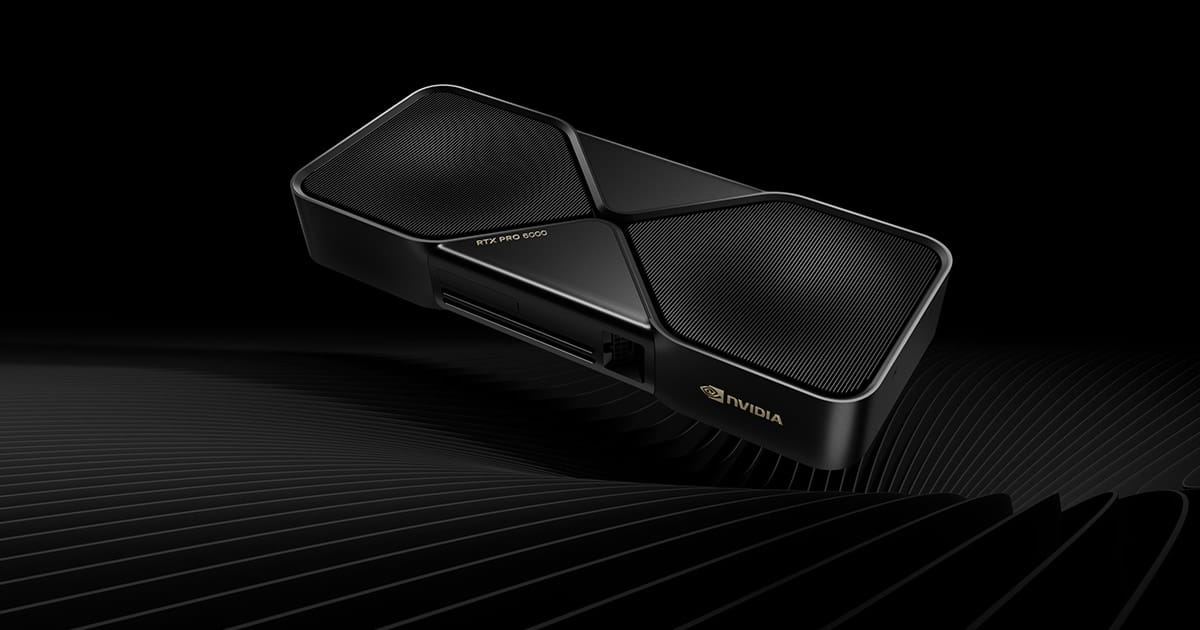
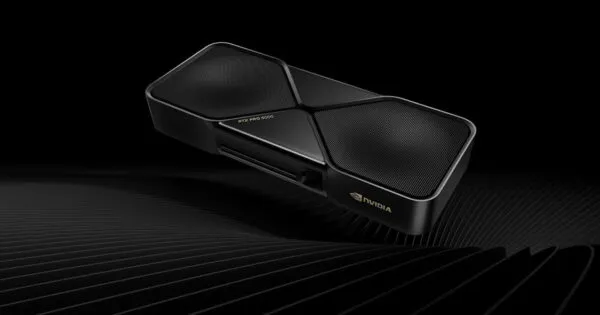
The NVIDIA RTX PRO 6000 Blackwell Workstation Edition is a flagship professional graphics card built for demanding GPU workloads across artificial intelligence, engineering, scientific computing, 3D design, visual effects and advanced rendering. Based on NVIDIA Blackwell architecture, it combines 24,064 CUDA cores with 96GB of GDDR7 memory featuring error-correcting code (ECC). Its 512-bit memory interface delivers 1,792 GB/s of memory bandwidth, providing substantial capacity and throughput for applications that process large models, complex scenes and high-resolution datasets. For organisations evaluating professional NVIDIA workstation graphics cards, this 600W Workstation Edition represents a different performance and power class from compact professional GPUs. Its PCIe 5.0 x16 interface and four DisplayPort 2.1b outputs support integration into suitable high-end workstation platforms. The card is intended for systems designed around its physical dimensions, cooling requirements and high-power connection. Thencix supports professional GPU procurement for businesses, engineering teams and technical organisations across Delhi NCR, with GST invoicing and configuration assistance available through its Nehru Place team.
Blackwell GPU Architecture and Compute
The NVIDIA Blackwell architecture provides the foundation for this professional graphics card. Its 24,064 CUDA cores support parallel processing workloads in which large numbers of operations can be executed concurrently. This architecture is relevant to GPU-accelerated applications used in engineering, scientific research, AI development, simulation and visual computing. Rather than relying only on general-purpose CPU processing, compatible software can use the GPU to accelerate specific compute-intensive operations.
The card includes fifth-generation Tensor Cores and fourth-generation Ray Tracing Cores. Tensor Cores are designed to accelerate supported matrix and AI operations, while RT Cores are dedicated to supported ray-tracing workloads. These specialised processing units allow compatible professional applications and development frameworks to use hardware acceleration for different types of computation. Actual performance depends on the software, model, precision mode, driver, workload and system configuration.
NVIDIA specifies up to 4,000 AI TOPS for the Workstation Edition. This is a peak AI performance figure and should not be interpreted as a guaranteed application-level throughput measurement. The result achieved in a real deployment depends on the supported precision format, sparsity, software optimisation, batch size and model architecture. Teams developing AI applications should evaluate the GPU against their actual frameworks and model requirements before finalising a deployment.
For engineering and research organisations in India, the architecture is relevant where a workstation must support a mixture of visualisation, simulation and GPU compute tasks. A technical team in Noida, for example, may use the same workstation platform for model development, engineering visualisation and accelerated data processing, provided its applications support the relevant NVIDIA GPU compute capabilities.
96GB GDDR7 ECC Memory Architecture
The 96GB GDDR7 graphics memory capacity is one of the defining characteristics of this GPU. Professional applications can consume substantial graphics memory when working with complex geometry, high-resolution textures, large rendering scenes, extensive simulation data or AI models. A larger dedicated memory pool can reduce the need to divide a workload across multiple devices or repeatedly move data between system memory and graphics memory, although the actual benefit depends on how the application manages its data.
The memory uses a 512-bit interface and provides a specified bandwidth of 1,792 GB/s. Memory bandwidth describes how quickly data can be transferred between the GPU processor and its local memory. It is particularly relevant to workloads that repeatedly access large datasets, perform matrix operations or process complex visual assets. The combination of memory capacity and bandwidth gives this card a substantial resource pool for demanding professional applications.
ECC stands for error-correcting code. ECC memory can detect and correct certain memory errors, helping improve data integrity in supported workloads. This is particularly relevant to professional environments where long-running computations, scientific workflows, engineering analysis and AI processing may place sustained demands on GPU memory. ECC does not eliminate every possible hardware or software failure, but it provides an additional layer of memory reliability.
For organisations deploying GPU workstations in Delhi NCR, memory capacity should be considered alongside system RAM. NVIDIA and workstation platform documentation should be checked when selecting host memory, motherboard, CPU and storage configuration. Large GPU memory capacity alone does not guarantee that a workstation can efficiently feed the GPU with data; the complete system architecture matters.
600W Power and Thermal Design
This Workstation Edition has a maximum total board power of 600W. It is therefore intended for a high-end workstation with a suitable power supply, the correct auxiliary power connection and sufficient chassis cooling. It should not be treated as a routine upgrade for an ordinary desktop simply because a PCIe x16 slot is available.
The NVIDIA reference specifications identify a PCIe CEM5 16-pin power connector and a double-flow-through thermal solution. The cooling arrangement is designed to move air through the card’s heatsink structure. A workstation chassis must provide an appropriate airflow path so that the GPU can operate within its thermal design limits during sustained workloads. Restricted airflow, unsuitable fan placement or a poorly ventilated enclosure can affect operating temperatures and performance.
Before procurement, the system integrator should check the PSU’s rated output, the required native power connector, cable compatibility, available power budget and the manufacturer’s installation guidance. A power adapter should not be assumed to be included or suitable without checking the supplied package and system requirements. The power needs of the CPU, motherboard, memory, storage, fans and any additional expansion cards must also be included in the system-level calculation.
The card uses a dual-slot, extended-height form factor measuring approximately 5.4 inches high by 12 inches long. Buyers should confirm the usable card clearance and slot layout of the intended workstation. This is especially important in compact towers, multi-drive systems and configurations containing additional PCIe expansion cards. Thencix can assist with reviewing the proposed workstation configuration before a GPU upgrade or new-system procurement.
PCIe 5.0 and Professional Displays
The GPU uses a PCI Express 5.0 x16 system interface. PCIe provides the high-bandwidth connection between the graphics card and the host workstation. A compatible PCIe 5.0 platform can provide the intended interface generation, while physical and electrical compatibility should be checked when installing the card in an earlier-generation workstation. The actual link operates according to the capabilities of the host platform and the card.
Four DisplayPort 2.1b outputs support professional multi-display configurations. NVIDIA’s published specifications describe support for high-resolution displays, including configurations involving 4K, 5K and 8K displays at supported refresh rates. The exact display combination depends on monitor capabilities, cable specification, resolution, refresh rate and the application environment.
For design studios, architecture teams and engineering departments, multi-display support can help separate modelling, reference drawings, application panels and visualisation output across multiple screens. Businesses should verify the monitor’s DisplayPort input, supported resolution and refresh rate before choosing cables and displays. Display adapters can introduce limitations and should be checked against the intended monitor configuration.
AI Development and Model Workloads
The combination of Blackwell architecture, CUDA processing, Tensor Cores and 96GB of ECC-protected GDDR7 memory makes this GPU relevant to professional AI development and inference environments. Developers can use compatible NVIDIA software and frameworks to accelerate supported model operations. The available memory can be particularly useful when a model, working context or dataset requires more GPU memory than smaller professional cards provide.
Multi-Instance GPU (MIG) support allows supported workloads to divide GPU resources into isolated instances. NVIDIA’s published specifications describe configurations of up to four 24GB instances, two 48GB instances or one 96GB instance. This can be useful when an organisation wants to allocate GPU resources across separate supported workloads. MIG availability and behaviour depend on the supported driver, software stack and deployment configuration.
AI teams should assess the complete software stack before deployment. CUDA version, framework support, operating system, driver branch, container environment and model precision all influence compatibility. The GPU’s peak AI specification should not be used as a substitute for testing the actual model and inference pipeline. Organisations planning a production AI system should also account for host RAM, NVMe storage, networking and power infrastructure.
Rendering and Engineering Visualisation
Professional rendering workloads can benefit from the combination of CUDA processing, dedicated ray-tracing hardware and large graphics memory. Complex scenes may contain high-polygon geometry, detailed materials, lighting data and high-resolution textures. When the application supports GPU rendering, these resources can help process demanding visual workloads while retaining substantial scene data in local GPU memory.
Architecture, engineering and construction teams may use professional graphics acceleration for 3D modelling, visualisation, walkthroughs and design review. VFX and animation studios can use compatible GPU-rendering applications for supported rendering and compositing tasks. Scientific and industrial teams may use GPU acceleration in applications that support CUDA or other supported compute interfaces.
Application compatibility should be confirmed independently. A professional GPU does not automatically certify every CAD, CAE, DCC or rendering application. Check the software vendor’s supported GPU list, driver recommendations and certification information for the exact application version and operating system used by the organisation.
Key Features
- NVIDIA Blackwell Architecture: Professional GPU architecture with 24,064 CUDA cores for graphics and parallel compute workloads.
- 96GB GDDR7 ECC Memory: 512-bit memory interface and 1,792 GB/s bandwidth for large datasets, scenes and supported AI workloads.
- Dedicated AI and Ray Tracing Hardware: Fifth-generation Tensor Cores and fourth-generation RT Cores for supported accelerated applications.
- PCIe 5.0 x16 and Four DisplayPort Outputs: High-bandwidth workstation interface and four DisplayPort 2.1b display connections.
- Professional Procurement Support: GST invoice and configuration assistance from Thencix, Nehru Place, Delhi. Contact +91 9891150949 for warranty and system compatibility confirmation.
Technical Specifications
| Specification |
Details |
| Product |
NVIDIA RTX PRO 6000 Blackwell Workstation Edition |
| Model Number |
900-5G144-2500-000 |
| GPU Architecture |
NVIDIA Blackwell |
| CUDA Cores |
24,064 |
| Tensor Cores |
Fifth Generation |
| Ray Tracing Cores |
Fourth Generation |
| AI Performance |
Up to 4,000 AI TOPS |
| GPU Memory |
96GB GDDR7 with ECC |
| Memory Interface |
512-bit |
| Memory Bandwidth |
1,792 GB/s |
| System Interface |
PCI Express 5.0 x16 |
| Display Connectors |
4x DisplayPort 2.1b |
| Video Engines |
4x Ninth-Generation NVENC; 4x Sixth-Generation NVDEC |
| MIG Support |
Up to 4x 24GB, 2x 48GB or 1x 96GB configurations |
| Maximum Board Power |
600W |
| Power Connector |
1x PCIe CEM5 16-pin |
| Thermal Solution |
Double-flow-through |
| Form Factor |
5.4-inch height x 12-inch length; dual-slot, extended height |
| Warranty |
3-Year Brand Warranty — confirm applicable India coverage on supply documentation |
Package Contents
- NVIDIA RTX PRO 6000 Blackwell Workstation Edition graphics card — 1 unit.
- Auxiliary power cable or adapter — confirm the supplied retail package contents before installation.
- Product documentation and warranty information — as supplied with the unit.
- NOT INCLUDED: Workstation, processor, motherboard, system RAM, storage, operating system, monitor and external display cables unless separately specified. For a complete workstation, explore the HP Z8 Fury G5 professional workstation range.
- NOT INCLUDED: Additional PSU, chassis cooling upgrades or power-cable changes required for a particular workstation installation. These must be selected according to the host system’s requirements.
Ideal Use Cases for Indian Businesses
AI Development and Enterprise Inference: AI research teams, software companies and enterprise IT departments can evaluate the 96GB GPU memory capacity for supported model development, inference and data-processing workloads. The MIG capability can help divide resources for supported deployment scenarios. Organisations in Noida, Gurugram and Bengaluru should validate the framework, driver and model requirements before building a production environment.
Architecture, Engineering and Construction: Architecture practices and engineering consultancies can use compatible professional software for 3D modelling, rendering, design visualisation and simulation. The four-display output capability can support multi-monitor design desks, while the large graphics memory pool can be useful for complex scenes. For a complete workstation configuration, Thencix can help evaluate the GPU against the selected tower, PSU and cooling system.
Media Production and Visual Effects: Animation, VFX and post-production studios can assess the card for supported GPU rendering, visualisation and AI-assisted production tools. Its 96GB GDDR7 ECC memory and dedicated ray-tracing hardware are relevant to demanding graphics pipelines. Studios should check application-specific GPU support, project memory requirements and sustained thermal performance before deployment.
Scientific Computing and Technical Research: Research laboratories and technical organisations can use compatible CUDA-enabled applications for accelerated computation, data analysis and simulation. ECC memory is relevant to workflows where memory integrity is important. For institutional procurement, Thencix can provide a GST invoice and assist with configuration discussions from its Nehru Place, Delhi location.
Why Buy from Thencix
- 3-Year Brand Warranty: Warranty duration and claim coverage should be checked against the supplied India-market warranty documentation.
- GST Invoice: Business procurement documentation is provided for eligible purchases.
- Physical Business Location: 109B Osian Building, 12 Nehru Place, Delhi 110019.
- Configuration Assistance: Contact +91 9891150949 or [email protected] for workstation compatibility, bulk procurement and delivery coordination.
NVIDIA RTX PRO 6000 Blackwell Workstation Edition FAQs
How much graphics memory does this GPU provide
This Workstation Edition includes 96GB of GDDR7 graphics memory with ECC. The memory capacity is intended for demanding professional graphics, AI, rendering and compute workloads that require substantial local GPU memory.
What is the difference between the Workstation Edition and Max-Q Edition
The standard Workstation Edition is rated at 600W and uses a double-flow-through thermal solution with a 5.4-inch by 12-inch dual-slot form factor. The Max-Q Workstation Edition is a separate 300W variant designed for denser workstation configurations. They should not be treated as interchangeable when planning power, cooling or chassis compatibility.
Which power connection does the card require
NVIDIA specifies one PCIe CEM5 16-pin power connector and a maximum board power of 600W. The host workstation must have a suitable power supply, compatible cable and adequate total system power capacity. Contact Thencix at +91 9891150949 for help checking a proposed workstation configuration.
Does the GPU support multiple displays
Yes. The card has four DisplayPort 2.1b outputs. Supported resolution and refresh-rate combinations depend on the monitors, cables and display configuration.
Can this GPU be installed in an existing workstation
Installation depends on the workstation’s PCIe slot, chassis clearance, power supply, 16-pin power connection and cooling design. Its 600W board power and extended-height dual-slot dimensions make compatibility checks essential before ordering.
Does the card support ECC memory
Yes. The 96GB GDDR7 graphics memory includes error-correcting code. ECC can detect and correct certain memory errors and is relevant to supported professional computing and data-intensive workloads.
Can the GPU be used for AI model development
It is designed for professional AI and compute workloads and includes CUDA cores, fifth-generation Tensor Cores and 96GB of GDDR7 ECC memory. Actual framework and model compatibility depends on the operating system, drivers, CUDA version and application software.
What is Multi-Instance GPU support
MIG allows supported workloads to use isolated GPU instances. NVIDIA specifies configurations of up to four 24GB instances, two 48GB instances or one 96GB instance. Availability depends on the supported software and deployment environment.
Which operating systems and applications are compatible
Compatibility depends on the NVIDIA driver branch and the requirements of the professional application. Confirm the exact operating system, application version and vendor-supported GPU list before deployment, particularly for certified engineering and design workflows.
Is this GPU suitable for professional CAD and rendering
The card is designed for professional graphics, rendering, ray tracing and compute workloads. Application-level support and performance depend on the software and project configuration, so engineering and design teams should verify the vendor’s supported GPU and driver information.
What warranty applies to this graphics card
The listing is specified with a 3-Year Brand Warranty. The applicable service provider, coverage and claim procedure should be confirmed from the India-market warranty documentation supplied with the unit. Thencix can assist with procurement documentation and warranty-related coordination.
Can Thencix supply this GPU for a complete workstation or bulk order
Thencix can assist with GPU procurement, workstation compatibility checks and business purchasing requirements. For a complete system or institutional requirement, contact +91 9891150949 or [email protected] to discuss the configuration, GST invoice and delivery arrangements.
 Skip to navigation
Skip to main content









 Free Delivery










Reviews
Clear filtersThere are no reviews yet.