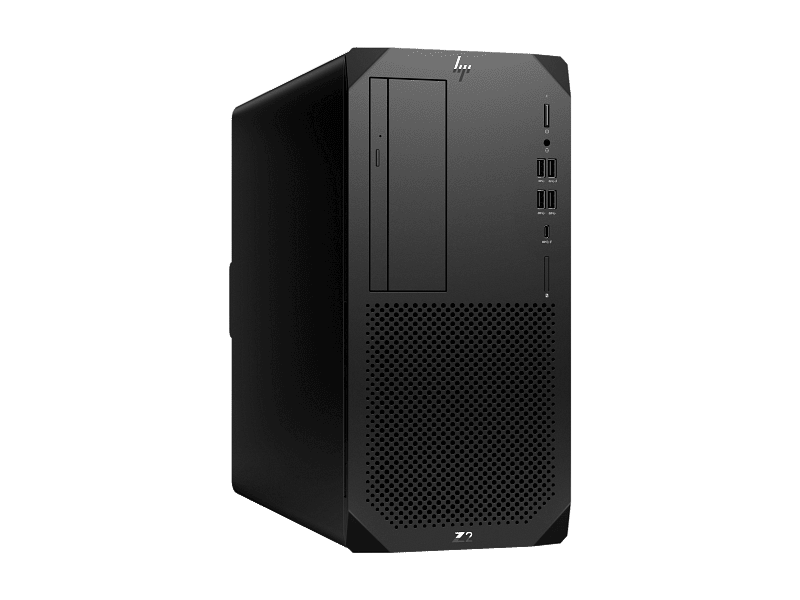
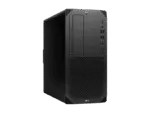
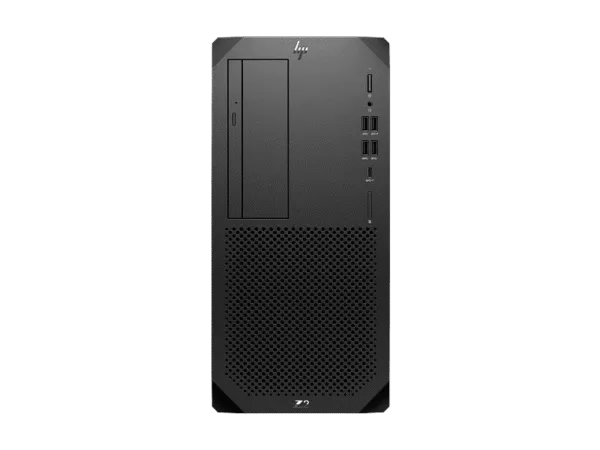
HP Z2 Tower G9 Intel Core i9-14900K 32GB 1TB Workstation
If you are researching HP Z2 Tower G9 price India for a professional desktop deployment, this configuration combines the Intel Core i9-14900K processor, 32GB DDR5 memory and a 1TB PCIe Gen4 NVMe SSD in a tower workstation platform. The system is designed for CPU-intensive professional applications, software development, business productivity and technical workloads where processor performance and future expansion are important. For buyers in Delhi NCR, Noida and Gurgaon, the tower format also provides practical service access and component expansion options. Thencix supplies eligible business purchases with a GST invoice, and customers can confirm configuration and availability on WhatsApp at +91 9891150949.
Processor Architecture for Professional Workloads
The Intel Core i9-14900K belongs to Intel’s 14th Generation Core desktop processor family and uses a performance-hybrid design combining Performance-cores and Efficient-cores. The processor provides 24 cores and 32 threads, with eight Performance-cores and sixteen Efficient-cores. This architecture allows the CPU to handle demanding foreground work while distributing background and parallel tasks across the available processing resources.
The 36MB cache helps keep frequently accessed instructions and data closer to the processor, while the high maximum turbo frequency provides additional responsiveness for workloads that benefit from high single-thread performance. This combination is useful in professional environments where application behaviour can vary between lightly threaded operations and workloads capable of using multiple cores.
A technical team working in Noida may use the system for software development, compilation, data processing and multiple simultaneous development tools. A consulting organisation in Gurgaon may use the workstation for large spreadsheets, business intelligence tools, document processing and browser-based applications while maintaining several applications concurrently.
The processor is also suitable for users who want substantial CPU capability without automatically adding a discrete professional GPU. This distinction matters because workstation configuration should follow the software requirement rather than simply maximising every hardware component.
Intel’s published specifications identify the processor as a desktop part based on the Raptor Lake product family. The architecture combines Performance-core and Efficient-core designs, and the processor supports up to 32 threads. These characteristics make it appropriate for a broad range of CPU-focused professional workloads, although application-specific performance should always be validated against the software vendor’s requirements.
For Indian business deployments, the processor also provides useful headroom for multitasking. A finance department running Tally or spreadsheet workloads, a development department running Visual Studio or JetBrains tools, or an engineering office running CPU-dependent calculations can all have different resource patterns. The available CPU resources allow the same workstation platform to serve a range of professional roles without treating every workload as identical.
Graphics Performance for Professional Applications
This configuration uses integrated Intel UHD Graphics 770. The graphics processor is intended for display output and applications that do not require a dedicated professional graphics card. This makes the configuration relevant for CPU-focused business applications, software development, productivity environments and technical workloads where graphics acceleration is limited.
Professional users should distinguish between CPU-intensive applications and GPU-intensive applications before procurement. Standard office productivity, browser-based workflows, programming environments, document management and many business applications can operate without a discrete professional GPU. In contrast, advanced 3D visualisation, GPU rendering, CUDA-based workloads and applications that specifically require professional graphics hardware should be matched with a different graphics configuration.
For a CAD workstation deployment, the application requirements should be checked before order confirmation. The system platform can be expanded according to supported hardware options, but a buyer should not assume that integrated graphics provide the same acceleration profile as a dedicated professional GPU.
The same principle applies to media production. CPU-heavy encoding, document preparation and general productivity can be handled differently from GPU-accelerated effects, 3D rendering or professional visualisation. Thencix can help customers identify whether their application workload is primarily CPU-based or requires a dedicated graphics solution.
This configuration therefore makes the most sense when the organisation has identified a requirement for strong CPU performance and does not need a dedicated graphics processor in the initial build.
Memory Architecture and Upgrade Path
The workstation is supplied with 32GB of DDR5-4800 non-ECC memory in a single 32GB module configuration. The platform provides four DIMM slots, giving organisations room to evaluate additional memory when future workloads demand greater capacity.
For professional multitasking, 32GB provides a useful starting point for development tools, large spreadsheets, browser sessions, business applications and many technical workloads. Users running multiple virtual machines, large datasets or particularly memory-intensive professional applications should evaluate their memory requirements before finalising the configuration.
The use of DDR5-4800 provides a modern memory platform for the processor. When upgrading, buyers should use compatible memory specifications and follow the manufacturer’s supported configuration guidelines rather than mixing arbitrary modules.
For an engineering office in Noida or an MSME technology company in Gurgaon, this upgrade path can be useful because memory requirements often increase after deployment. A workstation may initially serve a software developer or business analyst and later be assigned to a more demanding technical workflow.
Because the supplied memory is non-ECC, organisations requiring ECC memory for a specific professional application should evaluate a different supported memory configuration before purchase. ECC should not be assumed simply because the product is marketed as a workstation.
Customers requiring a memory upgrade can discuss the required capacity and compatibility with Thencix before dispatch. This is particularly useful for bulk orders where several systems need to be configured differently according to user roles.
Storage Technology and Expansion
The configuration includes a 1TB PCIe Gen4 NVMe M.2 SSD. NVMe storage provides fast access to the operating system, applications and active project files and is well suited to a workstation where application responsiveness and local file access are important.
A 1TB SSD can provide practical capacity for Windows, professional applications, documents, development projects and active working files. Users handling large engineering datasets, media projects or extensive local archives should calculate their expected storage consumption before deployment.
The workstation platform provides three M.2 NVMe storage positions according to the documented platform configuration, along with additional internal drive-bay options. This gives IT teams a practical path for planning future storage expansion rather than replacing the original system when local capacity requirements increase.
For businesses in Delhi NCR, storage planning should also consider backup policy. Additional internal storage is not a substitute for a properly designed backup system. Important business data should be protected according to the organisation’s backup and retention policy.
Customers who require additional NVMe storage can discuss the intended capacity and application workload before purchase. This allows the storage configuration to be considered alongside memory, graphics and power requirements instead of treating each component independently.
Expansion and Upgradeability
The tower chassis is designed around expandability and service access. HP documents four DIMM slots, PCIe expansion slots and multiple M.2 storage positions for the platform. This architecture gives professional users more flexibility than a tightly integrated compact desktop.
The available PCIe configuration includes a PCIe 5 x16 slot along with additional PCIe expansion positions. The exact suitability of an expansion card depends on its physical dimensions, power requirements, interface requirements and the remaining system configuration.
The system also provides internal storage-bay options, allowing organisations to consider additional storage as project requirements increase. This can be particularly useful for professional users who begin with a 1TB NVMe SSD and later require separate project or archive storage.
For IT teams managing systems in Nehru Place, Delhi or Gurgaon, a tower platform also makes hardware inspection and supported upgrades more straightforward. Any component upgrade should nevertheless be checked against HP’s compatibility requirements and the system’s available power and thermal capacity.
The workstation can therefore be treated as a platform rather than a fixed one-time specification. Procurement teams can start with the required configuration and plan future upgrades according to actual workload growth.
Ports and Business Connectivity
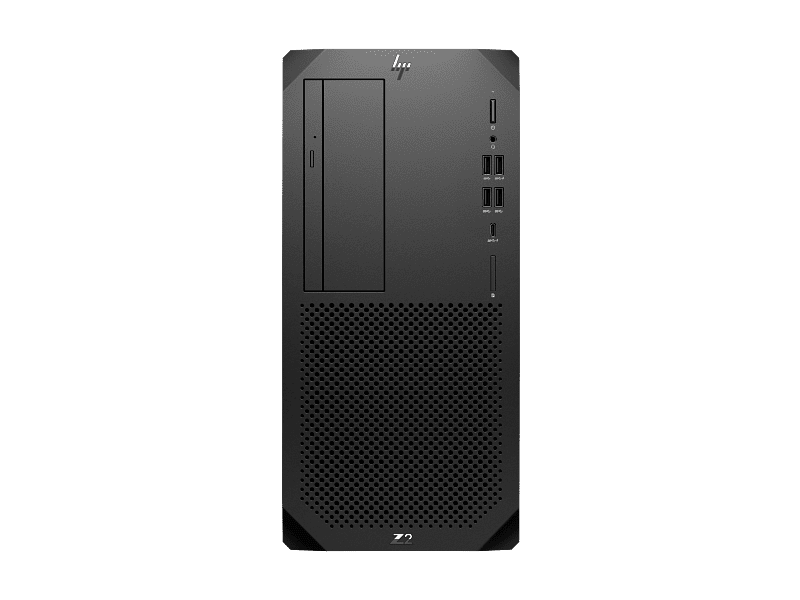
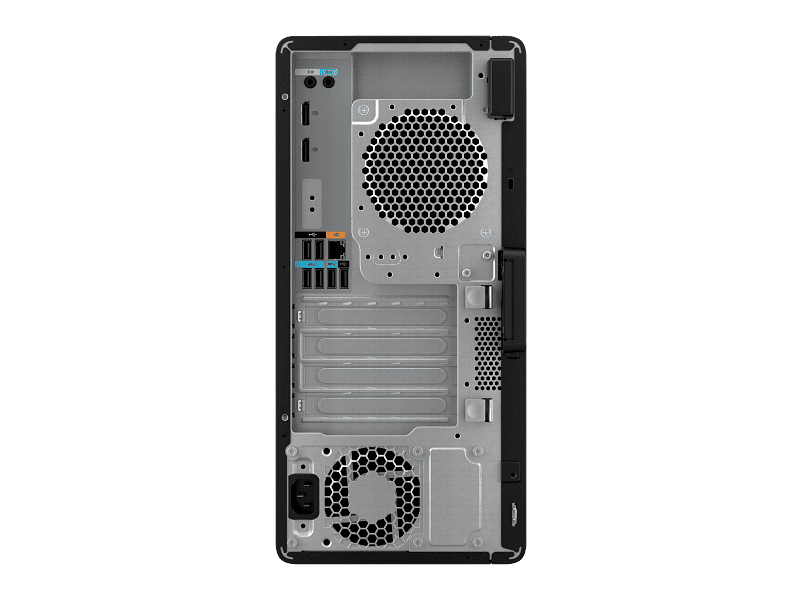
The workstation provides an integrated Intel I219-LM Gigabit Ethernet interface for wired network connectivity. The rear I/O includes DisplayPort 1.4 outputs, USB ports, audio connections and RJ-45 networking, while the front provides high-speed USB connectivity and a universal audio jack.
This connectivity profile is suitable for a conventional professional office where the workstation is connected to a wired business network and one or more displays. A corporate office in Noida or a technical department in Gurgaon can integrate the system into an existing Ethernet infrastructure without requiring a separate network adapter for standard Gigabit connectivity.
DisplayPort connectivity also makes the system suitable for multi-display professional desktop setups where the supported integrated graphics configuration meets the display requirements. Display requirements should be checked against the actual monitor resolution and refresh-rate requirements before deployment.
For users who need reliable power protection in areas affected by voltage fluctuations or power cuts, the workstation can be paired with an appropriate professional UPS solution. The UPS capacity should be selected based on the complete workstation load and any connected display or peripheral equipment.
Enterprise Security and Manageability
The platform includes documented HP security and management technologies including HP Secure Erase, HP Sure Click, HP BIOSphere Gen6, HP Sure Admin, HP Sure Start Gen7, HP Sure Recover Gen4, HP Sure Sense Gen2 and HP Sure Run Gen5. These features are relevant to organisations that require more structured endpoint management than a basic consumer desktop deployment.
HP also documents management utilities including HP Driver Packs, HP System Software Manager and the HP Manageability Integration Kit for Microsoft System Center Configuration Management. These tools can be useful for IT departments managing multiple HP systems across a business environment.
For an MSME expanding from a small number of workstations to a larger deployment, centralised management becomes increasingly relevant. Standardised driver packages and system-management utilities can reduce the administrative effort involved in maintaining multiple systems.
Security features should be configured according to the organisation’s IT policy. Hardware security functionality does not replace endpoint protection, account controls, backup procedures or network security practices.
Reliability and Cooling Design
The tower form factor provides physical room for airflow, internal component access and supported hardware expansion. This is relevant for professional users who expect a workstation to remain in service through multiple hardware upgrade cycles.
The 700W power supply provides the specified power capacity for this configuration. When planning a future discrete graphics card or other high-power expansion component, the complete system power requirement must be checked rather than assuming that the existing supply is automatically sufficient for every upgrade.
Professional deployments in Delhi NCR can also benefit from sensible environmental management. Dust accumulation, summer temperatures and inconsistent power conditions can affect computer equipment over time. Regular cleaning, appropriate ventilation and suitable power protection should therefore form part of an organisation’s workstation maintenance practice.
The manufacturer warranty for this configuration is 3 years with the documented 3/3/3 coverage structure, including parts, labour and on-site repair according to applicable terms.
Professional Software Compatibility
The configuration is suitable for a range of professional software categories where CPU performance is important. Examples include Microsoft Office workloads, Visual Studio, JetBrains development environments, business applications, database tools and CPU-focused engineering or analysis applications.
For CAD and engineering software, buyers should distinguish between CPU requirements and graphics requirements. Applications that primarily depend on CPU processing can benefit from the available processor resources, while advanced viewport rendering or GPU-accelerated workloads may require a dedicated professional graphics configuration.
The system can also serve as a development workstation for Visual Studio, code compilation, local databases, containerised development and other software-engineering workflows, subject to the application’s own system requirements.
HP’s product documentation also identifies the workstation platform as ISV certified. Specific application certification should be confirmed for the exact software and configuration before making a procurement decision, particularly for regulated engineering or production environments.
Industry Applications in India
Architecture and Engineering: A Noida-based architecture or engineering office can use the system for CPU-focused modelling, documentation, project coordination and supporting applications. If the workflow depends heavily on GPU-based 3D rendering, the graphics configuration should be evaluated separately.
Software Development: A Gurgaon technology company can deploy the workstation for development environments, compilation, testing and local development tools. The 32GB memory configuration provides a practical starting point for users who regularly operate several development applications simultaneously.
Corporate Operations: A Delhi or Faridabad business can use the workstation for large spreadsheets, financial applications, document management, reporting and enterprise software. The tower format also gives the IT team room to evaluate future memory and storage requirements.
Educational Institutions: An engineering college or training centre in Delhi NCR can deploy the workstation for programming, technical applications and laboratory environments. Bulk procurement can be structured around different user requirements rather than assigning the same specification to every workstation.
Technical Specifications
| Specification |
Details |
| Brand |
HP |
| Product Series |
Z2 Tower G9 Workstation |
| Model Number |
A1ZK8PT |
| Processor |
Intel Core i9-14900K |
| Processor Generation |
14th Generation Intel Core |
| Architecture |
Performance-hybrid architecture |
| Performance Cores |
8 |
| Efficient Cores |
16 |
| Total Cores |
24 |
| Total Threads |
32 |
| Maximum Turbo Frequency |
Up to 6.0GHz |
| Cache |
36MB L3 |
| Chipset |
Intel W680 |
| Memory |
32GB DDR5-4800 MT/s non-ECC, 1 x 32GB |
| Memory Slots |
4 DIMM |
| Storage |
1TB PCIe Gen4 NVMe M.2 SSD |
| Graphics |
Integrated Intel UHD Graphics 770 |
| Operating System |
Windows 11 Pro |
| Network |
Integrated Intel I219-LM Gigabit Ethernet |
| Power Supply |
700W, 92% efficient, wide-ranging, active PFC |
| Optical Drive |
9.5mm Slim DVD Writer |
| Form Factor |
Tower Workstation |
| ISV Certification |
HP states ISV certification; specific application certification should be confirmed |
| Warranty |
3 Years 3/3/3 limited warranty |
Package Contents
- HP Z2 Tower G9 workstation system
- Intel Core i9-14900K processor configuration
- 32GB DDR5 memory configuration
- 1TB PCIe Gen4 NVMe M.2 SSD
- Integrated Intel UHD Graphics 770
- Windows 11 Pro
- 700W power supply
- 9.5mm Slim DVD Writer
- HP 125 Wired Keyboard
Dedicated professional graphics cards, additional memory, additional SSDs, monitors, UPS systems and other peripherals are not included unless specifically stated in the final quotation. Customers requiring a complete workstation setup can discuss compatible display, storage and power-backup requirements with Thencix before order confirmation.
For customers who need display hardware alongside the workstation, the professional monitor range at Thencix can be evaluated according to resolution, colour requirements and intended application.
Why Buy From Thencix
- 3-Year 3/3/3 Brand Warranty: The documented warranty provides 3 years of parts, labour and on-site repair subject to applicable manufacturer terms.
- GST Invoice: Eligible business purchases are supplied with a GST invoice for accounting and procurement documentation.
- Technical Configuration Support: Thencix can help review processor, memory, storage, graphics and power requirements before order confirmation.
- Nehru Place Business Support: Customers in Delhi NCR, Noida and Gurgaon can coordinate workstation procurement and deployment requirements with the Thencix team.
Comparison With Similar Workstations
| Specification |
HP Z2 Tower G9 |
HP Z4 G5 |
| Processor Class |
Intel Core i9-14900K configuration |
Intel Xeon workstation configurations |
| Primary Positioning |
Professional tower workstation |
Higher-tier professional workstation platform |
| Graphics Options |
Configuration-dependent |
Configuration-dependent |
| Memory Expansion |
4 DIMM slots on this platform |
Platform-dependent |
| Best Fit |
CPU-focused professional workloads and business workstation deployment |
Higher-end workstation requirements requiring a different platform configuration |
Choose the Z2 Tower G9 when the requirement centres on strong desktop CPU performance, professional expandability and a practical tower platform. Choose a higher-tier workstation such as the Z4 family when the application requirement calls for a different workstation platform, processor class or higher-end component configuration.
HP Z2 Tower G9 Price India — Frequently Asked Questions
Current pricing depends on the final business configuration
The current selling price depends on availability, commercial terms, warranty and the exact configuration supplied. Customers in Delhi NCR can request the latest quotation and availability from Thencix on WhatsApp at +91 9891150949.
Three-year warranty covers parts labour and on-site repair
The documented warranty is 3 years with a 3/3/3 limited warranty structure covering parts, labour and on-site repair, subject to HP’s applicable terms and conditions. Customers should retain the GST invoice and warranty documentation for service requirements.
Intel Core i9-14900K targets demanding CPU workloads
The processor provides 24 cores, 32 threads, up to 6.0GHz turbo frequency and 36MB L3 cache. This makes the configuration suitable for professional multitasking, development and other CPU-focused workloads where substantial processing resources are required.
Graphics capability depends on the application workload
This configuration uses integrated Intel UHD Graphics 770. It is suitable for standard display output and workloads that do not require dedicated GPU acceleration, while GPU-intensive CAD, rendering and compute applications should be evaluated against their specific graphics requirements.
Memory can be expanded through the four DIMM slots
The system is supplied with 32GB DDR5-4800 non-ECC memory in one 32GB module. The platform has four DIMM slots, allowing additional compatible memory to be considered when workload requirements increase.
Storage expansion is available through the workstation platform
The supplied configuration contains a 1TB PCIe Gen4 NVMe M.2 SSD. The platform provides additional M.2 NVMe storage positions and internal drive-bay options, subject to supported configurations and component compatibility.
Windows 11 Pro is included with the supplied configuration
The workstation is supplied with Windows 11 Pro. Organisations using Linux or another operating system should confirm their deployment requirements and software compatibility before purchase.
ISV certification should be matched to the required application
HP identifies the Z2 Tower platform as ISV certified. Buyers using specific engineering, CAD or professional applications should confirm the exact application certification and recommended graphics configuration before procurement.
Non-ECC memory should be considered during technical planning
The supplied memory configuration is DDR5-4800 non-ECC. Organisations with an application requirement for ECC memory should discuss an appropriate supported workstation configuration before placing the order.
Bulk business procurement can be configured around user requirements
Corporate, MSME and educational customers can structure workstation orders around different memory, storage and graphics requirements where supported. For bulk procurement, contact Thencix on WhatsApp at +91 9891150949 to discuss configuration, GST documentation and delivery requirements.
A higher-tier workstation may suit different technical requirements
The Z2 Tower G9 is positioned for professional workloads requiring strong CPU performance and tower expansion. A higher-tier workstation platform should be evaluated when the workload requires a different processor architecture, larger memory configuration or higher-end professional graphics platform.
Pre-configuration and delivery can be discussed before dispatch
Customers can confirm the final hardware configuration, accessories, warranty documentation and delivery requirements before dispatch. Thencix can also help coordinate compatible UPS, display and storage requirements for a complete workstation deployment.
 Skip to navigation
Skip to main content
Skip to navigation
Skip to main content






 Free Delivery










Reviews
Clear filtersThere are no reviews yet.