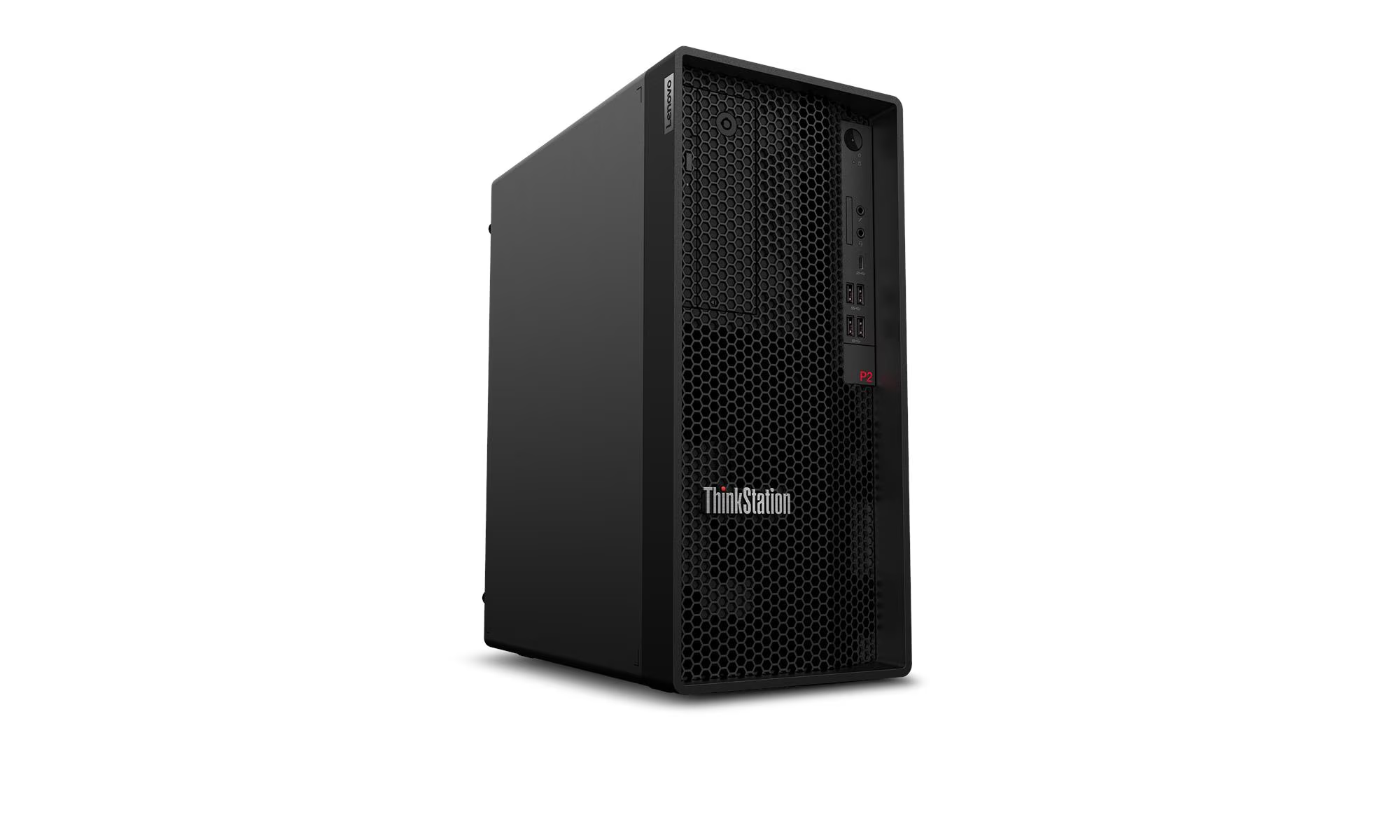
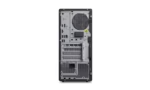
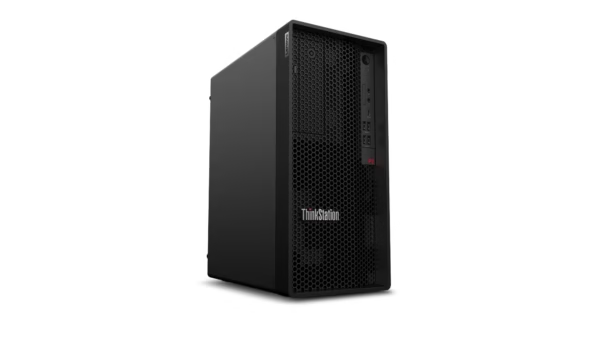
The Lenovo ThinkStation P2 Tower Gen 2 ships with an Intel Core Ultra 7 265 vPro processor, 16 GB DDR5-5600 memory, and a 512 GB PCIe 4.0 NVMe SSD. It is the entry-level config in the P2 lineup — half the RAM and half the storage of the standard 32 GB / 1 TB models — but it keeps the same 20-core CPU, the same tool-free chassis, and the same PCIe 5.0 x16 graphics slot. If you are a startup in Noida on a tight budget, a freelance designer in Gurgaon who can add RAM later, or a student in Delhi building a first workstation, this is the cheapest way into Lenovo’s ThinkStation family without buying a consumer PC. If you are looking at our full desktop and laptop range for your team, Thencix stocks this configuration with GST invoice and same-day dispatch for Delhi NCR.
What You Actually Get for the Money
The 30JQS0AR00 is the most affordable ThinkStation P2 Tower Gen 2 config. You get the same Intel Core Ultra 7 265 vPro that sits in the more expensive models — 20 cores, 20 threads, 30 MB cache, turbo up to 5.3 GHz — but paired with 16 GB of DDR5-5600 and a 512 GB NVMe SSD instead of 32 GB and 1 TB. The chassis, motherboard, power supply, and expansion slots are identical to the higher-end configs. That means you are not locked into entry-level specs forever — you can add RAM, swap the SSD, and install a graphics card down the line without replacing the machine.
The 16 GB RAM is enough for single-application workloads: AutoCAD drafting, light SolidWorks assemblies, Photoshop editing, or coding in VS Code with a few browser tabs open. It is not enough for heavy multi-tasking or large dataset work, but that is the point — you buy what you need now and upgrade when your budget allows. The 512 GB SSD handles the OS, applications, and a moderate project library. For a freelancer in Nehru Place with a few active client projects, that is plenty. When you land bigger contracts, add a second M.2 SSD or a 3.5-inch HDD for archives.
This config ships without Windows pre-installed — it is Linux-ready with FreeDOS on the drive, same as the 30JQS0BM00. You can install Ubuntu, Fedora, or Windows 11 Pro yourself, or have Thencix handle the OS setup before dispatch. The integrated Intel Graphics drives up to four displays via HDMI 2.1 and DisplayPort 1.4 — enough for dual-monitor productivity setups without a discrete GPU.
Why the Core Ultra 7 265 at 16GB Still Beats a Consumer PC
A 20-core workstation CPU in a 16 GB config sounds unbalanced, but it is still a better investment than a consumer Core i5 or Ryzen 5 with 16 GB. Here is why:
CPU longevity: The Core Ultra 7 265 will still be relevant in five years. A consumer Core i5-14400 will struggle with new software by then. Workstation CPUs hold their value because the socket and chipset support upgrades that consumer boards do not.
Expansion headroom: Consumer PCs often have soldered RAM, one M.2 slot, and a 300W PSU that cannot handle a real GPU. The ThinkStation P2 has four DIMM slots, three M.2 slots, and a 750W PSU that supports an RTX A5000. You are buying a platform, not a closed system.
vPro remote management: If this machine sits in an office in Gurgaon and you are troubleshooting from Delhi, Intel vPro lets you power it on, access the BIOS, and diagnose hardware remotely. Consumer PCs need physical access for that.
Tool-free upgrades: Adding RAM or swapping a drive takes five minutes without a screwdriver. For a small business with no dedicated IT staff, that matters.
The 65W TDP keeps power consumption reasonable — important for Indian offices where electricity costs add up. The integrated NPU handles background AI tasks without loading the CPU, so your 16 GB goes further than it would on a machine without an NPU.
Upgrade Path: From Entry-Level to Powerhouse
The 30JQS0AR00 is designed to grow with you. The four DDR5 DIMM slots mean you can bump from 16 GB to 32 GB by adding one 16 GB stick, or go to 64 GB with four 16 GB sticks, or max out at 128 GB with four 32 GB modules. You do not throw away the existing RAM — you add to it. A 16 GB stick costs roughly Rs 3,000-4,000, so a 32 GB upgrade is a small investment that doubles your multi-tasking capability.
The 512 GB SSD is a single M.2 2280 drive. Two more M.2 slots are free, plus two 3.5-inch HDD bays for cheap bulk storage. A 2 TB NVMe SSD adds fast project storage, while a 4 TB HDD handles archives and backups. The tool-free drive caddies mean you pop in a new drive, slide it home, and format it — no cables, no screws, no technician visit.
The PCIe 5.0 x16 slot is the real future-proofing feature. It accepts any modern GPU: NVIDIA RTX A-series for CAD work, GeForce RTX for gaming and rendering, AMD Radeon Pro for video editing. The 750W PSU supports up to an RTX 4070 or RTX A5000 without needing replacement. For a student in Delhi who starts with CPU-only work and adds a GPU after landing a paid internship, this upgrade path saves buying a second machine.
The Flex I/O module lets you add ports later: a second HDMI for an extra monitor, VGA for a legacy projector, USB-C with DisplayPort for modern docks, or a serial port for industrial equipment. You configure it at purchase or add it later — the motherboard header is already there.
Key Features
- 20-Core Intel Core Ultra 7 265 vPro: 8 performance cores plus 12 efficient cores, 20 threads, up to 5.3 GHz turbo, 30 MB cache, and built-in NPU for AI acceleration with vPro remote management.
- 16 GB DDR5-5600 UDIMM: Entry-level memory with three slots free, expandable to 128 GB total without replacing existing modules.
- 512 GB PCIe 4.0 x4 NVMe SSD: Fast boot and application loading with two additional M.2 slots and two 3.5-inch HDD bays for future expansion.
- Tool-Free Upgradeable Chassis: PCIe 5.0 x16 for future GPUs, 750W PSU, Flex I/O module, and tool-less access to memory, storage, and graphics.
- Linux-Ready with FreeDOS: No OS lock-in — install Ubuntu, Windows 11 Pro, or RHEL based on your workflow and budget.
Technical Specifications
| Specification |
Detail |
| Model |
ThinkStation P2 Tower Gen 2 (30JQS0AR00) |
| Operating System |
FreeDOS (Linux-ready, no Windows pre-installed) |
| Processor |
Intel Core Ultra 7 265 vPro (up to 5.3 GHz with Intel Turbo Boost Technology, 30 MB Intel Smart Cache, 20 cores: 8P + 12E, 20 threads, 65W TDP) |
| Chipset |
Intel W880 |
| Graphics |
Integrated Intel Graphics (no discrete GPU included) |
| Memory |
16 GB DDR5-5600 MT/s UDIMM (1 x 16 GB) |
| Memory Slots |
4 DDR5 UDIMM slots, dual-channel capable (expandable up to 128 GB) |
| Internal Storage |
512 GB M.2 2280 PCIe 4.0 x4 NVMe SSD |
| Storage Expansion |
3 M.2 2280 NVMe SSD slots total; 2x 3.5″ HDD bays; 1x 2.5″ HDD bay; RAID supported |
| Max Storage |
Up to 10 TB total (3x M.2 + 3x HDD) |
| Expansion Slots |
1 PCIe 5.0 x16 (full height, full length, double-width); 1 PCIe 4.0 x16 (x4 electrical, full height, half length); 2 PCIe 3.0 x1 (full height, half length, open-ended) |
| Front Ports |
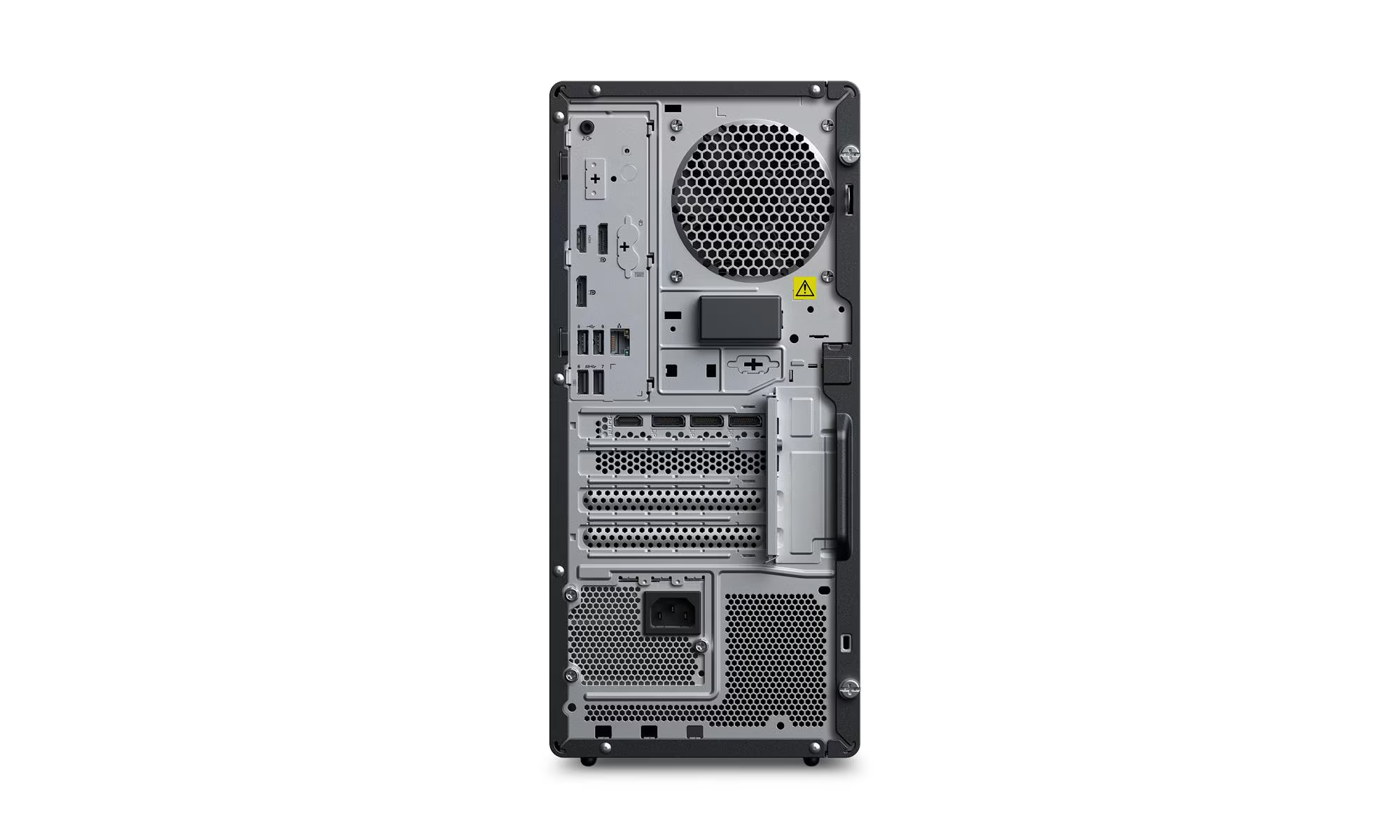
1 USB-C 20 Gbps (data only); 2 USB-A 5 Gbps; 2 USB-A 10 Gbps; 1 headphone/microphone combo (3.5mm); 1 microphone (3.5mm) |
| Rear Ports |
2 USB-A 5 Gbps (1 with Smart Power On); 2 USB 2.0; 1 HDMI 2.1 TMDS; 2 DisplayPort 1.4; 1 Ethernet (RJ-45); 1 line-out (3.5mm) |
| Flex I/O (Optional) |
USB-C 5 Gbps with DisplayPort; HDMI 2.1 TMDS; DP 1.2; VGA; parallel; serial |
| Network |
Intel Ethernet Connection I219-LM Gigabit Ethernet (RJ-45), Wake-on-LAN |
| Wireless |
Not included (optional Wi-Fi 7 BE200 available) |
| Audio |
Realtek ALC623-CG codec, 2W internal mono speaker |
| Keyboard |
Lenovo Calliope USB Keyboard |
| Mouse |
Lenovo Calliope USB Mouse |
| Power Supply |
750 W, 92% efficient @ 50% load, 80 PLUS Platinum, autosensing 100-240V |
| Dimensions (W x D x H) |
170 mm x 315.35 mm x 376 mm (6.7″ x 12.4″ x 14.8″) |
| Weight |
Starting at 8.65 kg; maximum configuration 9.67 kg |
| Security |
Discrete TPM 2.0 (TCG certified, FIPS 140-2), Kensington Security Slot, padlock loop, chassis intrusion switch, self-healing BIOS, administrator/power-on passwords |
| Manageability |
Intel vPro Enterprise with Intel AMT 16 |
| Certifications |
ENERGY STAR 9.0; EPEAT Gold; TCO Certified Gen 10; RoHS compliant |
| Warranty |
3-year limited onsite service (parts, labor, and repair) |
Package Contents
- Lenovo ThinkStation P2 Tower Gen 2 Workstation (30JQS0AR00) — 1 unit
- Lenovo Calliope USB Keyboard — 1 unit
- Lenovo Calliope USB Mouse — 1 unit
- Power Cord — 1 unit
- Quick Setup Guide — 1 copy
- Warranty Documentation — 1 set
NOT INCLUDED: Discrete graphics card — this config ships with integrated Intel Graphics only. NVIDIA RTX A-series, GeForce RTX, AMD Radeon Pro, or Intel Arc discrete GPUs must be purchased separately and installed via the PCIe 5.0 x16 slot. Browse our business laptop range for mobile alternatives with built-in discrete graphics. Operating system — FreeDOS is pre-installed; Windows 11 Pro, Ubuntu, or RHEL must be purchased and installed separately. Thencix can assist with Windows licensing and OS installation. Monitor — must be purchased separately; Thencix stocks Lenovo ThinkVision and third-party monitors. Wi-Fi and Bluetooth card — wireless connectivity is optional and not included. Additional memory modules — 16 GB is baseline; upgrades to 32 GB, 64 GB, or 128 GB require separate DIMM purchases. Additional storage drives — HDDs and extra SSDs are NOT included. DisplayPort cable, HDMI cable, and Ethernet patch cable are NOT included.
Ideal Use Cases
1. Startups and Small Businesses in Noida and Gurgaon
Early-stage companies need reliable workstations without enterprise budgets. The 30JQS0AR00 gives you a 20-core CPU and validated chassis for the price of a consumer PC with fewer cores and no expansion room. The 16 GB RAM handles day-to-day productivity, coding, and light design work. When revenue grows, add RAM and a GPU instead of replacing the machine. The 3-year onsite warranty means Lenovo fixes hardware issues without you paying for IT support. With GST invoice from Thencix, startups claim input tax credit on capital expenses.
2. Freelance Designers and Architects in Delhi and South Delhi
Solo practitioners running AutoCAD, SketchUp, or Photoshop need a machine that does not crash during client presentations. The Core Ultra 7 265 handles 2D drafting and basic 3D modeling smoothly, while the integrated graphics drives dual 4K monitors for drawings and reference material side by side. The 512 GB SSD stores active projects, with room for a second SSD when the portfolio expands. The tool-free chassis means you can add an RTX A2000 later when you start taking on larger BIM projects. If your home office needs UPS backup for power protection, Thencix stocks APC units compatible with this 750W PSU.
3. Students and Aspiring Developers in Delhi NCR
Engineering and design students need a machine that lasts through four years of coursework and internships. The ThinkStation P2 is overkill for first-year coding assignments, but it grows with you: add RAM for machine learning courses, install a GPU for game development projects, and upgrade storage for video editing portfolios. The vPro remote management lets parents or friends troubleshoot from home when you are stuck in a hostel in Noida. The 65W CPU keeps hostel electricity bills manageable. Compared to a gaming laptop that thermal-throttles under sustained loads, this desktop maintains performance during all-night compile jobs.
4. Back-Office Operations and Accounting Firms
CA offices and accounting firms in Nehru Place running Tally, Excel, and GST software do not need a GPU, but they do need stability and data security. The TPM 2.0 chip enables BitLocker encryption for client financial data. The vPro management lets IT support diagnose issues remotely across multiple branch offices. The 20-core CPU handles large Excel models with thousands of rows without stuttering. The tool-free chassis simplifies drive swaps when a machine needs replacement — pop out the old SSD, pop in the new one, and restore from backup. The integrated graphics drives two monitors for spreadsheet and email side by side.
Why Buy from Thencix
- 3-Year Lenovo Onsite Warranty: A technician comes to your office in Delhi, Noida, Gurgaon, or Faridabad if something breaks. Thencix supplies the original GST invoice required for all claims.
- Genuine Lenovo Product: Sourced directly from authorized Lenovo distribution. Every unit carries original serial number and India warranty eligibility.
- GST Invoice Provided: Full tax invoice with HSN code for input tax credit claim. Essential for startups, freelancers, and businesses filing GST returns in Tally or similar accounting software.
- Same-Day Dispatch Delhi NCR: Orders confirmed before 3 PM ship same day via express courier to Delhi, Noida, Gurgaon, and Faridabad.
- Pan-India Delivery: Secure packaging and insured shipping to all states. Tracking number shared via WhatsApp within 2 hours of dispatch.
- Technical Support: Post-sale assistance for OS installation, driver updates, RAM and storage upgrades, and GPU compatibility checks. Our team has hands-on experience with Lenovo ThinkStation, HP Z, and Dell Precision systems.
- WhatsApp Support: Quick queries, configuration help, and order tracking via WhatsApp at +91 9891150949. No IVR, no hold time — message and get a response.
FAQ — Lenovo ThinkStation P2 30JQS0AR00 Price India
What is the difference between the 30JQS0AR00 and the 30JQS0BM00?
The 30JQS0AR00 has 16 GB RAM and a 512 GB SSD. The 30JQS0BM00 has 32 GB RAM and a 1 TB SSD. Both have the same Intel Core Ultra 7 265 vPro processor, the same chassis, the same 750W PSU, and the same expansion slots. The only difference is the base memory and storage configuration. Choose the 30JQS0AR00 if you are on a tight budget and plan to upgrade later. Choose the 30JQS0BM00 if you want more headroom out of the box without immediate upgrades. Contact Thencix at +91 9891150949 for current pricing on both configs.
Can I upgrade the RAM and storage on the 30JQS0AR00 later?
Yes. The ThinkStation P2 Tower Gen 2 has four DDR5 DIMM slots — this config ships with one 16 GB stick, leaving three free. You can add a second 16 GB stick for 32 GB total, or go up to 128 GB with four 32 GB modules. For storage, two additional M.2 2280 slots and two 3.5-inch HDD bays are free. A 1 TB or 2 TB NVMe SSD adds fast project storage, while a 4 TB HDD handles archives. The tool-free chassis means you can upgrade without a screwdriver. Thencix stocks compatible DDR5 UDIMMs and NVMe SSDs and can install upgrades before dispatch.
Is 16 GB RAM enough for AutoCAD or SolidWorks?
16 GB is enough for 2D drafting in AutoCAD, small assemblies in SolidWorks (under 500 parts), and single-application workflows. It is not enough for large assemblies, complex simulations, or heavy multi-tasking with multiple applications open. If your projects grow in complexity, add a second 16 GB stick to reach 32 GB — that is the sweet spot for most CAD and BIM work. The ThinkStation P2’s tool-free chassis makes this upgrade trivial. Thencix can install the extra RAM before dispatch if you order it together with the machine.
What is the warranty on Lenovo ThinkStation P2 30JQS0AR00 in India?
Lenovo provides a 3-year limited onsite warranty on this workstation in India, covering parts, labor, and repair at your location. A technician comes to your office in Delhi, Noida, Gurgaon, or Faridabad — you do not ship the machine to a service center. Thencix supplies the original GST invoice required for all warranty claims and RMA processing. For warranty service, contact Lenovo India customer care or reach out to Thencix support at +91 9891150949 for assistance with documentation and service coordination.
Does the 30JQS0AR00 come with Windows pre-installed?
No. This configuration ships with FreeDOS pre-installed, which is Linux-ready but does not include Windows. You can install Ubuntu, Fedora, RHEL, or Windows 11 Pro yourself, or Thencix can handle the OS installation before dispatch. You will need a valid license key for Windows 11 Pro activation. Thencix stocks genuine Windows 11 Pro OEM licenses and can quote a bundled price including installation. All drivers for the Core Ultra 7 265 and Intel W880 chipset are available on Lenovo’s support website. Contact us on WhatsApp at +91 9891150949 for OS options and pricing.
 Skip to navigation
Skip to main content
Skip to navigation
Skip to main content








 Free Delivery










Reviews
Clear filtersThere are no reviews yet.