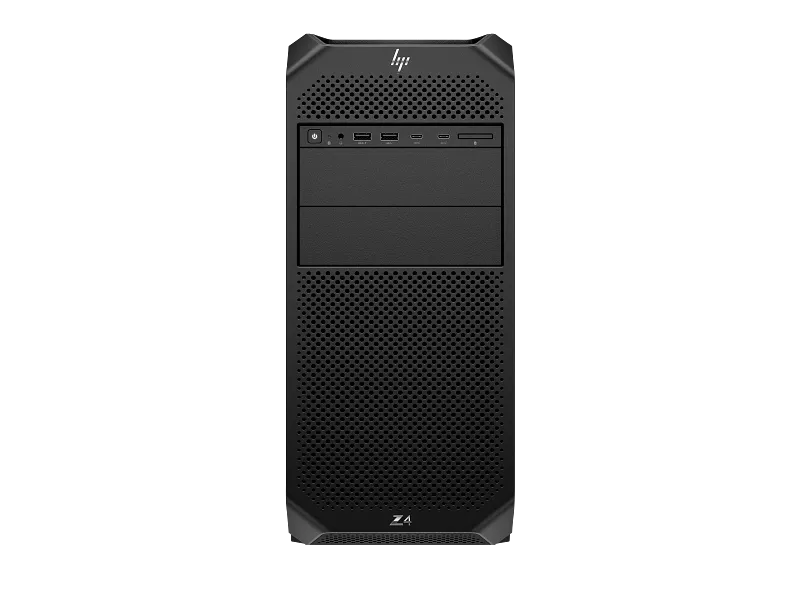
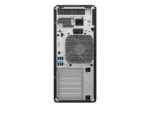
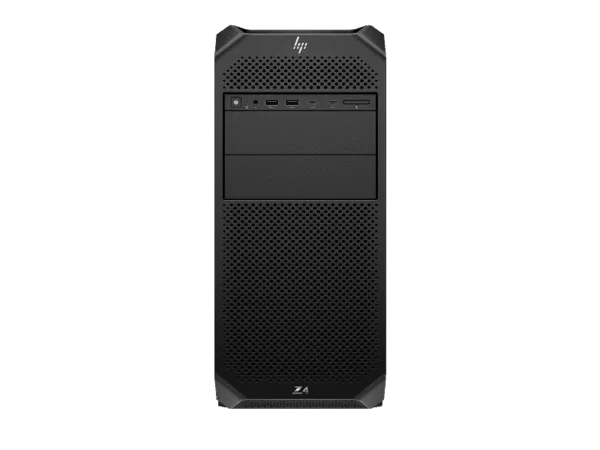
The HP Z4 G5 Workstation is a professional tower workstation designed for demanding engineering, computer-aided design, 3D content creation, visualisation, software development and advanced computing environments. This configuration combines the Intel Xeon W5-2565X workstation processor with 64GB of DDR5-4800 ECC memory, NVIDIA RTX PRO 4000 Blackwell professional graphics with 24GB GDDR7 memory and a 2TB HP Z Turbo Drive PCIe NVMe SSD. Windows 11 Pro comes preconfigured, making this system suitable for professional users who need a dedicated workstation platform for complex applications, large project files and demanding multitasking.
Built around HP’s Z4 G5 workstation platform, this configuration brings together workstation-class processing, error-correcting memory, professional GPU acceleration and high-speed solid-state storage. The 18-core, 36-thread Intel Xeon W5-2565X provides substantial parallel processing capability for applications that can use multiple CPU cores, while its Intel Turbo Boost frequency of up to 4.8GHz supports workloads that benefit from higher individual core speeds. The NVIDIA RTX PRO 4000 Blackwell GPU adds dedicated graphics and GPU-compute resources for supported professional applications.
With 64GB of ECC memory installed as two 32GB modules, the system has capacity for substantial working datasets and professional multitasking. The HP Z4 G5 platform provides eight DIMM slots, giving businesses a memory expansion path as project requirements develop. Its 2TB HP Z Turbo Drive PCIe NVMe TLC M.2 SSD provides high-speed local storage for operating system files, applications, active projects and frequently accessed data. A 1125W internal power supply and a slim DVD-Writer complete this factory configuration.
Professional workstation performance for demanding applications
Professional workstation workloads often combine several demanding tasks. An engineer may work with large assemblies while referencing technical drawings, a visualisation specialist may prepare scenes and review rendered output, and a software development team may compile projects while running local test environments. These workflows can benefit from a balanced system with strong processor performance, sufficient memory, dedicated professional graphics and fast storage.
The HP Z4 G5 configuration is designed around that combination. The Intel Xeon W5-2565X provides 18 processor cores and 36 threads, allowing supported software to distribute suitable tasks across multiple processing threads. This can be useful in CPU-rendering workloads, code compilation, engineering calculations, simulation preparation and other applications that scale with available processor resources. Actual performance depends on the software, project complexity, system configuration and workload characteristics.
The workstation platform also provides room to adapt the system over time. Its eight DIMM slots support memory expansion, while its PCIe expansion architecture and multiple storage positions provide options for supported future upgrades. This flexibility can be useful for organisations that want to deploy a capable workstation now and assess additional memory, storage or expansion requirements as their applications and datasets grow.
Intel Xeon W5-2565X processor
At the centre of this configuration is the Intel Xeon W5-2565X, an 18-core, 36-thread workstation processor with a maximum Intel Turbo Boost frequency of up to 4.8GHz. It is designed for professional workstation environments where applications may combine multi-threaded processing with tasks that depend on strong per-core performance.
The processor’s 18 cores can help supported applications handle parallel workloads such as rendering, compilation, data processing and engineering calculations. Its 36 threads allow compatible software to schedule multiple execution threads across the processor. The benefits depend on how efficiently an application is designed to use available cores and threads; not every application will scale equally with additional processor resources.
For workflows that involve both interactive work and background processing, the processor’s combination of multiple cores and high turbo frequency can be useful. Users may work with complex project files, run calculations, compile software or process content while keeping other applications available. The workstation should still be configured according to the specific software’s CPU, memory and graphics requirements.
The Xeon W processor family is intended for professional workstation platforms. In this HP Z4 G5 configuration, it is paired with ECC memory and discrete NVIDIA RTX PRO graphics, creating a system suited to business and technical environments where stability, application compatibility and upgrade planning are important purchasing considerations.
NVIDIA RTX PRO 4000 Blackwell professional graphics
This workstation includes the NVIDIA RTX PRO 4000 Blackwell Generation professional graphics card with 24GB of dedicated GDDR7 graphics memory. The GPU provides dedicated graphics-processing resources for supported professional applications, including technical visualisation, 3D workflows, graphics-intensive design tasks and GPU-accelerated computing.
The 24GB graphics memory capacity is relevant when working with detailed scenes, complex visual assets, larger textures and graphics workloads that require substantial GPU memory. The amount of memory required varies according to application, viewport settings, model complexity, render settings and project size. A larger graphics-memory capacity can provide more room for suitable workloads, but it does not guarantee a particular rendering speed or application performance.
NVIDIA RTX PRO Blackwell graphics are intended for professional computing and visualisation environments. Users should check the graphics requirements and supported driver recommendations of their specific applications before deployment. For organisations working with CAD, 3D design, visualisation or content-production software, selecting a professional GPU configuration should be based on the application’s supported graphics features and the complexity of the projects being handled.
The RTX PRO 4000 Blackwell is paired here with the Xeon W5-2565X and 64GB ECC system memory. This combination provides separate CPU and GPU resources for workloads that use both general-purpose processing and graphics acceleration. The system can be considered for professional design studios, engineering teams, technical departments and organisations that need a workstation with dedicated professional graphics rather than relying on integrated graphics.
64GB DDR5-4800 ECC memory
The HP Z4 G5 is configured with 64GB of DDR5-4800 ECC memory in a two-module arrangement of 2 × 32GB. This provides a substantial memory capacity for professional multitasking, larger working files and applications that use significant system memory. The installed ECC memory is designed to detect and correct certain memory errors, an important capability in supported workstation environments.
Memory capacity can influence how comfortably a workstation handles large assemblies, complex scenes, multiple open applications, datasets and virtualised development environments. When available memory is insufficient, the operating system may need to rely more heavily on storage-backed paging, which can affect responsiveness. A 64GB starting configuration gives many professional users room to work with demanding projects, although the ideal capacity should be determined by the actual software and dataset requirements.
The HP Z4 G5 platform provides eight DIMM slots. This creates an upgrade path for organisations that later need additional memory for larger projects, more extensive multitasking or applications with higher memory requirements. Any memory expansion should follow HP’s supported memory specifications and population guidelines. For best compatibility, memory modules should be selected to match the workstation platform’s supported type, speed and configuration.
ECC memory is particularly relevant in technical environments where long-running workloads and data integrity matter. It does not replace backups, application-level validation or appropriate data-protection procedures, but it provides memory error detection and correction capabilities supported by the workstation platform.
2TB HP Z Turbo Drive PCIe NVMe SSD
This configuration includes a 2TB HP Z Turbo Drive PCIe NVMe TLC M.2 SSD. The solid-state drive provides local storage for Windows 11 Pro, professional applications, active project files and frequently accessed working data. PCIe NVMe storage is designed to provide high-speed access compared with conventional mechanical hard drives and can help reduce storage-related delays in supported workloads.
A fast system drive is useful for workstation users who regularly open large applications, load project files, access working datasets and move between multiple professional tools. The 2TB capacity provides room for the operating system, installed software and a substantial amount of active work. Actual available capacity will be lower than the advertised drive capacity because the operating system, recovery data, formatting and installed applications occupy storage space.
Organisations handling large video projects, engineering datasets, simulation output or extensive media libraries should plan their storage requirements before deployment. A workstation’s internal storage expansion options can be evaluated according to the number of drives required, data-retention policies and backup arrangements. Additional storage should be selected for compatibility with the HP Z4 G5 platform and the intended workload.
Windows 11 Pro for business and professional environments
Windows 11 Pro is included with this configuration. It provides a familiar desktop operating environment for professional applications, business productivity tools, collaboration software and supported workstation workflows. Organisations can integrate the system into their existing Windows-based environments according to their IT policies and software requirements.
Windows 11 Pro includes business-oriented capabilities such as domain and identity management options, remote desktop hosting and BitLocker drive encryption support on compatible hardware and editions. The availability and configuration of these features depend on the organisation’s policies, licensing, hardware configuration and IT administration. Businesses should configure user accounts, security policies, recovery procedures and update management before putting the workstation into production use.
Before ordering, users should verify that their essential professional applications, device drivers, peripherals and licence arrangements support the selected operating system. Where specialist engineering or production software is involved, application compatibility should be confirmed with the software publisher.
1125W power supply and DVD-Writer
The workstation is equipped with a 1125W internal power supply. The power supply is part of the factory configuration and is intended to support the system’s installed components within HP’s supported operating conditions. The system’s actual power consumption will vary according to processor load, GPU activity, connected peripherals, installed expansion cards and workload duration. A higher-rated power supply should not be interpreted as the workstation’s continuous electricity consumption.
The included 9.5mm slim DVD-Writer provides optical-disc reading and writing capability for users who still need to access supported DVD media. This can be useful in organisations that maintain legacy software media, archived documents or data stored on optical discs. Optical media should not be treated as the only backup method for important business data; organisations should maintain appropriate backup and retention procedures.
HP Z4 G5 workstation platform and expansion
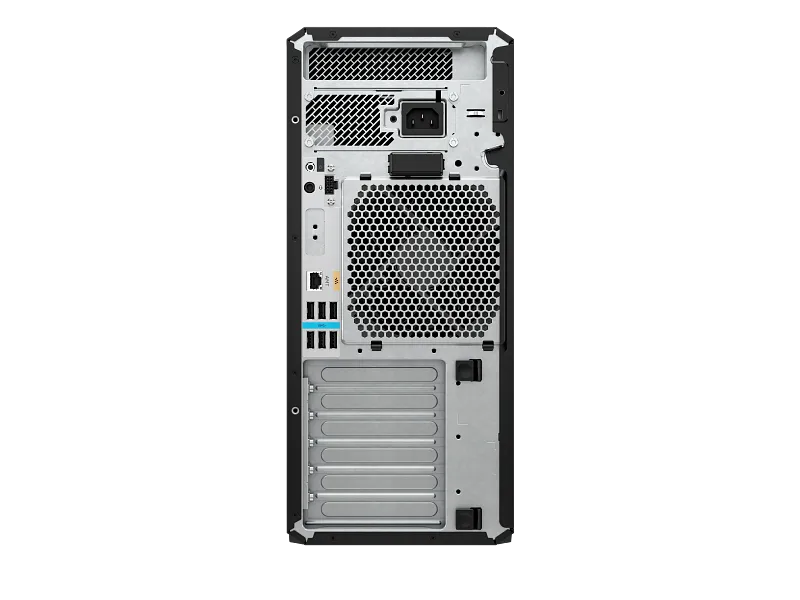
The HP Z4 G5 is a professional tower workstation platform designed to support demanding computing requirements and future configuration changes. HP specifies eight memory slots and a combination of PCIe expansion slots for supported add-in cards and workstation components. The platform also provides multiple internal storage positions, allowing organisations to assess additional storage according to their project and data-management needs.
Expansion should be planned around the installed graphics card, available power connections, thermal requirements, physical clearance and HP-supported configurations. Not every expansion card or storage device is compatible with every system configuration. Before adding a second graphics card, high-speed network adapter, storage controller or other PCIe device, users should verify the system’s slot availability, bandwidth requirements and power budget.
For businesses planning long-term workstation deployments, upgradeability can be an important factor in total ownership planning. The ability to increase memory or add compatible storage may help a workstation adapt to changing project requirements. However, upgrades should be selected based on verified platform support rather than assuming that every component available in the market will work in the system.
Suitable professional workloads
CAD and engineering design
The combination of an Intel Xeon W processor, ECC memory and NVIDIA RTX PRO graphics makes this configuration a candidate for supported computer-aided design and engineering applications. Users working with complex models, assemblies and technical visualisation should check the recommended processor, graphics driver and memory requirements of their software. The professional GPU provides dedicated graphics resources for supported viewport and visualisation features.
3D modelling and visualisation
3D modelling and visualisation workflows can use both CPU and GPU resources. The Xeon processor provides multi-core CPU capacity, while the RTX PRO 4000 Blackwell provides dedicated graphics acceleration for supported applications. The 24GB graphics memory capacity can be useful for scenes and assets that require substantial GPU memory. Render times and viewport performance depend on the application, rendering engine, scene complexity and selected settings.
Rendering and content creation
For supported rendering applications, the workstation’s CPU cores and professional GPU can contribute to different parts of a production workflow. The 64GB ECC memory and 2TB NVMe SSD provide working capacity for project files, assets and applications. Users should compare the software’s CPU-rendering and GPU-rendering requirements before selecting a workstation configuration for a production pipeline.
Software development and compilation
Software developers can use the multi-core processor for supported build and compilation workloads, while the 64GB memory configuration can accommodate development tools, test environments and multiple applications. The 2TB SSD provides local space for source repositories, development environments and project assets. Actual compilation performance depends on the programming language, build system, project size and parallelisation support.
GPU-accelerated applications and AI development
The NVIDIA RTX PRO 4000 Blackwell provides dedicated GPU resources for applications that support NVIDIA GPU acceleration. Professional users evaluating local AI development, inference, data processing or accelerated visualisation should check the framework, software version, GPU memory requirements and supported driver stack. The 24GB graphics memory capacity is a key configuration consideration for workloads that keep models, scenes or datasets in GPU memory. It does not establish a guaranteed model size, training speed or inference throughput.
Technical specifications
| Model Number |
HP Z4 G5 Workstation – CB4N0PT#ACJ |
| Product Type |
Professional Tower Workstation |
| Processor |
Intel Xeon W5-2565X |
| Processor Cores |
18 Cores |
| Processor Threads |
36 Threads |
| Maximum Turbo Frequency |
Up to 4.8GHz with Intel Turbo Boost Technology |
| Processor Cache |
37.5MB L3 Cache |
| Chipset |
Intel W790 |
| Installed Memory |
64GB DDR5-4800 ECC |
| Memory Configuration |
2 × 32GB |
| Memory Slots |
8 DIMM Slots |
| Graphics |
NVIDIA RTX PRO 4000 Blackwell Generation |
| Graphics Memory |
24GB GDDR7 Dedicated Graphics Memory |
| Storage |
2TB HP Z Turbo Drive PCIe NVMe TLC M.2 SSD |
| Operating System |
Windows 11 Pro |
| Optical Drive |
9.5mm Slim DVD-Writer |
| Power Supply |
1125W Internal Power Supply |
| Network Interface |
Integrated Intel I219-LM Gigabit Ethernet |
| Form Factor |
Tower |
| Warranty |
4-Year HP Limited Warranty (4/4/4), subject to HP terms and conditions |
Who should consider this HP Z4 G5 configuration?
This configuration is intended for organisations and professionals who need a workstation with a high-core-count Xeon processor, ECC system memory, professional NVIDIA graphics and fast NVMe storage. It can be considered by engineering departments, architecture and design studios, technical consultants, content-production teams, software development groups and business users running supported professional applications.
For engineering and design teams, the processor and professional graphics combination provides resources for supported modelling, visualisation and calculation workflows. For content creators, the RTX PRO GPU and 24GB graphics memory provide a dedicated graphics platform for compatible 3D and visual-production tools. For software development teams, the 18-core processor and 64GB ECC memory can support compilation, multitasking and local development environments.
Organisations should evaluate the workstation against their actual application requirements. Some workloads are primarily CPU-bound, others rely heavily on GPU acceleration, and some require more system memory or storage capacity. The right configuration depends on the software being used, the size of active projects, the number of concurrent users or tasks and the expected deployment period.
Configuration planning and upgrade guidance
Before deployment, businesses should review the workstation’s intended workload and decide whether the installed memory and storage capacity are appropriate. The supplied 64GB memory configuration is a practical starting point for many professional workloads, but larger datasets, extensive virtual machines or particularly complex scenes may require additional memory. The platform’s eight DIMM slots provide room to plan supported memory expansion.
Storage planning should consider the size of active project files, the need to retain completed work locally and the organisation’s backup policy. The included 2TB HP Z Turbo Drive SSD provides fast local storage, but teams working with extensive media libraries or large datasets may need additional storage. Additional drives should be checked for interface compatibility, supported capacity and physical installation requirements.
Graphics expansion should be considered carefully. The installed NVIDIA RTX PRO 4000 Blackwell is a professional graphics solution with 24GB of dedicated GDDR7 memory. Users should confirm that the selected applications benefit from a different or additional GPU before planning a graphics upgrade. Power supply capacity, card dimensions, cooling and available PCIe slots must be checked before installing additional hardware.
Warranty and after-sales assistance
This configuration is listed with a 4-Year HP Limited Warranty. HP’s published specification for the CB4N0PT configuration identifies a four-year 4/4/4 limited warranty, covering four years of parts, labour and onsite repair. Warranty terms, service availability, exclusions and applicable conditions are determined by HP and may vary by country and entitlement. Customers should retain their purchase documentation and verify the applicable service entitlement for the supplied unit.
TheNcix.Com provides purchase documentation and assistance with warranty coordination. If support is required, customers can contact TheNcix.Com for help understanding the documentation and coordinating with the manufacturer’s service channel. TheNcix.Com does not represent itself as an HP-authorised service provider, and warranty decisions and repair services remain subject to HP’s applicable terms and processes.
Why buy from TheNcix.Com?
Choosing a professional workstation involves more than comparing processor and graphics specifications. Businesses may also need help checking application requirements, selecting a suitable memory or storage configuration, arranging purchase documentation and understanding the manufacturer’s warranty process. TheNcix.Com supports workstation procurement with configuration guidance and post-purchase assistance.
- Configuration guidance: Discuss processor, memory, graphics and storage requirements before placing an order so the selected workstation is aligned with the intended applications and workload.
- Warranty assistance: TheNcix.Com can help customers with warranty documentation and coordination through the manufacturer’s service channel, subject to HP’s warranty terms and the unit’s service entitlement.
- Pickup and drop-off coordination: For eligible cases, pickup or drop-off coordination may be discussed depending on location, logistics, service eligibility and applicable charges.
- Post-purchase support: Assistance is available for product documentation, configuration queries and guidance on contacting the appropriate manufacturer support channel.
- GST invoice: A GST invoice is provided for eligible purchases to support business accounting and procurement documentation.
- Business quotations: Organisations, institutions and project buyers can contact the sales team to discuss workstation quantities and configuration requirements.
Store: TheNcix.Com
Address: 109B Osian Building, 12 Nehru Place, New Delhi, Delhi 110019, India
WhatsApp: +91 9891150949
Email: [email protected]
Website: https://TheNcix.Com/
Explore related workstation options
If you are comparing professional workstation configurations, you can also review the HP Z4 G5 Xeon W7-2575X workstation with RTX PRO 4000 Blackwell for a different processor configuration on the Z4 G5 platform.
For a workstation based on a different platform and processor family, explore the HP Z2 Tower G1i workstation. Buyers who want to compare the available desktop workstation range can browse the desktop PCs and workstation category.
Frequently asked questions
1. Which processor is included in the HP Z4 G5 CB4N0PT configuration?
This configuration includes the Intel Xeon W5-2565X processor with 18 cores, 36 threads, 37.5MB L3 cache and a maximum turbo frequency of up to 4.8GHz. HP’s official specification for CB4N0PT identifies the processor as W5-2565X.
2. How much memory does this HP Z4 G5 workstation include?
The workstation includes 64GB of DDR5-4800 ECC memory in a 2 × 32GB configuration. The HP Z4 G5 platform provides eight DIMM slots, allowing supported memory expansion according to HP’s configuration guidelines.
3. Which graphics card is installed?
This configuration includes the NVIDIA RTX PRO 4000 Blackwell Generation professional graphics card with 24GB of dedicated GDDR7 graphics memory. It is intended for supported professional graphics, visualisation and GPU-accelerated applications.
4. Does the workstation include Windows 11 Pro?
Yes. Windows 11 Pro is included with this HP Z4 G5 configuration. Users should verify compatibility of their specialist applications, drivers and peripherals before deployment.
5. What storage capacity is included?
The workstation includes a 2TB HP Z Turbo Drive PCIe NVMe TLC M.2 SSD. It provides local storage for the operating system, applications and project files. Additional storage requirements should be planned according to the platform’s supported drive options.
6. Does this HP Z4 G5 workstation have ECC memory?
Yes. The installed 64GB DDR5-4800 memory is ECC memory. Error-correcting memory can detect and correct certain memory errors when supported by the processor and platform, which is useful in professional workstation environments.
7. What is the power supply capacity?
This configuration includes a 1125W internal power supply. Actual system power consumption varies with workload, installed components, connected peripherals and system activity. The power supply rating is not the same as continuous electricity consumption.
8. Does this configuration include an optical drive?
Yes. The configuration includes a 9.5mm slim DVD-Writer for reading and writing supported DVD media.
9. What warranty is provided with the HP Z4 G5 CB4N0PT?
HP’s published CB4N0PT specification identifies a 4-Year HP Limited Warranty with 4/4/4 coverage: four years of parts, labour and onsite repair. Warranty terms, exclusions and service availability are subject to HP’s applicable terms and the supplied unit’s warranty entitlement.
10. Can the memory be upgraded later?
The HP Z4 G5 platform provides eight DIMM slots. Additional memory may be installed subject to HP-supported memory specifications, capacity limits and module population guidelines. Confirm the required memory configuration before purchasing upgrade modules.
11. Is this workstation suitable for CAD and 3D applications?
The Intel Xeon W5-2565X processor, 64GB ECC memory and NVIDIA RTX PRO 4000 Blackwell graphics make this configuration suitable for consideration with supported CAD, 3D modelling and visualisation applications. Actual compatibility and performance depend on the specific software, driver version and project requirements.
12. Can businesses request a quotation or configuration guidance?
Yes. Businesses and institutions can contact TheNcix.Com for a quotation, GST invoice and configuration guidance. For assistance, WhatsApp +91 9891150949 or email [email protected].
 Skip to navigation
Skip to main content







 Free Delivery










Reviews
Clear filtersThere are no reviews yet.